Package Information
Available Nodes
Documentation generating…
Documentation
🐳 n8n-nodes-docker-api


Interact with Docker via direct API (no Portainer required) — manage containers, stream logs, and automate infrastructure with ease.
✨ Why this node?
Managing Docker via raw HTTP calls in n8n is painful and error-prone.
This node gives you:
- 🔍 Clean container listing (normalized output)
- 📜 Readable logs (stdout/stderr separated, no binary noise)
- ⚡ Simple control (start/stop containers safely)
- 🔐 Built-in access control (read-only vs full control)
👉 Turn Docker into a first-class automation tool inside n8n
🚀 Quick Start
- Install the node:
npm install n8n-nodes-docker-api
- Add Docker API credentials
- Add the Docker node to your workflow
- Choose an operation and execute
✅ No manual API calls needed
📦 Installation
Community Nodes (Recommended)
- Go to Settings → Community Nodes
- Install:
n8n-nodes-docker-api
Manual Installation
npm install n8n-nodes-docker-api
🧪 Usage
Docker Node in n8n
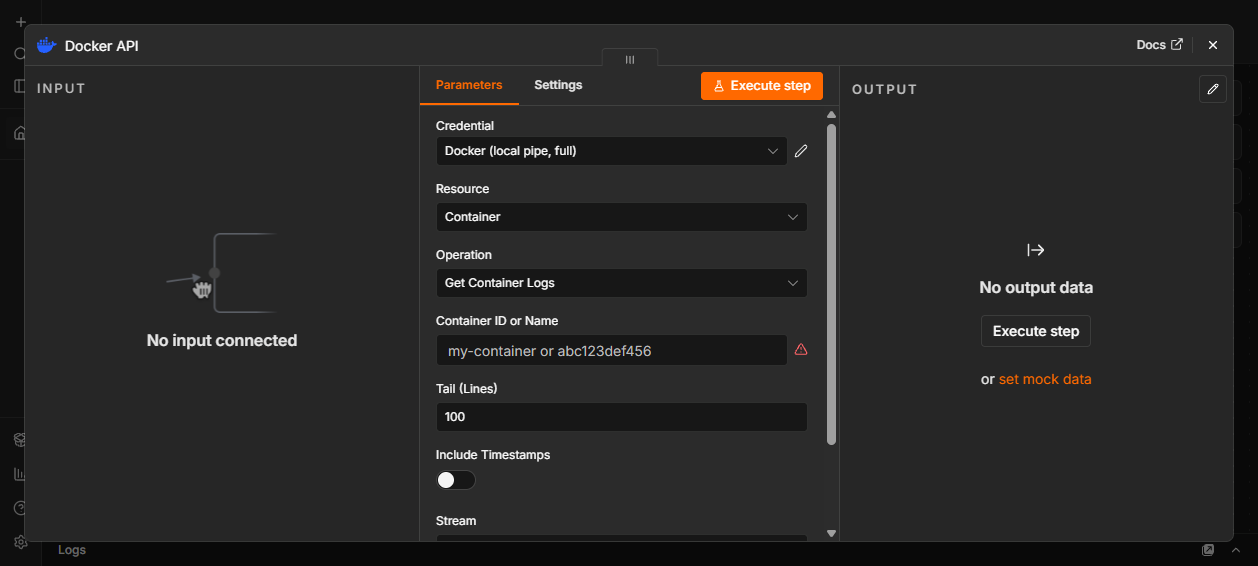
Add the Docker node
Select an operation:
- List Containers
- Get Container Logs
- Start Container
- Stop Container
Configure credentials
Execute the node
Example: List Containers
Operation:
List ContainersOptional filters:
- Name
- Status
- Show all containers
🔐 Credentials
Credentials UI in n8n

Connection Modes
🟢 Unix Socket (Local)
- Default for local Docker setups
- Path:
/var/run/docker.sock
🌐 TCP (Remote)
Connect to remote Docker daemon
Example:
- Host:
192.168.1.10 - Port:
2375
- Host:
⚠️ Requires Docker daemon configured with:
-H tcp://0.0.0.0:2375
🔒 TLS (Coming in v2)
- Secure remote connection using certificates
Access Modes
🟡 Read Only (Recommended)
- ✅ List containers
- ✅ Get logs
- ❌ Cannot start/stop containers
🔴 Full Control
- ✅ All operations enabled
📋 Supported Operations (v1)
| Operation | Description | Access |
|---|---|---|
| List Containers | Get containers with normalized output | Read Only |
| Get Container Logs | Logs with stream filtering & timestamps | Read Only |
| Start Container | Start stopped containers | Full Control |
| Stop Container | Stop running containers (with dry run) | Full Control |
🔥 Real Use Cases
♻️ Self-Healing Containers
Automatically restart crashed services:
List Containers → IF (status != running) → Start Container
🚨 Log-Based Alerting
Detect errors and notify:
Get Logs → Search "ERROR" → Send Slack alert
📊 Container Monitoring
Track system health:
Schedule → List Containers → Aggregate → Report
🧠 Output Examples
List Containers
{
  "id": "3025272c7592...",
  "shortId": "3025272c7592",
  "name": "qdrant",
  "image": "qdrant/qdrant",
  "status": "running",
  "createdAt": "2026-03-13T23:19:38.000Z"
}
Logs
{
  "message": "Server started",
  "stream": "stdout"
}
🔒 Security
⚠️ Docker access = host-level control
Best Practices
Use Read Only mode unless needed
Avoid exposing Docker over public TCP
Use a proxy like:
tecnativa/docker-socket-proxy
Restrict network access
🧪 Testing
npm test
🗺️ Roadmap
v2
- Restart Container
- Remove Container
- Image operations (list/pull/remove)
- TLS support
- Container autocomplete
v3
- Run container (ephemeral jobs)
- Execute commands in container
- Container stats
v4
- Docker Trigger node (events)
⭐ Contributing
PRs and ideas are welcome — especially for new operations and improvements.
📄 License
MIT
💬 Support
Open an issue on GitHub for:
- Bugs
- Feature requests
- Questions