Package Information
Available Nodes
Documentation generating…

Documentation
Website Contact & Socials Extractor for n8n
Extract emails, phone numbers and social media links from company websites inside your
n8n workflows. Give the node a list of websites, for example from Google Sheets,
a CRM or a webhook, and get back one item per website with the contacts published on it.
The node runs the Website Contact & Socials Extractor
on your Apify account. Crawling, browser rendering and proxies are handled for
you, and you pay a flat price per website.
It finds contacts on the pages businesses use to publish them, such as contact, about, team and
imprint pages. It also reads PDF documents and vCard files on the site. Besides emails and phone
numbers, it returns links to LinkedIn, Facebook, Instagram, X/Twitter, YouTube, TikTok, WhatsApp,
Telegram, Threads, Pinterest, Reddit, Snapchat, Discord, Twitch, GitHub, CodePen, Google Maps,
Yelp and Tripadvisor.
Use cases · Installation · Credentials · Usage · Output · Pricing ·
Compatibility · Resources
Use cases
- Use with an AI Agent. Add the node as a tool for n8n's AI Agent. For example, the agent can request contact details for
example.comand receive the emails, phone numbers and social profiles found on the site. - Process form submissions. Pass a company website from a website form, Typeform or Google Form to the node and return the contact details found for that company.
- Enrich a lead list. Process websites from Google Sheets, Airtable or a CRM and write the returned emails, phone numbers and social profiles back to each row.
Installation
On self-hosted n8n, open Settings → Community Nodes → Install and enter:
@entityplane/n8n-nodes-website-contacts
See n8n's community nodes installation guide
for details.
Credentials
You need an Apify account. The Free plan works for trying
the node.
- API key: copy your token from Apify Console → Settings → API & Integrations and create an
Apify API credential with it. - OAuth2: available on n8n Cloud only.
The credential is the same one Apify's own n8n node uses, so an existing Apify credential works here
too.
Usage
Set Website to the address to process, usually mapped from the input, for example{{ $json.website }}. It accepts full URLs such as https://example.com/contact or bare domains
such as example.com. You can also put several websites on separate lines.
All input items are sent to Apify in one run, and their websites are processed in parallel. A
website appearing in several items is processed once. A run usually takes a minute or more,
because the crawler waits for each site to respond.
| Option | Description |
|---|---|
| Include Sources and Counts | Adds the page and time where each contact was found, full value counts and redirect details. |
| Max Cost per Run (USD) | Stops the run once its charges reach this amount, at least $0.025. Websites left out are reported in a notice on the output. |
| Maximum Result Age (Hours) | Websites processed within this window are served from cache at a lower rate. Default 720 (30 days), minimum 4. |
Stopping the workflow stops the Apify run, so no further websites are charged.
Example: enrich a Google Sheet
- Google Sheets → Get Rows reads your list, with a
websitecolumn. - Website Contact & Socials Extractor with Website set to
{{ $json.website }}. - Google Sheets → Update Row writes
{{ $json.emails.join(', ') }}and other columns back.
Each result stays linked to the row it came from, so expressions such as{{ $('Get Rows').item.json.row_number }}resolve to the right row.
Output
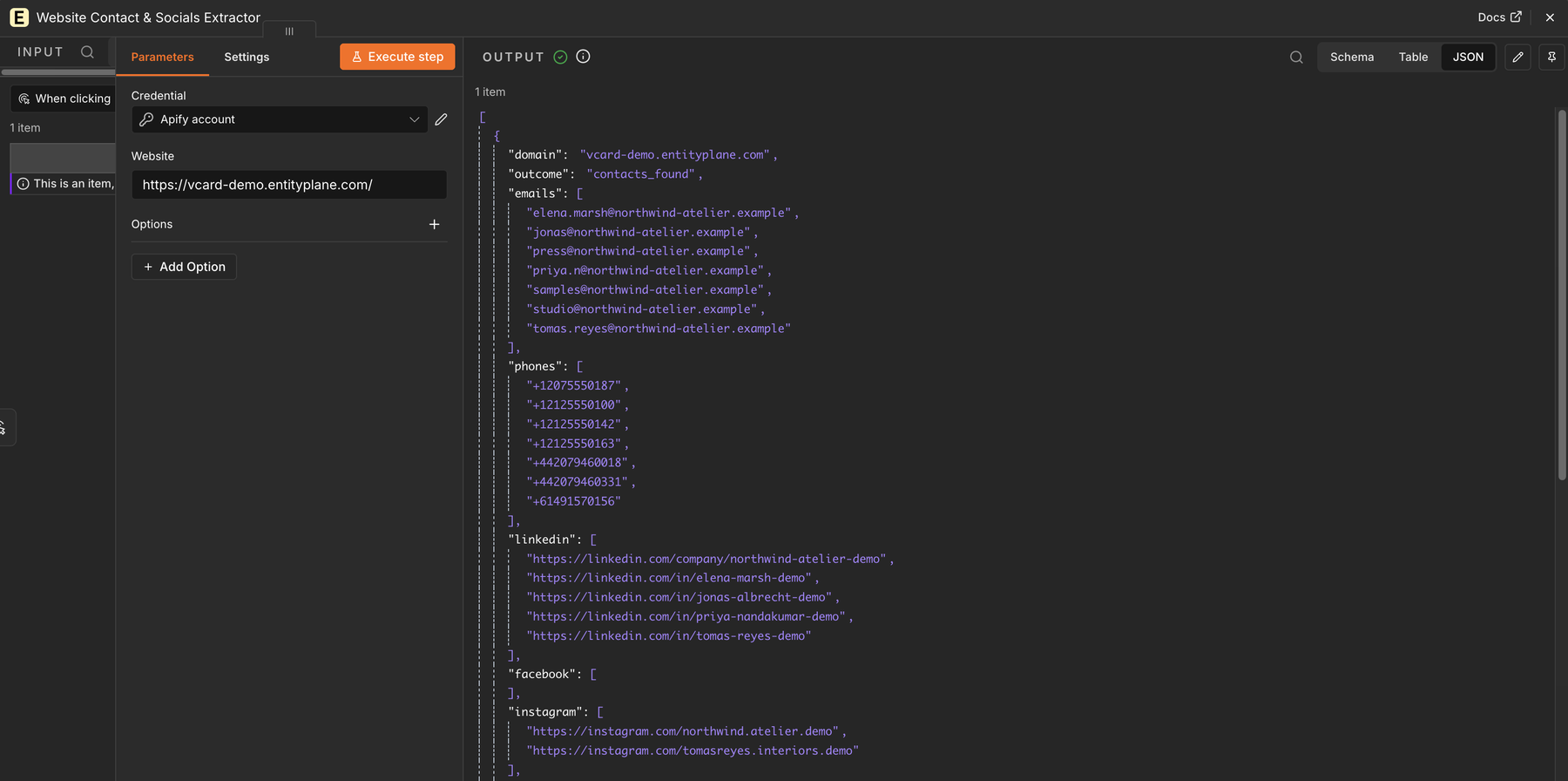
One item per website:
{
	"domain": "example.com",
	"outcome": "contacts_found",
	"emails": ["hello@example.com"],
	"phones": ["+14155550123"],
	"linkedin": ["https://www.linkedin.com/company/example"],
	"facebook": [],
	"instagram": [],
	"crawled_at": "2026-09-15T12:00:45Z",
	"charged_event": "domain-with-contacts",
	"start_urls": ["https://example.com"],
	"redirected_to": null
}
outcomeiscontacts_found,no_contacts_found,blocked,unreachableorredirected.- Every contact column is present, with
[]when nothing was found. charged_eventshows which result fee applied, ornullwhen none did.
Entries that could not be processed come out as items too, so no row disappears silently:
{ "input": "not a url", "outcome": "rejected", "rejection_reason": "not_a_url" }
Pricing
Runs are billed to your Apify account at the rates on the actor's
Pricing tab: a small fee
per submitted entry and one result fee per website, lower for cached results. Rendering, proxies
and crawling are included, with no per-page charges.
Apify Free-plan users can process up to 10 websites per run and 50 per 30 days. When a run leaves
websites out, the node shows the reason in a notice on the output.
Compatibility
Tested with n8n 2.40.
Resources
- Website Contact & Socials Extractor on Apify Store
- n8n community nodes documentation
- Report an issue
Use extracted data in line with the laws that apply to you, such as GDPR and CAN-SPAM. Website
owners who do not want their site processed can write to privacy@entityplane.com.