Package Information
Available Nodes
Documentation generating…

Documentation
@invoir/n8n-nodes-invoir
An n8n community node for Invoir: turn invoice data into a
compliant EU e-invoice (Factur-X, ZUGFeRD, XRechnung, Peppol BIS), and validate and read the
e-invoices you receive, inside your n8n workflows.
Every invoice Invoir generates is checked against the official rules (KoSIT, EN 16931 and Peppol
Schematron, PDF/A-3) before you get it, so what you send is what tax offices and public buyers accept.
Installation · Credentials · Operations ·
Example workflow · Errors · Compatibility ·
Resources · Version history
Installation
Invoir is a verified community node, so it installs from the nodes panel, on n8n Cloud and on
self-hosted n8n: open a workflow, click +, search for Invoir, select it under More from the
community and click Install. Only the instance owner or an admin can install it; after that,
everyone on the instance can use it.
Self-hosted n8n can also install it from npm: Settings → Community Nodes → Install, enter@invoir/n8n-nodes-invoir, accept the risk note and install, or runnpm install @invoir/n8n-nodes-invoir in ~/.n8n/nodes. See the n8n
community nodes installation guide.
The package has no dependencies besides n8n itself.
Credentials
- Get a free API key at validate.invoir.dev/signup: enter
your email, click the link, copy the key. The free plan includes 25 documents a month, no card. - In the dashboard, create a test key (
inv_test_…)
too. Test documents are identical but watermarked, never count against your quota and are deleted
after 24 hours; a test key makes 25 calls a day. Build and try your workflow with it, then switch
to the live key. - In n8n, add an Invoir API credential and paste the key. n8n checks it with a free call.
Operations
| Resource | Operation | What it does |
|---|---|---|
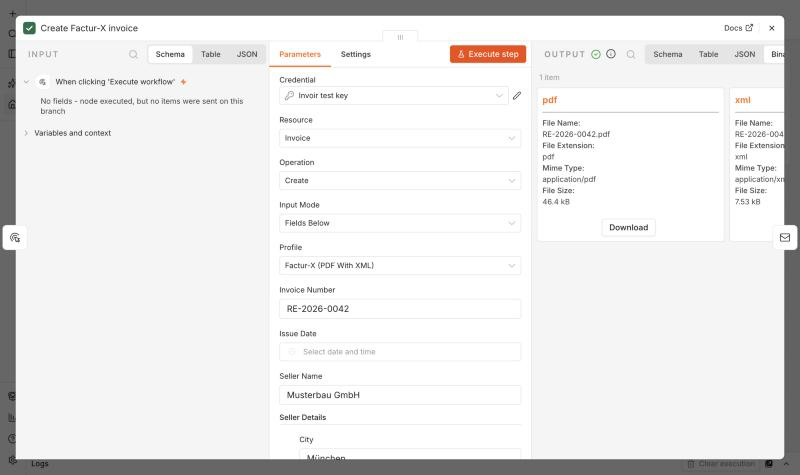
| Invoice | Create | Generates the e-invoice from fields or from invoice JSON. Output: the API answer (ID, totals, validation report) plus the PDF and XML as binary fields pdf and xml. |
| Invoice | Get | The same answer and files again for an invoice ID (kept 90 days, test documents 24 hours). |
| E-Invoice File | Validate | Checks a PDF or XML from a binary field against the official rules. Output: valid (true/false), status, errors, warnings, and findings (rule, message, location) as a flat list. |
| E-Invoice File | Parse | Reads a received e-invoice (XML, or a Factur-X / ZUGFeRD PDF) from a binary field. Output: invoice in the same JSON as Create takes (number, dates, seller, buyer, lines, payment, references), totals as the document states them, unmapped (every value that JSON has no field for), reading warnings, and the validation result (valid, status, findings, validation). |
| E-Invoice File | Extract XML | The XML inside a Factur-X / ZUGFeRD PDF, as text and as a binary xml field. |
Profiles (Create): Factur-X and ZUGFeRD (PDF/A-3 with the XML embedded; France and Germany),
XRechnung UBL / CII (German public sector), Peppol BIS Billing 3.0 (Belgium, Netherlands, the Peppol
network), and Plain PDF (no XML).
Two ways to fill in an invoice (Input Mode):
- Fields Below: invoice number, issue date (empty = today), seller and buyer (name, VAT ID,
address, contact, electronic address, buyer reference / Leitweg-ID), line items, and additional
fields for payment (IBAN, BIC, reference, terms), references (order, contract, project), notes,
due date, currency, language, template and Factur-X level. Line items can be defined in the node or
come from an expression (Line Items Source → From JSON), e.g. mapped from a shop order:{{ $json.items.map(i => ({ description: i.title, quantity: i.qty, unitPrice: i.net, vatRate: 19 })) }} - Invoice JSON: the complete request body of
POST /invoices, documented under
"The invoice JSON" at invoir.dev/docs. Every field the API knows,
including allowances, charges, delivery and attachments.
Totals and the VAT breakdown are always computed by Invoir from the lines (EN 16931 rules, rounded to
cents), so the PDF, the XML and the numbers never disagree.
Options: an Idempotency Key (e.g. the order ID) makes a re-run return the first invoice
instead of creating a second one; Download Files can be switched off when you only need the
JSON; the binary field names can be changed.
Example workflow
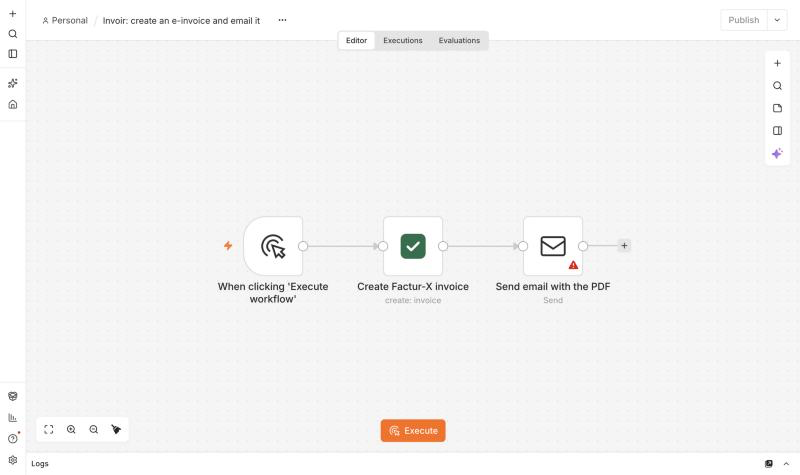
Order paid → e-invoice → email to the customer. Importexamples/create-and-email-invoice.json (n8n: ⋯ →
Import from File), pick your Invoir credential, and run it:
- Manual Trigger (replace with your shop's trigger, a webhook or a form).
- Invoir → Invoice → Create: Factur-X, seller and buyer, two lines. The output has the PDF in
the binary fieldpdf. - Send Email (or Gmail / Outlook) with Attachments set to
pdf.
To check incoming e-invoices: Email Trigger (IMAP) with attachments → Invoir → E-Invoice File →
Validate (Input Binary Field attachment_0) → If {{ $json.valid }}.
To book them: Email Trigger (IMAP) → Invoir → E-Invoice File → Parse (Input Binary Fieldattachment_0) → Google Sheets or your accounting system, mapping e.g.{{ $json.invoice.number }}, {{ $json.invoice.seller.name }}, {{ $json.invoice.seller.vatId }},{{ $json.totals.due }} and {{ $json.invoice.currency }}. An invalid invoice is still read, so an
If on {{ $json.valid }} can send the findings back to the supplier.
Errors
The node shows Invoir's own explanation, so you can fix the input in one go:
- 400 invalid_request: every problem at once, with the field, e.g.
buyer.reference: XRechnung requires the buyer reference (BR-DE-15). - 422 invoice_invalid: the document was generated but the official rules rejected it; the rule
IDs and messages are listed. Nothing was stored or counted. - 401: the API key is wrong or revoked. 429 quota_exceeded: the free plan's 25 documents for
the month are used up; upgrade in the dashboard. 429 test_limit_exceeded: the test key's 25
calls for the day are used up; they start again at midnight UTC. - 422 not_an_invoice / invalid_xml / unsupported_syntax (Parse): the file holds no invoice to
read (a PDF without invoice XML, a file that isn't XML, ZUGFeRD 1.0). Not counted. - 503 busy: Invoir was busy for 30 seconds; turn on Retry On Fail in the node settings.
With On Error → Continue the item carries error and details instead of stopping the workflow.
Compatibility
Built with the n8n node CLI and tested on n8n 2.43.8 (self-hosted). Needs n8n 1.0 or newer.
Resources
- Invoir API documentation and OpenAPI
- Free e-invoice validator (no signup)
- Invoir integrations: n8n, Make, Zapier
- n8n community nodes documentation
- Support: hello@invoir.dev
Version history
- 0.2.0: E-Invoice File → Parse.
- 0.1.1: Invoice → Create explains that e-invoices need a due date or payment terms.
- 0.1.0: first release. Invoice Create and Get, E-Invoice File Validate and Extract XML.
Development
npm install
npm run dev      # n8n on http://localhost:5678 with this node, rebuilt on every change
npm run lint
npm run build
Releases are published to npm by the GitHub Action in .github/workflows/publish.yml when a version
tag is pushed (npm run release bumps the version, updates the changelog, tags and pushes), with an
npm provenance statement as n8n requires for community nodes.