Package Information
Available Nodes
Documentation generating…


Documentation
@loopthink/n8n-nodes-loopthink
Run loopthink MCP tools from inside your own network.
The node reaches out to loopthink, claims tool calls, hands them to your
workflow, masks whatever it answers with and sends that back. Nothing has
to reach your n8n from the internet, which is the whole point: it exists for
environments where the Docker runner cannot be deployed because inbound traffic
is not an option.
Claude ──► loopthink ──► queue ──┐
                                 │  pushed to n8n (outbound only)
                                 ▼
                          [loopthink Runner] ──► your internal API
                                 │
                          masked result ──► loopthink ──► Claude
Two kinds of tool, one shape
HTTP tools are calls loopthink resolved in full: method, URL, headers, body.
Workflow tools are calls it cannot resolve, because the source has no address
(an n8n Data Table, a Sheet, a database, any node-only integration), so it sends
the validated arguments instead.
Every call leaves the Runner on the same output. A Switch on {{$json.tool}}
sends each tool to the branch that answers it, and every branch ends in
loopthink → Send Result. Give the Switch a fallback, or a tool nobody answers
leaves the caller waiting out its timeout.
What a branch does is your decision, because a tool carries what it needs. A
parameter the author pinned down arrives alongside the ones the model filled: a
table name, a statement, a path. So a Postgres branch reads{{ $json.params.statement }}, and an HTTP branch reads{{ $json.params.path }} and issues the call with an n8n credential.
See examples/ for three working workflows: over an n8n Data Table,
over Postgres, and over an HTTP API.
Two nodes
loopthink Runner is the trigger: it claims work and executes the HTTP tools.
loopthink is what the workflow does with the rest: Build Index Page and
Send Result.
How work arrives
The Runner holds one outbound WebSocket and is pushed each call the moment it
is queued. There is nothing to configure: no poll interval, so no latency added
to a tool call, and no request paid for while there is nothing to do.
What it needs is a network that allows an outbound WebSocket upgrade to the
loopthink queue host. If one cannot be established, the log says so after three
attempts, which is the symptom of a proxy or of TLS inspection breaking the
upgrade. Where that cannot be changed, the Docker runner is the way in.
Install
Settings → Community Nodes → Install → @loopthink/n8n-nodes-loopthink
Self-hosted n8n only, as community nodes generally are.
Set up
- In loopthink, open your MCP server → Runners → Add pull runner.
- Copy the block it shows: workspace ID, group ID, secret, queue URL. The secret
is displayed once and is not recoverable afterwards. - In n8n, create a loopthink Runner API credential (the node's
Authentication slot) and paste the four values. Saving it runs a
connection check against the queue, so a wrong value shows up right away. - Add the loopthink Runner node to a workflow and activate it.
That last step matters: the connection to loopthink lives for as long as the
workflow is active, and Test workflow in the editor only holds it while the tab
waits. A runner that reads as offline in loopthink is almost always a workflow
nobody activated.
Credentials for your own systems
They stay in n8n, on whichever node makes the call, and loopthink never holds
them. A tool says what to reach, never what to reach it with: the path or the
statement travels as a fixed parameter, and the API key or database password is
picked from n8n's own credential store by the node that needs it.
The node used to substitute {{secret.NAME}} into a resolved request, and that
went with the HTTP kind. n8n's credentials do the same job better, because they
were never anywhere near us to begin with.
How it behaves
- A connection, not a schedule. The socket lives inside the node, so no
execution is created while there is nothing to do. A Schedule trigger at one
second would produce ~2.6 million executions a month, over 99% of them finding
nothing. - No latency of its own. A call is pushed as it is queued, so nothing is
added to it by waiting for the next look. - Bursts are handled without waiting. Each pushed call is emitted as it
arrives, however many arrive together. - Executions are your audit trail. One per tool call, with the tool name, the
URL, the status and how many masking rules applied. Turn it off with
Emit Results if you would rather keep the list clean. - Transient failures do not stop it. A dropped socket is logged and
reconnected with a backoff; API Gateway closes every connection eventually
anyway, so that is ordinary operation rather than a fault. Stopping would leave
the runner silently dead until someone noticed.
The loopthink node
Send Result masks the answer and sends it back. Masking is not a setting on
it: the only way to answer a call is through this operation, so an unmasked
result is not something a workflow can send by forgetting a step. Its output
carries the masked payload as sent, so what left the network is something you
can read rather than take on trust.
Answering a listing tool, set it to Capped List. The branch reads one row
more than the limit; if that extra row arrives there was more, and the answer
says truncated: true without the extra row in it. That is the whole paging
mechanism, and it needs no total, which the Data Table node does not hand out
anyway.
There is no cursor. A model told truncated narrows its filters, or continues
past the last id it was given by passing id_after. Both are ordinary filters it
already understands, so nothing opaque travels back and forth and the model can
also bisect a large range instead of only walking forward.
$json.params is what fills a Data Table node's condition rows, and it
arrives ready to use. That node cannot take its conditions from an expression:
they are rows in the editor, fixed when the workflow is built, and the list as a
whole cannot be computed, because n8n walks a string handed to a multi-value
collection character by character and quietly produces one empty condition per
character.
So every row has to hold a value on every call, including the ones the model left
empty. The platform sends them, keyed by the tool's parameter name: a bound so
far outside the data that the comparison is free, and a wildcard for an optional
match. One key, one plain value:
| Tool parameter | Column | Comparison | Value |
|---|---|---|---|
created_after |
createdAt |
Or Later | {{ $json.params.created_after }} |
created_before |
createdAt |
Or Earlier | {{ $json.params.created_before }} |
status |
status |
Contains | {{ $json.params.status }} |
id_after |
id |
Greater Than | {{ $json.params.id_after }} |
The comparison is chosen once from the dropdown and never changes, so it is not
in the data.
Every key under params is a parameter the tool declared, under the name its
author typed. Nothing is added on the way. A tool that wants a cap declareslimit like any other parameter, and then the reading node's Limit is{{ $json.params.limit + 1 }} — one more than the answer carries, which is wheretruncated comes from. A tool that declares sort gets ASC or DESC under
that name, ready for Order.
id_after is what lets a model read on, and it is an ordinary parameter like any
other. Compare it with Greater Than rather than Or Later, so that it means
what it says and the boundary row is not returned twice.
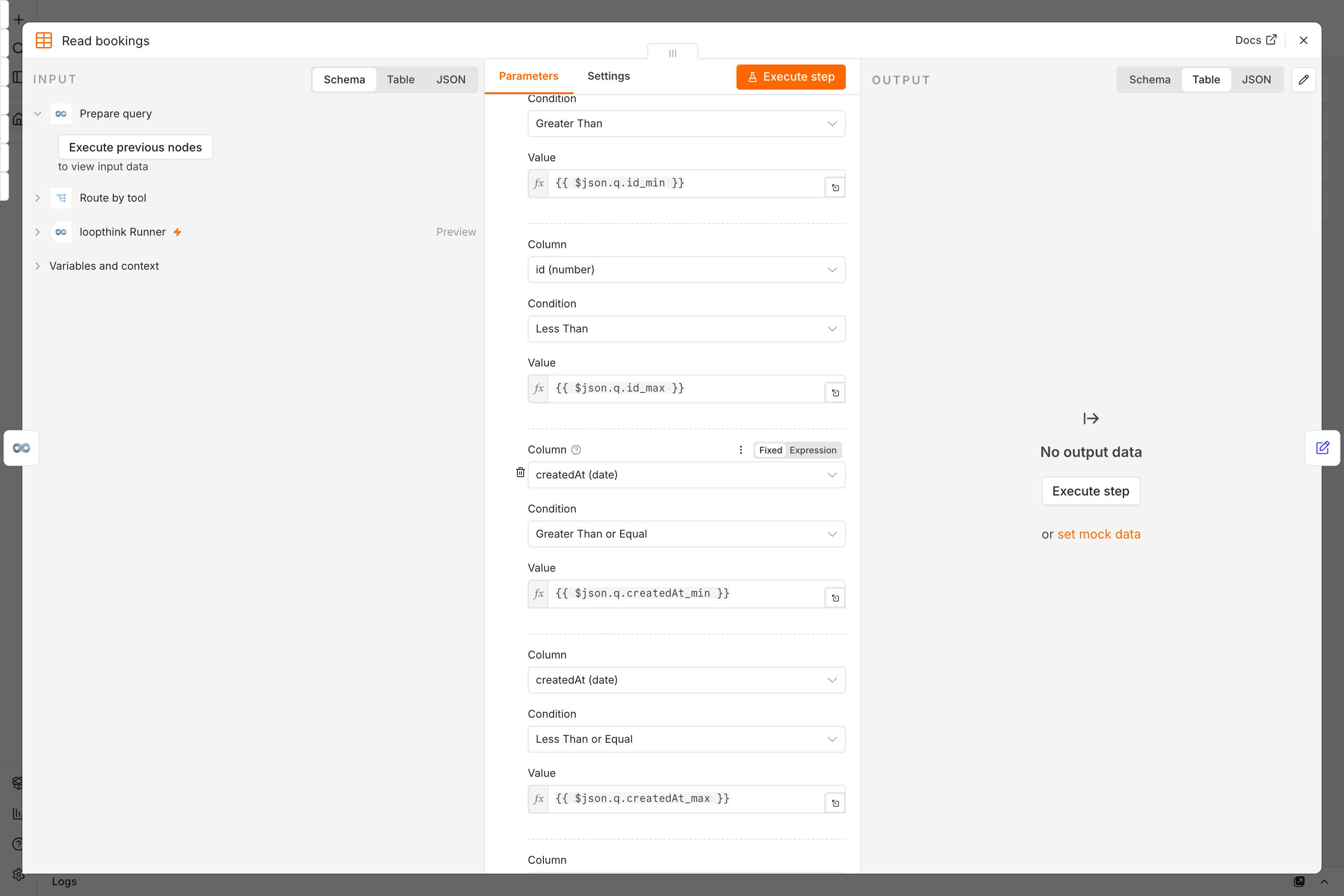
See examples/ for three sources worked through.
When an answer is too large
One answer carries 5 MB. Past that Send Result does not send the rows at
all: it answers with a sentence naming the size and the row count and saying to
narrow the filters or pass a smaller limit, which a model acts on by splitting
its question and asking again.
Five megabytes is what fits through the way back to the client, not what a model
reads comfortably: it is around a million tokens. A tool that answers with the
columns a question needs, rather than every column it has, stays far below it.
Measured before the POST on purpose. Sent anyway, an oversized body is rejected
by whichever layer notices first, the call stays unanswered, and the caller waits
out its timeout to learn nothing at all.
Masking
Masking runs here, before anything travels back. Only masked data ever passes
through the loopthink cloud.
The rules are not configured in n8n. They arrive with each request, so a rule you
add in loopthink takes effect on the very next tool call without anyone touching
this workflow.
One thing worth knowing: a rule with an entity scope only applies when the
target entity is known, which for HTTP tools it usually is not. Configure masking
for HTTP tools without a scope, or it will silently do nothing.
Scope
HTTP tools are executed by the node; anything else is a workflow tool your own
branch answers. HubSpot and Salesforce importers are not executed here.
Develop
npm install
npm test
npm run build
A local rig with n8n, an echo service and a seeded Postgres:
npm run docker:up      # http://127.0.0.1:5680
npm run docker:logs
npm run docker:down    # also drops the volumes, which is what makes Postgres re-seed
The package is mounted into the container, so npm run build is picked up. Node
descriptions are read at startup, though: after adding or renaming a parameter,
restart n8n or the old description keeps being served and the new parameter
silently reads as its default.
Local test rig
A compose file brings up n8n with this node already loaded, plus an echo service
to point tool calls at, so you can exercise a full round trip without a real
internal system:
npm run docker:up
n8n comes up on http://127.0.0.1:5680 (override with LOOPTHINK_N8N_PORT). From inside the workflow the echo service
is reachable at http://echo:8080. It returns whatever you send it, which makes
it easy to watch masking work on fields you choose.
npm run docker:restart   # rebuild + reload after a code change
npm run docker:logs      # follow n8n's log
npm run docker:down      # stop and remove the volume
npm run dev watches TypeScript and icons; with N8N_DEV_RELOAD set in the
compose file, n8n picks the rebuilt files up without a container restart. The
browser still needs a refresh to fetch the new node definition.
docker:restart remains for the cases dev reload does not cover (a changed
credential class, or anything in docker-compose.yml). It force-recreates rather
than restarts, because docker compose restart would not re-resolve the mount.
The whole package is mounted, not just ./dist: the build begins withrimraf dist, and a bind mount pointing at a directory that gets deleted leaves
the container holding a dangling inode. Every later rebuild would then be
invisible to it, silently, with the node still running whatever loaded at startup.
Custom nodes are loaded from /custom rather than ~/.n8n/custom on purpose:
that path lives inside n8n's data volume, and the two mounts would otherwise
shadow each other depending on mount order.
License
MIT