Package Information
Documentation
n8n-nodes-cartenvo
n8n nodes for nopCommerce stores that run the free
Cartenvo Integration Hub plugin
(nopCommerce 4.80, 4.90 and 5.00).
- Cartenvo Integration Hub Trigger starts a workflow the moment the store sends an event: a new or paid order, a
shipment, a stock or price change, a new customer. It registers its own webhook in the store when the workflow is
activated, removes it when it's deactivated, and checks every delivery's signature. - Cartenvo Integration Hub reads orders, changes their status, adds shipments with tracking, and sets stock and
prices by SKU, up to 1,000 lines a call.
Installation · Credentials · Trigger · Actions ·
Example workflows · Compatibility
Installation
In n8n, open Settings → Community nodes → Install, enter n8n-nodes-cartenvo and confirm. The
n8n guide covers self-hosted installs too.
On n8n Cloud, community nodes can be installed once n8n has verified them; until then, the
guide
shows the same workflows with the built-in Webhook and HTTP Request nodes.
The store needs the Integration Hub plugin installed (Configuration → Local plugins, or from the nopCommerce
marketplace).
Credentials
In the store's admin, open Configuration → Integration Hub → API keys and click Add key.
Name it ("n8n"), and tick the scopes the workflows need:
For Scopes The trigger webhooks:manageGet and Get Many orders orders:readUpdate Status, Add Shipment orders:writeUpdate Stock stock:writeUpdate Price prices:writeSave and copy the key (it starts with
cih_and is shown once).In n8n, add a Cartenvo Integration Hub API credential with the store's address (such as
https://shop.example.com) and the key. n8n checks it straight away.
The store accepts keys only over https://. Ignore SSL Issues is for test stores with a self-made certificate.
Trigger
Pick the events (or All Events) and activate the workflow. Each delivery becomes one item: the event's envelope
with the order, shipment, product, stock line or customer under data, in the shapes the
webhook guide
documents.
{
  "id": "evt_3f9c2a7d0b1e4c55a1d2e3f4a5b6c7d8",
  "type": "order.paid",
  "schemaVersion": 1,
  "occurredOnUtc": "2026-11-02T10:15:00.000Z",
  "store": { "id": 1, "name": "Your store", "url": "https://shop.example.com/" },
  "data": { "id": 1042, "number": "1042", "status": "Processing", "totals": { "total": 132 }, "items": [ … ] },
  "context": null
}
- Payload: Thin sends only
{"object", "id", "adminUrl"}underdata, for workflows that read the rest with the action node. - Options → Include Headers adds
delivery(event ID, delivery ID, attempt) to each item. The event ID stays the
same on retries, so it's the one to drop repeats by. - Options → Check Signature (on by default) refuses deliveries that aren't signed with this webhook's secret.
The store must be able to reach n8n. n8n's test URL (/webhook-test/…) works only while you click
Listen for test event; the store's own Send test button (in the webhook's page in admin) is the quickest way to
send one. A store with Block private networks on (the default) won't send to an n8n on localhost or a private
address.
Actions
| Resource | Operation | What it does |
|---|---|---|
| Order | Get | One order with its items, addresses, totals and external references |
| Order | Get Many | Orders oldest first, filtered by status, payment or shipping status, dates, or an ERP number |
| Order | Update Status | Order status (Pending, Processing, Complete, Cancelled) and payment status (Paid, Refunded, Voided), through nopCommerce's own rules and emails |
| Order | Add Shipment | Some items (by SKU or order item) or everything left, with a tracking number, shipped and delivered at once if you like |
| Product | Update Stock | Set or adjust stock by SKU or product ID, per warehouse and attribute combination, kept in stock history |
| Product | Update Price | Set price, old price and cost by SKU or product ID |
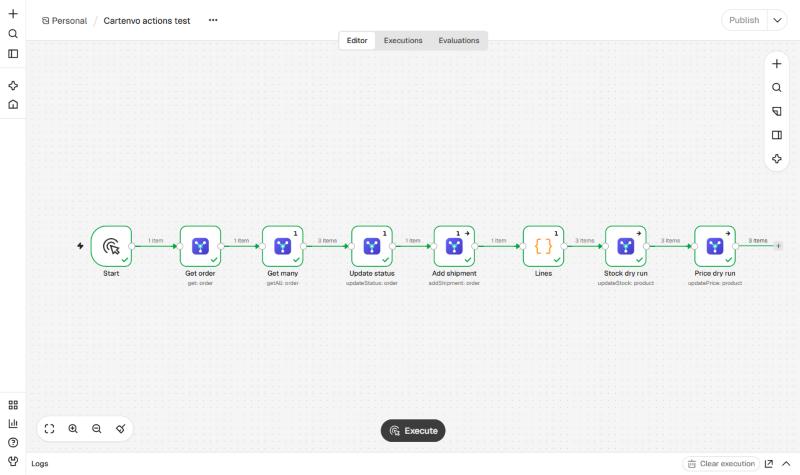
- Stock and prices are sent in bulk: each input item is one line, and up to 1,000 lines go in one call. Each
output item says what happened to its line (updated,unchangedorfailed, with old and new values). - Dry Run checks every line and reports what would change, without changing anything. Useful the first time a
spreadsheet or ERP export is used. - Writes carry an idempotency key, so n8n's Retry On Fail doesn't apply a change twice.
- With On Error: Continue, failed lines and orders come out as items with
errorinstead of stopping the
workflow.
Example workflows
The examples/ folder has workflows to import (Workflows → Import from file):
- New order → Google Sheets row: each paid order becomes a row with its number, customer, total and items.
- New order → Slack message.
- Stock from a sheet: reads SKU and quantity from Google Sheets every hour and sets stock in one call, with a dry
run first.
Compatibility
- Tested with n8n 2.45.
- The Integration Hub plugin release 2 or later (it adds the API these nodes use).
- nopCommerce 4.80, 4.90 and 5.00.
Resources
Licence
MIT. The Integration Hub plugin is free to use; its own licence is at https://cartenvo.com/plugins/integration-hub/license.