Package Information
Available Nodes
Documentation generating…
Documentation
n8n-nodes-cigalpay
n8n community nodes for CigalPay: accept crypto payments (BTC, ETH, USDT, LTC, SOL, TRX, DOGE and more, plus other coins converted at payment) in your workflows.
- CigalPay: create a checkout and get the payment link, read payments, refund, list coins.
- CigalPay Trigger: start a workflow when a payment is made, from CigalPay's signed notifications.
Installation
In n8n: Settings → Community Nodes → Install, enter n8n-nodes-cigalpay.
Self-hosted with npm: npm install n8n-nodes-cigalpay in ~/.n8n/nodes, then restart n8n.
Credentials
Create a CigalPay API credential with the values from the CigalPay dashboard, Settings → API credentials:
| Field | Used for |
|---|---|
| Account ID | Creating checkouts |
| API Key | Reading payments and refunds. Shown once when you create it. |
| Notification Signing Secret | The CigalPay Trigger: checking that notifications come from CigalPay |
CigalPay node
| Resource | Operation | What it does |
|---|---|---|
| Checkout | Create | Payment priced in USD or EUR (up to 5,000). Returns the chargeLink to send your customer to. |
| Payment | Get | One payment by its ID |
| Payment | Get by Order | Every payment created for one of your order references |
| Payment | Get Active | Payments still waiting for funds |
| Refund | Create | Refund a paid payment, in the checkout currency or in the coin paid. The customer gets a link to enter their address. |
| Refund | Get Many | The refunds of a payment |
| Coin | Get Accepted / Get Converted | Coins accepted directly, and coins converted at payment |
CigalPay Trigger
- Add a CigalPay Trigger and activate the workflow.
- Use its production URL as the Notification URL when you create a checkout (with the CigalPay node or the API).
- CigalPay sends a notification each time the payment's status changes. The trigger checks the
x-cigalpay-sigsignature and refuses anything unsigned or forged with a 401, before the workflow runs.
Trigger On: paid payments only (CONFIRMED or FINISHED, the default), all status changes, or the statuses you pick. Each item has the notification fields plus isPaid and receivedAt.
To try it, send a sample from the dashboard: Settings → API credentials → Test notification. Turn on Ignore Test Notifications once you're live.
Before delivering an order
Anyone can create a checkout with your Account ID and an order reference. Before delivering, check that the notification matches the order you priced:
extraIdis your order ID,checkoutAmountandcheckoutCurrencyare the price you set,isPaidistrue.
Example workflow: sell digital products for crypto
examples/sell-digital-product-crypto.json: download it, then in n8n open a new workflow and paste it (or ⋯ → Import from File).
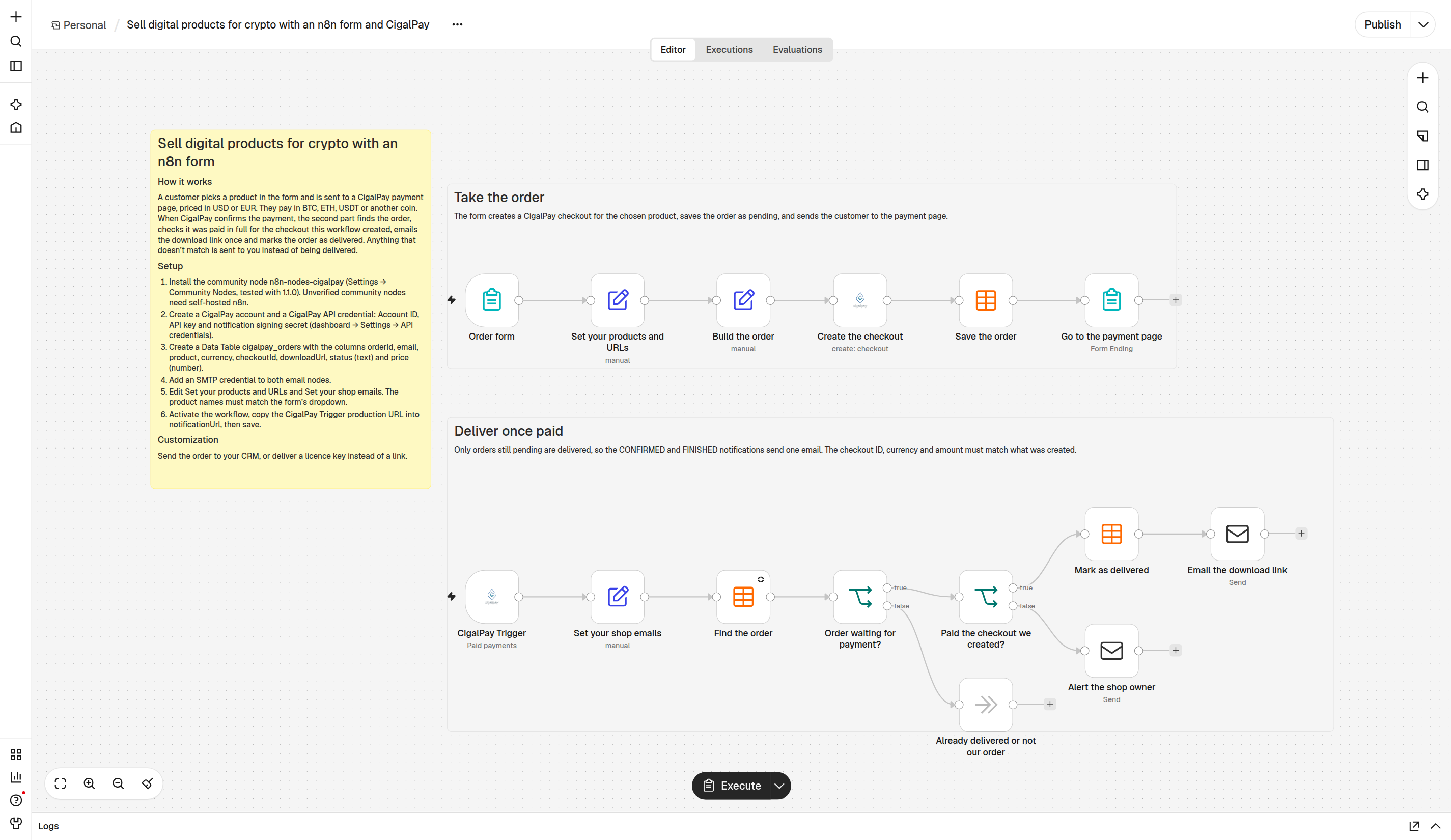
- Take the order: an n8n form creates a CigalPay checkout for the chosen product, saves the order in a Data Table and sends the customer to the payment page.
- Deliver once paid: the CigalPay Trigger finds the order, checks the checkout ID, currency and amount, emails the download link once and marks the order delivered. Anything that doesn't match is sent to you instead.
Setup steps are in the yellow note on the canvas.
Example workflow: get paid in crypto for Invoice Ninja invoices
examples/invoice-ninja-crypto.json
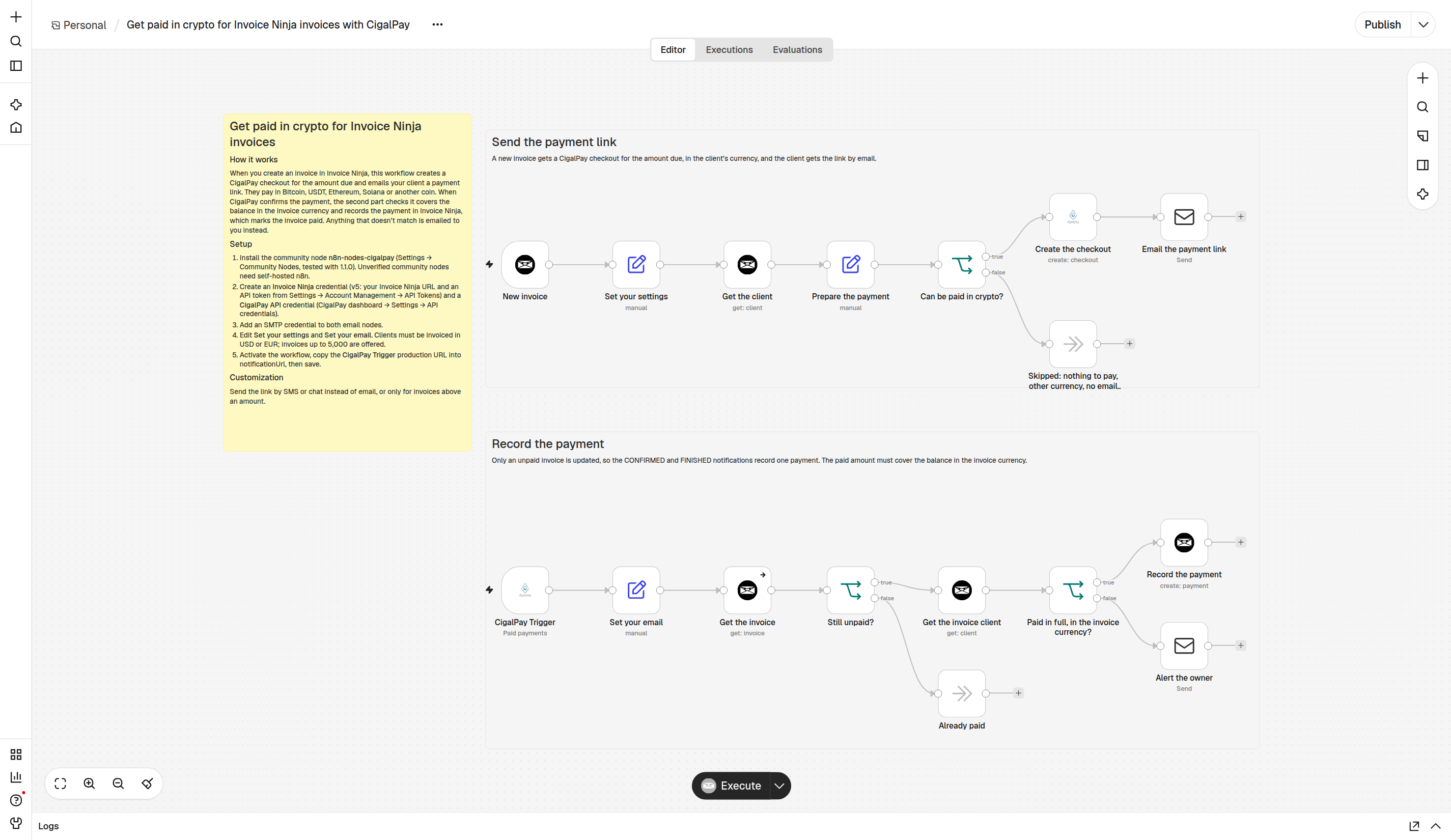
- Send the payment link: when you create an invoice in Invoice Ninja, the workflow creates a CigalPay checkout for the amount due, in the client's currency, and emails the client the link.
- Record the payment: once CigalPay confirms it, the workflow checks the invoice is still unpaid and the payment covers the balance in the invoice currency, then records the payment in Invoice Ninja. Anything else is emailed to you.
Limits
- 5,000 USD or EUR per payment.
- One-time payments: no automatic renewals.