Package Information

Documentation
n8n-nodes-firstspirit
Recommended for development and testing while in beta. This node is built for FirstSpirit REST API
version 0.0.25-beta. As the API continues to evolve, both the API and this node's operations, parameters
and behaviour may change without prior notice. Production use is not recommended at this stage.
Overview
This repository provides a custom n8n integration node for the FirstSpirit REST API. It enables direct access to FirstSpirit content and configuration from within an n8n workflow: projects, pages, page references, media, sections, datasets and data sources, global content, templates, scripts, modules and search.
What is it?
A n8n node module designed to simplify integration with the FirstSpirit REST API using basic auth credential management. It supports:
- Authentication using username/password
- Read and manage projects, pages, page references, sections and media
- Read and edit form content of pages, sections, datasets and global content
- Manage data sources and datasets
- Manage templates (page, section, format, link), schemas, scripts and modules
- Search elements by ID, UID and references
- Chain operations using dynamic expressions for automated content data pipelines
What is it for?
This module is useful for organizations looking to build automated content pipelines into the FirstSpirit ecosystem.
Supported Resources & Operations
The node covers 159 operations across 18 resources.
| Resource | Covers | Operations |
|---|---|---|
| Data Source | Data sources of a project | 3 |
| Dataset | Datasets of a data source, including form editors and revisions | 10 |
| Document Group | Document groups for page references | 3 |
| Folder | Page, page reference and media folders: read and rename | 6 |
| Format Template | Format templates and their channel sources | 7 |
| Global Content | Global content pages with bodies, sections, form editors and project properties | 14 |
| Link Template | Link templates with GOM, rules and channel sources | 12 |
| Media | Media with binary data, resolutions, revisions, usages and actions | 13 |
| Module | FirstSpirit modules: list, read, install and delete | 4 |
| Page | Pages with bodies, form editors, metadata, revisions, usages and actions | 17 |
| Page Reference | Page references with settings, revisions and actions | 10 |
| Page Template | Page templates with bodies, GOM, rules and channel sources | 16 |
| Project | Projects with their languages, resolutions, settings and template sets | 10 |
| Schema | Schemas (read only) | 2 |
| Script | Scripts with code, GOM and execution | 9 |
| Search | Search by text, element ID or UID, and for external and invalid references | 5 |
| Section | Sections of a page body with form editors | 6 |
| Section Template | Section templates with GOM, rules and channel sources | 12 |
Choose the resource and then the operation in the node. Each operation maps to one endpoint of the
FirstSpirit REST API; the mapping is defined innodes/FirstSpiritRestApi/operations.ts. Each method supports query parameterization using dynamic expressions and authenticates using Basic Auth.
Prerequisites
The node talks to the FirstSpirit REST API, which is provided by a FirstSpirit REST module. How you
get it depends on how your FirstSpirit is operated.
Warning: The FirstSpirit REST API is in beta and under active development.
Functionality, APIs, and compatibility are subject to change without notice.
Do not use in production environments.
On-premises
- FirstSpirit: a current FirstSpirit version
- Application server: standalone Apache Tomcat
- FirstSpirit REST module: Download and install the FirstSpirit REST API module (version 0.0.25-beta)
The download requires a login to the FirstSpirit Artifactory, which FirstSpirit customers have.
See the FirstSpirit REST API documentation for the API and for
setup and configuration of the module.
Note: To enable communication, the FirstSpirit server must be made accessible to n8n, for example by using a tunneling tool such as ngrok.
Cloud
- The FirstSpirit REST module is not available for self-installation. You can request to join the
open beta; the module is then provided on your own cloud instance.
Installation
As a Community Node
- In n8n, open Settings → Community Nodes and choose Install.
- Enter the package name
n8n-nodes-firstspirit, accept the risk notice and install. - The node appears as FirstSpirit REST API in the node panel.
See the n8n documentation on community nodes
for details and for installing on instances where this option is not available.
As a Private Node
This installs the node from a package built from this repository into an n8n Docker container.
- Clone this repository and build the package (Node.js 20.15 or higher is required):
This createsgit clone https://github.com/e-Spirit/n8n-nodes-firstspirit.git cd n8n-nodes-firstspirit npm install npm run build npm packn8n-nodes-firstspirit-<version>.tgzin the current directory. - Start the n8n Docker container:
docker run -d \ --name n8n \ -p 5678:5678 \ -v n8n_data:/home/node/.n8n \ docker.n8n.io/n8nio/n8n - Copy the package into the container and install it into n8n's nodes directory:
docker cp n8n-nodes-firstspirit-*.tgz n8n:/tmp/ docker exec -u node n8n sh -c "mkdir -p ~/.n8n/nodes && cd ~/.n8n/nodes && npm install --legacy-peer-deps /tmp/n8n-nodes-firstspirit-*.tgz"--legacy-peer-depsis needed because n8n already providesn8n-workflow; without it the install
tries to build it again and fails. - Restart the n8n Docker container:
docker restart n8n - Log in to n8n and the node will appear as FirstSpirit REST API.
Note: If it doesn't appear, check
docker logs n8nfor errors while loading the node.
To update the node, build a new package and repeat steps 3 and 4.
Usage
- Create a FirstSpirit API credential (see Credentials) and run its Test button.
- Add the FirstSpirit REST API node to a workflow, then choose a resource and an operation.
- Fields that refer to FirstSpirit elements (project, page, data source and so on) offer a searchable
dropdown filled from your server. You can also switch a field to an expression to map values from
previous nodes. - List operations can return all results or stop at a limit. The node walks through the pages of the
API for you.
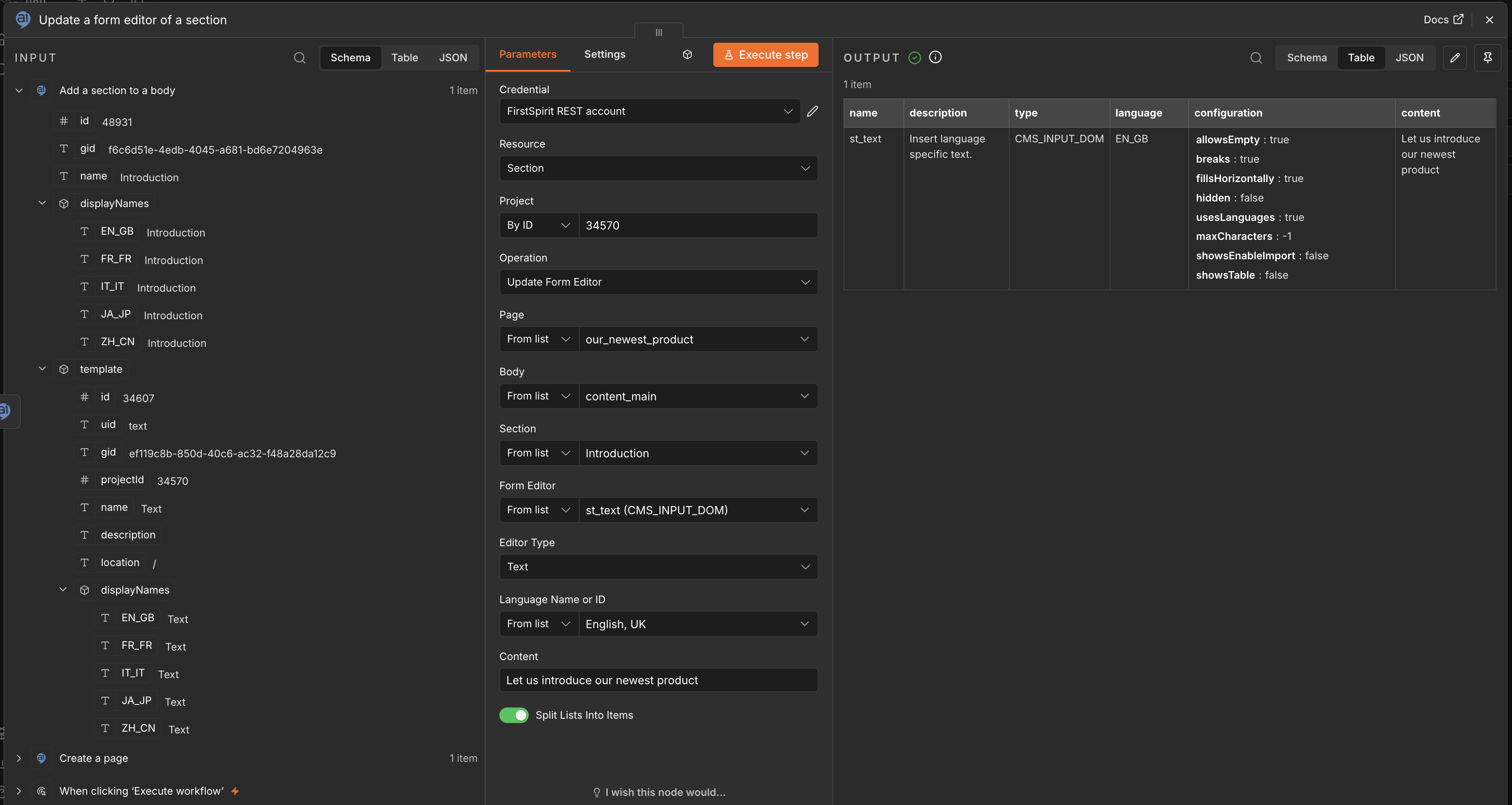
A typical pipeline reads content (for example Page → Get Form Editor), transforms it in other n8n
nodes and writes it back (Section → Update Form Editor). See the screenshots below.
Example workflow
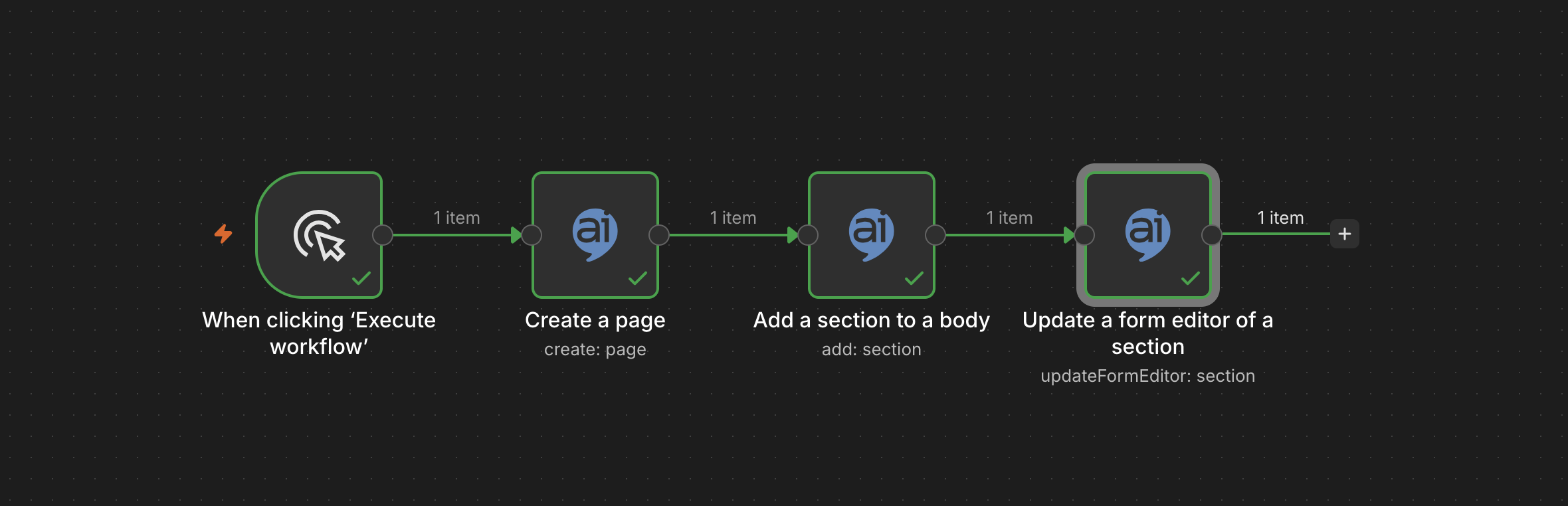
The workflow below creates a page, adds a section to its body and fills a form editor of that section,
as shown in the screenshots. To try it, copy the JSON, paste it onto an empty n8n canvas (Ctrl+V or
Cmd+V), select your FirstSpirit API credential on the three FirstSpirit nodes and replace everyREPLACE_WITH_... value with a value from your own project. Run it against a test project, because it
writes content.
Workflow JSON
{
  "name": "FirstSpirit: create a page and fill a form editor",
  "nodes": [
    {
      "parameters": {},
      "name": "When clicking 'Execute workflow'",
      "type": "n8n-nodes-base.manualTrigger",
      "typeVersion": 1,
      "position": [
        0,
        0
      ]
    },
    {
      "parameters": {
        "resource": "page",
        "operation": "create",
        "projectId": {
          "mode": "id",
          "value": "REPLACE_WITH_PROJECT_ID"
        },
        "body": "{\"uid\":\"REPLACE_WITH_NEW_PAGE_UID\",\"templateUid\":\"REPLACE_WITH_PAGE_TEMPLATE_UID\"}"
      },
      "name": "Create a page",
      "type": "n8n-nodes-firstspirit.firstSpiritRestApi",
      "typeVersion": 1,
      "position": [
        240,
        0
      ],
      "credentials": {
        "firstSpiritApi": {
          "id": "REPLACE_WITH_CREDENTIAL_ID",
          "name": "FirstSpirit API"
        }
      }
    },
    {
      "parameters": {
        "resource": "section",
        "operation": "add",
        "projectId": {
          "mode": "id",
          "value": "REPLACE_WITH_PROJECT_ID"
        },
        "pageUid": {
          "mode": "id",
          "value": "REPLACE_WITH_NEW_PAGE_UID"
        },
        "bodyName": {
          "mode": "id",
          "value": "REPLACE_WITH_BODY_NAME"
        },
        "sectionName": "REPLACE_WITH_SECTION_NAME",
        "body": "{\"templateUid\":\"REPLACE_WITH_SECTION_TEMPLATE_UID\"}"
      },
      "name": "Add a section to a body",
      "type": "n8n-nodes-firstspirit.firstSpiritRestApi",
      "typeVersion": 1,
      "position": [
        480,
        0
      ],
      "credentials": {
        "firstSpiritApi": {
          "id": "REPLACE_WITH_CREDENTIAL_ID",
          "name": "FirstSpirit API"
        }
      }
    },
    {
      "parameters": {
        "resource": "section",
        "operation": "updateFormEditor",
        "projectId": {
          "mode": "id",
          "value": "REPLACE_WITH_PROJECT_ID"
        },
        "pageUid": {
          "mode": "id",
          "value": "REPLACE_WITH_NEW_PAGE_UID"
        },
        "bodyName": {
          "mode": "id",
          "value": "REPLACE_WITH_BODY_NAME"
        },
        "sectionName": "REPLACE_WITH_SECTION_NAME",
        "editorName": {
          "mode": "id",
          "value": "REPLACE_WITH_EDITOR_NAME"
        },
        "language": {
          "mode": "id",
          "value": "REPLACE_WITH_LANGUAGE"
        },
        "body": "{\"name\":\"REPLACE_WITH_EDITOR_NAME\",\"type\":\"CMS_INPUT_TEXT\",\"content\":\"Hello from n8n\"}"
      },
      "name": "Update a form editor of a section",
      "type": "n8n-nodes-firstspirit.firstSpiritRestApi",
      "typeVersion": 1,
      "position": [
        720,
        0
      ],
      "credentials": {
        "firstSpiritApi": {
          "id": "REPLACE_WITH_CREDENTIAL_ID",
          "name": "FirstSpirit API"
        }
      }
    }
  ],
  "connections": {
    "When clicking 'Execute workflow'": {
      "main": [
        [
          {
            "node": "Create a page",
            "type": "main",
            "index": 0
          }
        ]
      ]
    },
    "Create a page": {
      "main": [
        [
          {
            "node": "Add a section to a body",
            "type": "main",
            "index": 0
          }
        ]
      ]
    },
    "Add a section to a body": {
      "main": [
        [
          {
            "node": "Update a form editor of a section",
            "type": "main",
            "index": 0
          }
        ]
      ]
    }
  },
  "pinData": {},
  "settings": {
    "executionOrder": "v1"
  }
}
Uploading and downloading binary data
- Download: Media → Get Binary Data (and the resolution variant) writes the file into the
binary property named in Binary Property (defaultdata) of the output item. Later nodes such as
Write Binary File can use it. - Upload: Media → Upload Binary Data and Module → Install read the file from the binary
property named in Binary Property (defaultdata) of the incoming item. Produce the binary data
with a node such as HTTP Request or Read Binary File before the FirstSpirit node.
Screenshots
Click an image to view it in full size.
A basic workflow
A basic workflow example using the n8n FirstSpirit REST API node.
Updating a form editor
The Update Form Editor operation of a section and its result.
Credentials
This node supports authentication against the FirstSpirit REST API. You'll need the following credentials:
- Username and Password
- Base URL of the FirstSpirit REST API — the server URL plus the REST context path, for example
https://your-server.example.com/rest. The browser URL of the server alone is not enough: every
operation path starts at/v1/...below that base, so a missing/restmakes every request 404.
Authentication is Basic Auth only. The FirstSpirit REST API also accepts Bearer (JWT) tokens;
this node deliberately does not support them.
Use the credential's Test button to check the values before building a workflow; it performs aGET /v1/projects/ against the base URL.
Development
npm install
npm run build        # compile to dist/
npm test             # unit tests
npm run lint
npm run format
npm run dev          # build in watch mode and start a local n8n with the node loaded
Node.js 20.15 or higher is required. npm run dev starts n8n through npx n8n@latest, which may
require a newer Node.js version than the package itself.
Versioning
The node version is the version of the FirstSpirit REST API it is built for, for example 0.0.25-beta.
A fix that only changes the node adds a counter (0.0.25-beta.1, 0.0.25-beta.2). The next API
release starts a new version (0.0.26-beta). Always install the REST module in the API version the
node is built for.
The operations are defined as data in nodes/FirstSpiritRestApi/operations.ts, and the editor UI
for them in nodes/FirstSpiritRestApi/descriptions/. If you add or change an operation, adjust the
operation counts in the overview above.
Support
- This repository is released under the MIT License.
- For n8n integration issues or pull requests, use GitHub Issues or Discussions.
License
MIT (c) Rezolve AI
See LICENSE for details.