Package Information
Available Nodes
Documentation generating…

Documentation
n8n-nodes-jira-session
n8n community node for Jira Server / Data Center that logs in with a username and password (cookie session) instead of an API token or Basic auth header.
Some self-hosted Jira instances sit behind a proxy that drops the Authorization header, so Basic, Bearer and personal access token auth all come back as anonymous / HTTP 401. n8n's built-in Jira node only offers header-based auth (Cloud OAuth2, Cloud API token, Server email + password as Basic auth), so it fails on such instances. This node does what the jira-tools CLI does: POST /rest/auth/1/session with JSON username/password, then sends the returned cookies (JSESSIONID and any others) as Cookie on every call. It also works on instances where header auth is fine.
Installation · Credentials · Operations · Examples · Limitations · Development
Installation
Follow the community nodes installation guide.
n8n UI (self-hosted, owner/admin): Settings → Community Nodes → Install, package name
n8n-nodes-jira-session. This needs the package on npm.Manual (self-hosted, e.g. Docker), from npm or from a tarball you built:
# inside the n8n container / host, as the n8n user
mkdir -p ~/.n8n/nodes && cd ~/.n8n/nodes
npm install n8n-nodes-jira-session            # from npm
# or: npm install --legacy-peer-deps /path/to/n8n-nodes-jira-session-*.tgz
Then restart n8n. Build a tarball from this folder with
npm ci && npm run build && npm pack.--legacy-peer-depsstops npm from installing its own copy of then8n-workflowpeer dependency (n8n provides it).
Credentials
Create a Jira Session API credential:
| Field | Example | Notes |
|---|---|---|
| Base URL | https://jira.example.com |
Root of the Jira instance, without /rest. A trailing / is fine. |
| Username | jdoe |
Jira username (not the e-mail address, unless that is your username). |
| Password | Stored encrypted by n8n like any credential secret. |
How the session works:
- The first request logs in with
POST /rest/auth/1/sessionand stores the session cookie in a hidden, expirable field of the credential. Later requests and later executions reuse it, so a workflow does not log in on every run. - When Jira answers a request with HTTP 401 (session expired or Jira restarted), n8n logs in once more and resends that request.
- A login answered with anything other than HTTP 200 fails the node with
Jira login failed: HTTP 401 (AUTHENTICATED_FAILED) ...and is never retried, because repeated failed logins trigger Jira's CAPTCHA lockout. If the reason saysAUTHENTICATION_DENIED, Jira wants a CAPTCHA: log in once in a browser, then run again. - Test in the credential dialog always performs a fresh login and then calls
GET /rest/api/2/myself. - Write requests carry
X-Atlassian-Token: no-check(Jira's XSRF check). - Each credential holds one session. Two workflows using the same credential at the same time share it.
Operations
Resource Issue:
Create (node version 2)
New nodes use version 2. Workflows saved with version 1 keep working unchanged: they keep the version 1 form until you replace the node.
| Parameter | Notes |
|---|---|
| Project | Loaded from GET /rest/api/2/project, or a project key via expression. |
| Issue Type | Loaded per project from GET /rest/api/2/project/{key}, or an issue type ID via expression. |
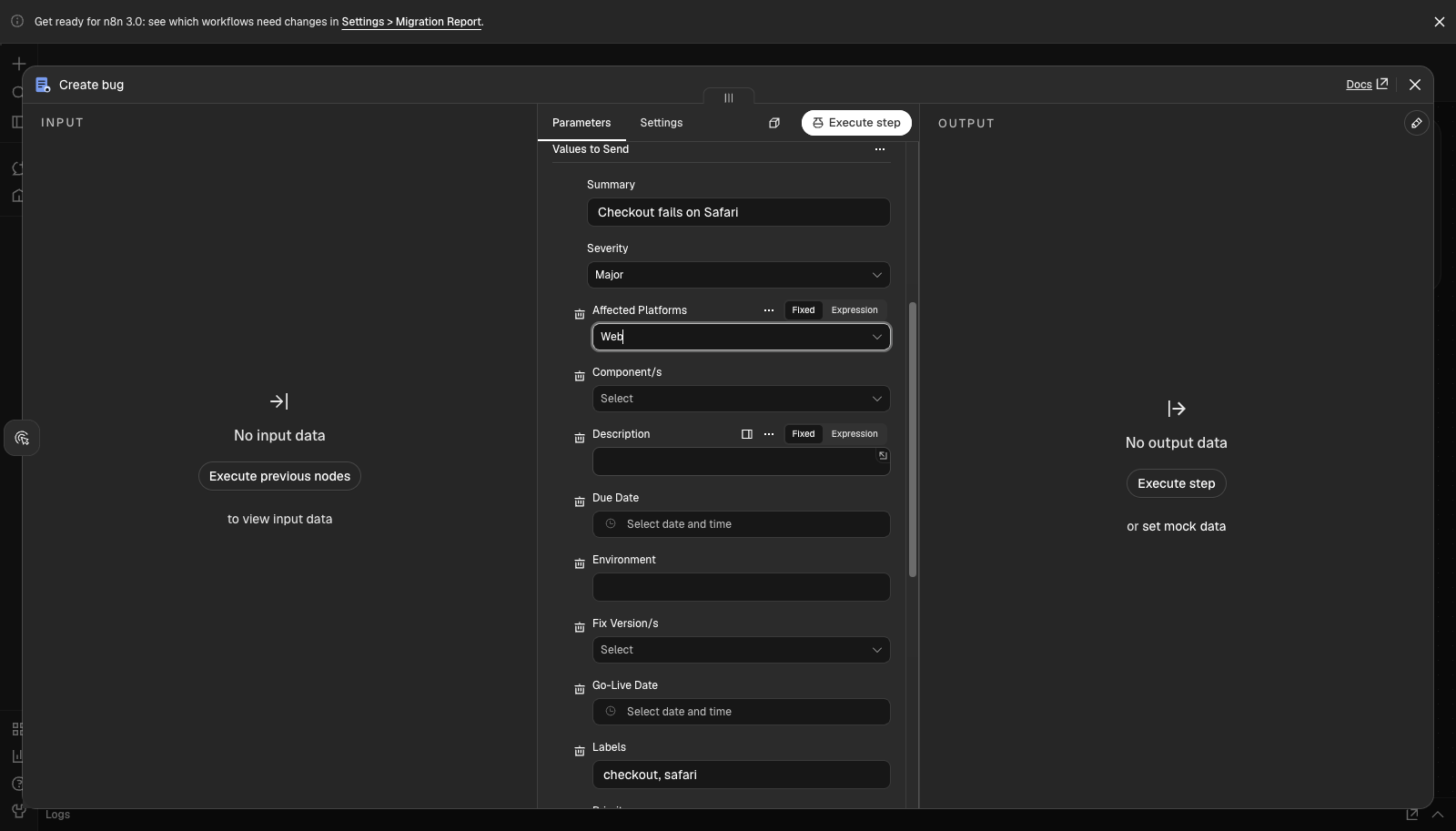
| Fields | Every field of the project + issue type create screen, read from Jira's create metadata. Required fields are marked and cannot be removed; optional ones can be removed or added back. Reload with Refresh field list after changing the screen in Jira. See Fields mapper. |
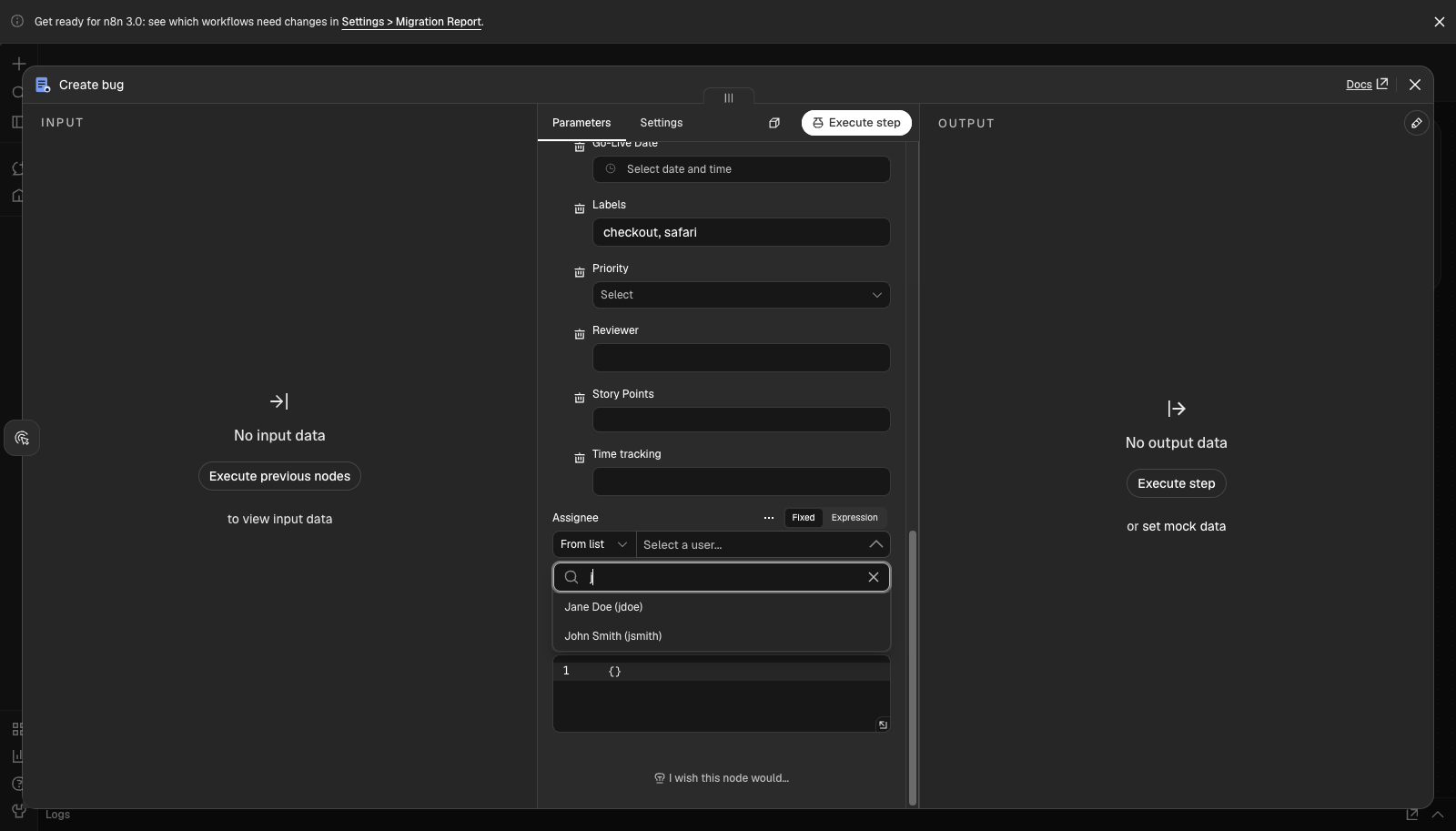
| Assignee | From list: type to search users assignable in the chosen project (GET /rest/api/2/user/assignable/search), shown as Display Name (username). By username: type or map a username. Empty = project default. |
| Reporter | Same, searching all users (GET /rest/api/2/user/search). Empty = the logged-in user. Setting it needs the Modify Reporter permission. |
| Additional Fields (JSON) | Merged into fields last, for anything the mapper cannot express; overrides mapper values. |
| Fields mapper after choosing project + issue type | Assignee search while typing |
|---|---|
 |
 |
Fields mapper
The schema comes from GET /rest/api/2/issue/createmeta/{project}/issuetypes/{issueTypeId} (Jira 8.4+, read page by page). When the server answers 404 (older Jira), the node falls back to GET /rest/api/2/issue/createmeta?projectKeys=…&issuetypeIds=…&expand=projects.issuetypes.fields. At execution the node reads the same metadata once per project + issue type and converts each value:
| Jira field schema | Mapper input | Sent to Jira |
|---|---|---|
string (summary, description, text custom fields) |
text | text |
number |
number | number |
date (due date, date pickers) |
date | yyyy-MM-dd |
datetime |
date-time | yyyy-MM-ddTHH:mm:ss.SSS+0000; a value without offset is read as UTC |
Anything with allowedValues: option (select), priority, resolution, version, component, security level… |
dropdown of allowed values | {"id": "…"}; an array of them when the field holds several (fix versions, components, multi-select) |
array of string (labels) |
comma-separated text | array of strings |
user / group (user pickers), and arrays of them |
username(s), comma-separated | {"name": "…"} / array of them |
parent (sub-tasks) |
issue key | {"key": "PROJ-1"} |
| anything else (time tracking, cascading select, plugin fields) | text | parsed as JSON when it is JSON, e.g. {"originalEstimate": "1d"}, otherwise text |
- A field is required when Jira marks it required and has no default for it (Jira fills defaulted ones such as priority itself).
- The n8n mapper dropdown picks one value. For multi-value fields (multi-select, components, fix versions) switch the field to an expression and give ids or names comma-separated (
Web, iOS) or as a JSON array (["20101", "iOS"]). Names are matched case-insensitively against the allowed values; an unknown value fails the item and lists the choices. - Project, issue type, assignee and reporter have their own parameters; attachments cannot be set on create, so these are not in the mapper.
- Map Automatically takes the values from input item keys named like the field IDs (
summary,customfield_10010); keys that are not fields of the create screen are ignored.
Create (node version 1)
| Parameter | Notes |
|---|---|
| Project | Loaded from GET /rest/api/2/project, or a project key via expression. |
| Issue Type | Loaded per project from GET /rest/api/2/project/{key}, or an issue type ID via expression. |
| Summary | Required. |
| Additional Fields | Description (wiki markup), Assignee and Reporter (usernames), Priority (loaded from GET /rest/api/2/priority), Labels and Components (comma-separated), Parent Issue Key (for sub-tasks), Due Date, Additional Fields (JSON). |
| Custom Fields | Pairs of field ID (customfield_10010) and value. A value that parses as JSON is sent as JSON (5, {"value": "High"}, ["a","b"], [{"name": "Team A"}]); anything else is sent as text. Wrap a value in quotes ("123") to send a number-like value as text. |
Additional Fields (JSON) is merged into the fields object last, so it can set any field the form does not cover and overrides form values, e.g. {"customfield_10020": {"id": "7"}, "environment": "staging"}.
Output, one item per input item:
{ "id": "10123", "key": "PROJ-42", "self": "https://jira.example.com/rest/api/2/issue/10123", "url": "https://jira.example.com/browse/PROJ-42" }
Get Many (search)
Uses POST /rest/api/2/search. Output: one n8n item per issue (id, key, self, fields).
| Parameter | Notes |
|---|---|
| Filter Mode | Builder composes JQL from the filters; Raw JQL sends your query unchanged. |
| Filters (Builder) | Project (keys), Status, Issue Type, Assignee, Labels: comma-separated lists, matched with = for one value and in (...) for several. Assignee currentUser() means the logged-in user. Updated Since (updated >= "yyyy-MM-dd HH:mm", Jira user's time zone). Text Contains (text ~ "..."). Filters are joined with AND; every value is quoted and escaped, so input cannot change the query structure. |
| Order By / Order Direction (Builder) | Field name such as updated, created, priority, key, cf[10010]. Empty for no ordering. In Raw JQL mode put ORDER BY in the query. |
| Fields to Return | Comma-separated. Default summary,status,assignee,issuetype,priority,created,updated. *all or *navigable also work. |
| Return All / Limit | Return All pages with startAt / maxResults (100 per page) until Jira's total is reached; otherwise stop at Limit (default 50). |
Example builder result: Project PROJ, Status To Do, In Progress, Labels n8n, ordered by updated →
project = "PROJ" AND status in ("To Do", "In Progress") AND labels = "n8n" ORDER BY updated DESC
Both operations support Continue On Fail: a failing item outputs { "error": "..." } and the others still run. HTTP errors show Jira's errorMessages / errors in the error description.
Examples
examples/create-fields-v2.workflow.json (node version 2): import it, pick your Jira Session credential, choose project and issue type and click Refresh field list on Fields. It creates a PROJ bug with summary, the required custom select Severity, a multi-select set by expression, labels, a due date, an assignee from the user search and the reporter by username.
examples/create-and-search.workflow.json (node version 1): import it with Workflows → Import from File, then pick your Jira Session credential on the three Jira nodes and adjust project/issue type/priority IDs. It:
- creates a
PROJtask with description, labels, priority, due date, one custom field and a JSON extra field, - searches the created issue with the builder (project, label, text),
- lists every
PROJissue with raw JQL and Return All.
Limitations
- Jira Server / Data Center, REST API v2 (tested against the 8.x/9.x API shape). Jira Cloud does not support
/rest/auth/1/sessionwith a password; use n8n's built-in Jira node there. - Only Issue → Create and Issue → Get Many. No update, transition, comment, attachment or trigger yet.
- Search uses
POST /rest/api/2/search, which Jira Data Center 10+ still offers; very largeReturn Allresult sets are fetched page by page into memory. - Accounts with two-factor auth or SSO-only login (no Jira password) cannot use session login.
- Not available on n8n Cloud unless the package is published and verified by n8n.
Development
Requires Node.js 22+ and npm. Standard @n8n/node-cli tooling:
cd n8n
npm ci
npm run build      # n8n-node build → dist/
npm run lint       # n8n community node linter
npm test           # unit tests with mocked HTTP (node:test + tsx)
npm run dev        # n8n with this node loaded, rebuilds on change
Mock Jira for end-to-end checks
mock-jira/server.mjs is a small in-memory Jira (no dependencies). Like the instances this node targets, it ignores the Authorization header and only accepts the cookie from POST /rest/auth/1/session (user jdoe, password secret). It implements myself, project, project/{key}, priority, create metadata (paged issue/createmeta/{project}/issuetypes/{id} and legacy issue/createmeta?expand=…; Task, Bug with a required custom select, Sub-task with a required parent, plus multi-select, number, date-time, user picker and time tracking fields), user/assignable/search and user/search (60 users, paged), POST issue (checks the XSRF header and required fields), POST search with paging, GET /__log (routes and query strings called, whether a cookie was sent) and GET /__last-create (body of the last create request). Start it with MOCK_JIRA_LEGACY_CREATEMETA=1 to make the paged createmeta endpoint 404, as on Jira before 8.4.
npm run mock-jira # http://localhost:8089, or: node mock-jira/server.mjs <port>
End-to-end run in Docker (what was used to verify this package):
npm run build && npm pack --pack-destination /tmp/n8n-e2e
docker run -d --name n8n-e2e -p 5678:5678 -v /tmp/n8n-e2e:/e2e \
  --add-host host.docker.internal:host-gateway docker.n8n.io/n8nio/n8n:2.48.7
docker exec n8n-e2e sh -c 'mkdir -p ~/.n8n/nodes && cd ~/.n8n/nodes && npm init -y >/dev/null \
  && npm install --legacy-peer-deps /e2e/n8n-nodes-jira-session-*.tgz'
docker restart n8n-e2e
# open http://localhost:5678, create a Jira Session credential with Base URL
# http://host.docker.internal:8089, user jdoe / secret, import the example workflow and run it
docker rm -f n8n-e2e
Releasing
Releases run from GitHub Actions so the npm package carries provenance, which n8n requires for verified community nodes.
- On npmjs.com, the package has a trusted publisher for GitHub Actions: repository
sajjad-fatehi/jira-tools, workflowpublish-n8n.yml. No npm token is stored in the repo. - In GitHub: Actions → Publish n8n node → Run workflow on
main, pick the bump (patch,minor,major, ornoneto publish the version already inpackage.json). - The workflow lints, builds and tests, bumps
n8n/package.json, commits and tagsn8n-vX.Y.Z, publishes to npm and creates a GitHub release.
npm publish from a local machine is blocked on purpose (prepublishOnly runs n8n-node prerelease).