Package Information

Documentation
n8n Market Sentiment Node
n8n-nodes-market-sentiment brings structured stock sentiment data from Adanos into n8n workflows.
It is built for finance automations that need usable outputs instead of raw posts:
- enrich a watchlist from Google Sheets, Airtable, or Notion
- send Slack or Discord alerts when a ticker gets unusually hot
- build daily market recap and newsletter workflows
- compare names like
NVDA,AMD,TSLA, orPLTRbefore the open
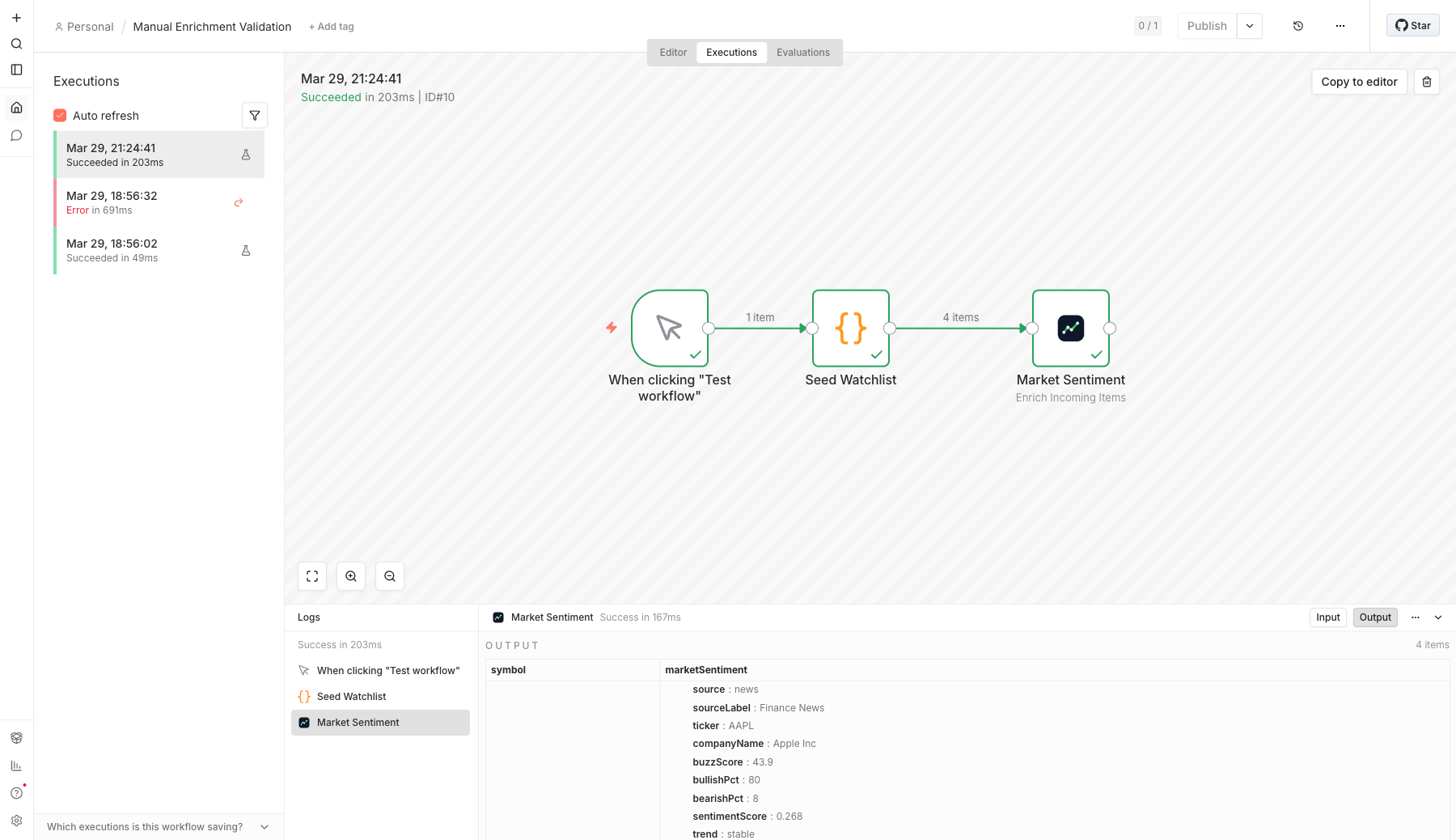
What it looks like in n8n
Real editor run with the Enrich Incoming Items operation on a live watchlist:
What the node does
The package exposes a single Market Sentiment node with three operations:
| Operation | Best for | Output |
|---|---|---|
Get Stock Snapshot |
multi-ticker scans | combined or per-source sentiment snapshots |
Get Trending Stocks |
source-specific movers | one item per trending ticker |
Enrich Incoming Items |
watchlists and downstream routing | original items plus nested sentiment data |
Supported sources:
redditxnewspolymarket
Install in n8n
- Open
Settings -> Community Nodes. - Install
n8n-nodes-market-sentiment. - Create an
Adanos APIcredential. - Add the
Market Sentimentnode to your workflow.
Get an API key:
Credential
The node uses a single credential:
API Key
The node always talks to the official Adanos API at https://api.adanos.org.
Operation guide
1. Get Stock Snapshot
Use this for pre-market scans, manual comparisons, and one-shot ticker lookups.
Inputs:
tickers: comma-separated list likeAAPL,NVDA,TSLAsources: any mix ofreddit,x,news,polymarketdays: lookback window,1to90outputModecombined: one row per ticker with averaged metrics and source alignmentperSource: one row per ticker/source pairraw: raw source payloads grouped into one result item
2. Get Trending Stocks
Use this for “what is moving right now?” workflows.
Inputs:
source:reddit,x,news, orpolymarketdays: lookback window,1to90limit:1to100offsetassetType:all,stock, oretf
3. Enrich Incoming Items
Use this when you already have items coming from Sheets, Airtable, Notion, webhooks, or a Code node.
Inputs:
tickerField: input field that holds the stock tickertargetField: field that will receive the combined snapshotsourcesdaysincludeSources: include nested per-source breakdowns or not
Typical flow:
Google Sheets -> Market Sentiment -> IF / Slack / AI summarizer
Output shape
Combined snapshot example:
{
  "ticker": "AAPL",
  "companyName": "Apple Inc",
  "averageBuzz": 36.73,
  "averageBullishPct": 63.5,
  "averageBearishPct": 15,
  "averageSentimentScore": 0.16,
  "coverage": 3,
  "sourceAlignment": "divergent",
  "sources": {
    "news": {
      "sourceLabel": "Finance News",
      "buzzScore": 43.9,
      "bullishPct": 80,
      "activity": 25,
      "activityLabel": "mentions",
      "trend": "stable"
    },
    "x": {
      "sourceLabel": "X.com",
      "buzzScore": 66.3,
      "bullishPct": 47,
      "activity": 287,
      "activityLabel": "mentions",
      "trend": "falling"
    }
  }
}
Enriched item example:
{
  "symbol": "NVDA",
  "marketSentiment": {
    "averageBuzz": 38.8,
    "averageBullishPct": 59.5,
    "coverage": 3,
    "sourceAlignment": "mixed"
  }
}
Import-ready example workflows
These are the fastest way to smoke-test the node inside a real n8n instance:
More workflow templates:
After import, select your Adanos API credential on the Market Sentiment node and run the workflow.
Local runtime validation
This package was validated inside a real Docker n8n instance on 2026-03-29.
Validated paths:
- node installs as a community node
- credential loads in the running n8n server
Manual Snapshot Validationruns in the editorManual Enrichment Validationreturns4enriched watchlist items in the editor output
Practical note:
- editor/manual execution in the running n8n server works
- standalone
n8n execute --id ...can hit a credential/license-state path in some local environments, so use the editor flow for smoke tests
Local development
cd integrations/n8n/market-sentiment-node
npm install
npm run test
npm run typecheck
npm run build
Release and submission notes live in docs/RELEASE_CHECKLIST.md.
Maintainer release flow
This repo publishes from Git tags through .github/workflows/publish.yml.
Release steps:
- bump
package.jsonto the target version - push
main - create and push the matching tag, for example
v0.1.0 - let GitHub Actions run
npm publish --provenance --access public
The publish workflow fails if the pushed tag does not match package.json exactly.