Package Information
Available Nodes
Documentation generating…

Documentation
n8n-nodes-media-toolkit
An n8n community node for media/content workflows. It renders MP4 video with ffmpeg (image+audio, image sequence, or transcode/resize), computes video render specs (resolution, frame count, bitrate, file-size estimate, ffmpeg args), and builds platform-budget-aware social caption payloads for TikTok, YouTube Shorts, and Instagram/Reels.
Render Video requires
ffmpegon the n8n host. The spec and caption operations have no external dependency.



Installation
Via n8n UI (recommended)
- Open your n8n instance
- Go to Settings > Community Nodes
- Click Install a community node
- Enter
n8n-nodes-media-toolkit - Accept the risks prompt and click Install
The Media Toolkit node will appear in your node palette after installation.
Via npm (self-hosted)
npm install n8n-nodes-media-toolkit
Then restart your n8n instance.
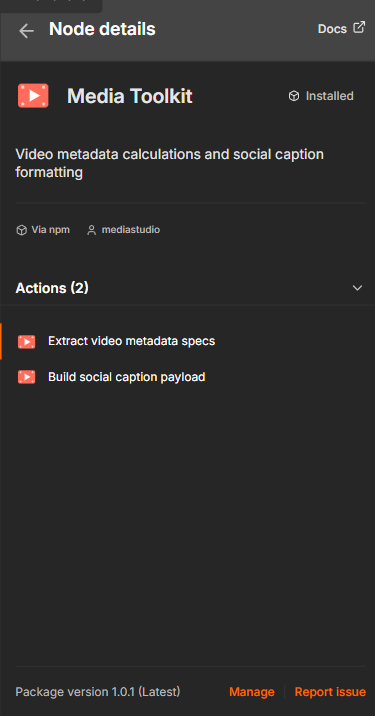
Verify the install in n8n
Once installed, n8n reports the package as Installed · Via npm with both actions available:
Operations
Render Video
Renders an MP4 with ffmpeg, sized to the target aspect ratio and bitrate from the spec math. Requires ffmpeg on the n8n host (set FFmpeg Path if it isn't on PATH).
Three modes:
| Mode | Inputs | What it produces |
|---|---|---|
| Image + Audio → Video | Image Path, optional Audio Path, Still Duration | Still looped for the audio (-shortest) or a fixed duration |
| Image Sequence → Video | Frame Pattern (e.g. frame_%04d.png) |
Numbered frames encoded at the given FPS |
| Transcode / Resize Video | Input Video Path, Fit Mode | Re-encode to the target aspect — contain (letterbox/pad) or cover (crop) |
Shared controls: Aspect Ratio, Resolution Scale, Frame Rate, Target Bitrate (0 = auto). Output goes to Output Path, or leave it blank for a temp file and enable Return Output as Binary to hand the MP4 to a downstream upload node.
Output:
{
  "renderMode": "imageAudio",
  "outputPath": "/data/out.mp4",
  "width": 1080,
  "height": 1920,
  "fps": 30,
  "bitrateMbps": 6.22,
  "fileSizeBytes": 4821234,
  "fileSizeMB": 4.82,
  "ffmpegCommand": "ffmpeg -y -loop 1 -i /data/img.png -i /data/vo.mp3 -vf scale=1080:1920:... -c:v libx264 -b:v 6.22M -c:a aac -shortest -movflags +faststart /data/out.mp4"
}
Arguments are passed to ffmpeg as an array (never a shell string), so file paths can't inject shell commands. Renders are killed after the configurable Timeout.
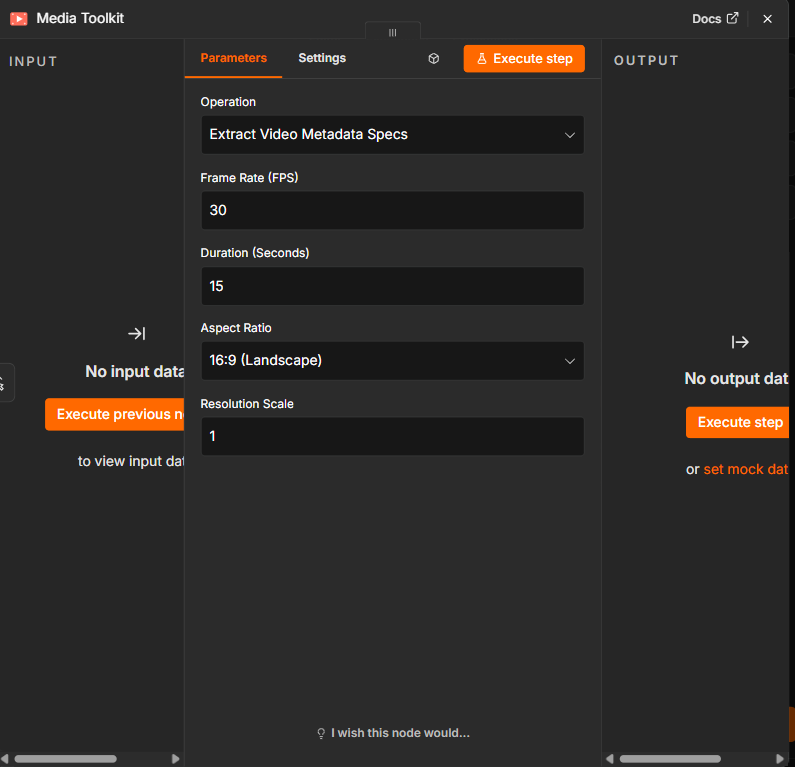
Extract Video Metadata Specs
Turns render inputs into a full output spec: even-safe resolution, frame count,
a recommended H.264 bitrate, a file-size estimate, and ready-to-use ffmpeg args.
| Parameter | Type | Description |
|---|---|---|
| Frame Rate (FPS) | number | Frames per second (e.g. 24, 30, 60) |
| Duration (Seconds) | number | Video length in seconds |
| Aspect Ratio | options | 16:9, 9:16, 1:1, or 4:5 |
| Resolution Scale | number | Multiplier on the 1080-class base resolution (0.1–4) |
| Target Bitrate (Mbps) | number | Bitrate for the file-size estimate; 0 auto-derives a recommended H.264 bitrate |
Output:
{
  "frameRate": 30,
  "duration": 15,
  "aspectRatio": "9:16",
  "resolutionScale": 1,
  "totalFrames": 450,
  "outputWidth": 1080,
  "outputHeight": 1920,
  "resolutionLabel": "1080p",
  "aspectRatioDecimal": 0.5625,
  "megapixels": 2.07,
  "recommendedBitrateMbps": 6.22,
  "bitrateMbps": 6.22,
  "estimatedFileSizeMB": 11.66,
  "ffmpegScaleFilter": "scale=1080:1920",
  "ffmpegArgs": "-r 30 -s 1080x1920 -t 15 -b:v 6.22M",
  "renderParams": {
    "width": 1080, "height": 1920, "fps": 30,
    "durationSeconds": 15, "totalFrames": 450, "bitrateMbps": 6.22
  }
}
- Base resolutions —
16:91920×1080 ·9:161080×1920 ·1:11080×1080 ·4:51080×1350. The scale multiplier is applied to both dimensions. - Even dimensions — width/height are rounded to the nearest even number (H.264/H.265 reject odd sizes).
- Recommended bitrate —
0.1 × width × height × fps ÷ 1e6Mbps (H.264 rule of thumb), floored at 1 Mbps. - File-size estimate —
bitrateMbps × duration ÷ 8MB.
Build Social Caption Payload
Sanitizes a caption and formats hashtags within the platform's character budget —
it reserves space for the hashtag block, de-duplicates tags, and trims the caption (not the tags) to fit.
| Parameter | Type | Description |
|---|---|---|
| Caption Text | string | Raw caption text |
| Hashtags | string | Comma or space separated, # optional |
| Platform | options | TikTok, YouTube (Shorts), Instagram, or Instagram Reels |
| Lowercase Hashtags | boolean | Force all hashtags to lowercase |
What it does: strips control/zero-width characters and trailing spaces, collapses 3+ blank lines to one, de-duplicates hashtags case-insensitively (first-seen order kept), caps tags to the platform limit, then fits the caption so caption + hashtags never exceeds the platform ceiling.
Platform limits applied:
| Platform | Caption chars | Max hashtags |
|---|---|---|
| TikTok | 2,200 | 5 |
| YouTube (Shorts) | 5,000 | 15 |
| 2,200 | 30 | |
| Instagram Reels | 2,200 | 30 |
Output:
{
  "platform": "tiktok",
  "caption": "Check out this new video!",
  "hashtags": ["#media", "#automation", "#n8n"],
  "hashtagBlock": "#media #automation #n8n",
  "fullCaption": "Check out this new video!\n\n#media #automation #n8n",
  "characterCount": 52,
  "platformCharacterLimit": 2200,
  "hashtagLimit": 5,
  "withinLimit": true,
  "truncated": false,
  "droppedHashtagCount": 0
}
Example Workflow
- Schedule Trigger → fires daily
- Media Toolkit (Extract Video Metadata Specs) → computes render specs for a 9:16 short
- HTTP Request → sends specs to your render pipeline
- Media Toolkit (Build Social Caption Payload) → formats the caption for TikTok
- TikTok upload node / HTTP Request → publishes with the generated
fullCaption
Credentials
This node pack does not require any credentials. All operations are pure data transformations performed locally within your n8n instance.
Compatibility
- Requires n8n version 1.0.0 or later
- Node.js 18+
Development
git clone https://github.com/Media-Studios/n8n-nodes-media-toolkit.git
cd n8n-nodes-media-toolkit
npm install
npm run build
To test locally, link the package into your n8n custom nodes directory:
npm link
cd ~/.n8n/custom
npm link n8n-nodes-media-toolkit
Contributing
Contributions are welcome! Please read CONTRIBUTING.md for guidelines on submitting pull requests and reporting issues.