Package Information

Documentation
Introduction
Nushir is a powerful social media scheduling tool that allows you to manage your social media accounts efficiently.
You can use n8n to automate your workflow and post to multiple social media platforms at once.
You can self-host Nushir or use our cloud version.
For example: Load news from Reddit >> Make it a video with AI >> Post it to your social media accounts.
Nushir supports: X, LinkedIn, BlueSky, Instagram, Facebook, TikTok, YouTube, Pinterest, Dribbble, Telegram, Discord, Slack, Threads, Lemmy, Reddit, Mastodon, Warpcast, Nostr and VK.
You can learn how to use Nushir + n8n after installation here:
https://youtu.be/c50u3K3xsCI
Note
If you are self-hosting Nushir on port 5000 (reverse proxy),
Your host must end with /api for example:
http://yourdomain.com/api
Alternatively, you can use the SDK with curl, check the Nushir API documentation for more information.
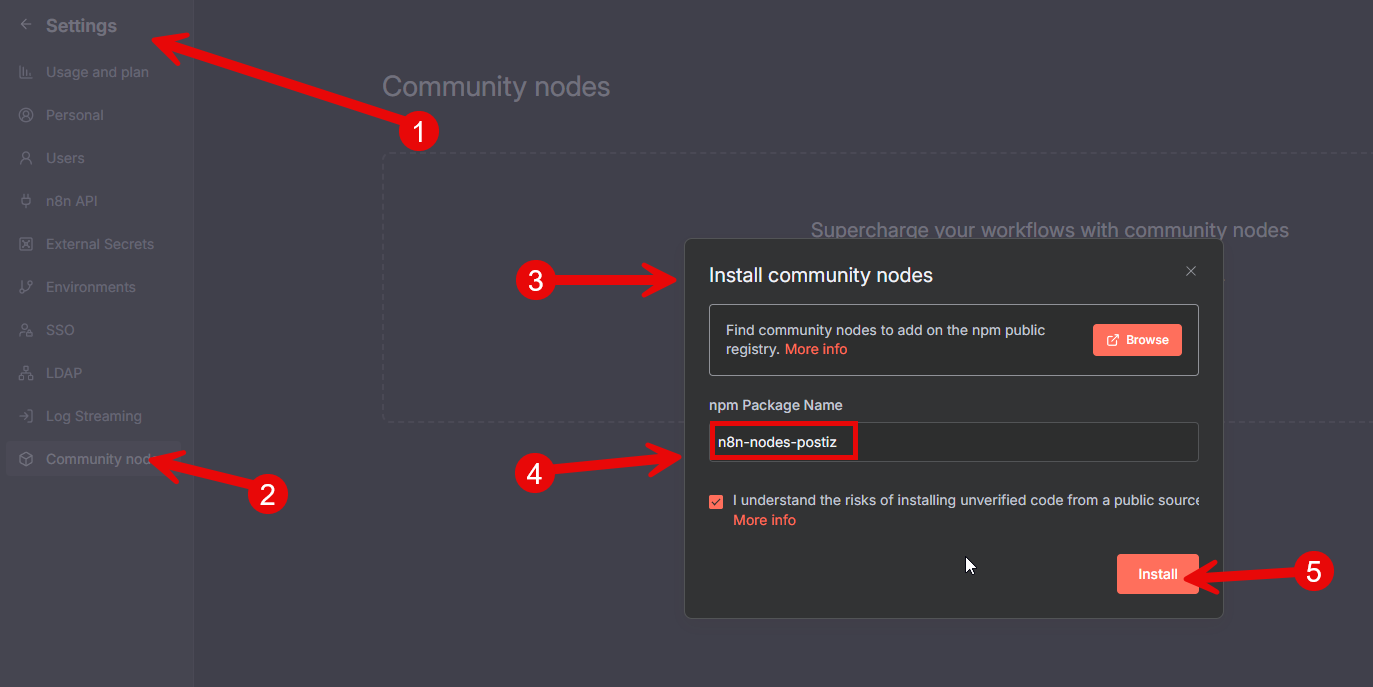
Installation (quick installation)
- Click on settings
- Click on Community Nodes
- Click on Install
- Add "n8n-nodes-nushir" to "npm Package Name"
- Click on Install
Installation (non-docker - manual installation)
Go to your n8n installation usually located at ~/.n8n.
Check if you have the custom folder, if not create it and create a new package.json file inside.
mkdir -p ~/.n8n/custom
npm init -y
Then install the Nushir node package:
npm install n8n-nodes-nushir
For docker users (manual installation)
Create a new folder on your host machine, for example ~/n8n-custom-nodes, and create a new package.json file inside:
mkdir -p ~/n8n-custom-nodes
npm init -y
install the Nushir node package:
npm install n8n-nodes-nushir
When you run the n8n docker container, mount the custom nodes folder to the container:
Add the following environment variable to your docker run command:
N8N_CUSTOM_EXTENSIONS="~/n8n-custom-nodes"