Package Information
Available Nodes
Documentation generating…

Documentation
n8n-nodes-ollaya
Ask typed questions about any text or JSON from an n8n workflow, and route items by the answer, using decision models that return calibrated probabilities.
This community node connects n8n to two interchangeable backends that speak the same API:
| Backend | What it is | Base URL |
|---|---|---|
| Ollaya | An open-source daemon that runs decision models on your own machine or server, the way Ollama runs LLMs. Nothing leaves your infrastructure. | http://localhost:11435 (default Ollaya port) |
| TypeSafe AI | The hosted service behind the System One API and its Jev models. | https://api.typesafe.ai (default) |
The node is compatible with TypeSafe AI: it uses the same /v1/systemone and /v1/models endpoints, so a workflow built against the TypeSafe cloud runs against a local Ollaya server by changing one field in the credential, and back.
This is an independent community node, published by Cogniwork. It started as a fork of
@typesafe-ai/n8n-nodes-typesafe-ai(MIT) and is not affiliated with or endorsed by TypeSafe AI or by the Ollaya project.
What is a decision model?
A decision model reads a state (a support ticket, an email, a chat message, any JSON) together with typed questions, and answers all of them in a single forward pass, in milliseconds. It never writes free text: each answer is a choice, a score or a probability, with a confidence you can act on. That makes it a good fit for the parts of a workflow that must be fast, cheap and predictable: triage, routing, scoring, guardrails.
Quick start
- Get a backend.
- Local: install Ollaya, then pull a model, for example
ollaya pull laya(a small model that also runs on a CPU). With Docker:docker run -d -p 11435:11435 ghcr.io/ollaya-dev/ollaya. - Hosted: create an API key in the TypeSafe console.
- Local: install Ollaya, then pull a model, for example
- Install the node in n8n (see Installation).
- Create an Ollaya API credential, set Base URL and API Key (see Credentials).
- Add the Ollaya node to a workflow, pick a model, and choose Evaluate or Route.
Installation
On a self-hosted n8n, go to Settings → Community nodes → Install, enter n8n-nodes-ollaya, accept the risk notice, and install. You need to be the instance owner or an admin. The community nodes guide covers the other installation methods.
Credentials
Add an Ollaya API credential with two fields:
| Field | What to enter |
|---|---|
| Base URL | The server to call. Leave the default (https://api.typesafe.ai) for TypeSafe AI, or enter the address of your Ollaya server, for example http://localhost:11435. A trailing slash is ignored. |
| API Key | Your TypeSafe AI key. For Ollaya, use the value of OLLAYA_API_KEY if you set one on the server. |
When you save, n8n checks the credential by listing the server's models (GET /v1/models).
Good to know
- The API Key field cannot be left empty. If your Ollaya server runs without
OLLAYA_API_KEY, type any placeholder text. - If n8n runs in Docker,
localhostmeans the n8n container itself, not your computer. Use an address the container can reach (for examplehttp://host.docker.internal:11435with Docker Desktop, or the server's LAN address). - Your server must expose
GET /v1/modelsandPOST /v1/systemone, and acceptAuthorization: Bearer <key>. Ollaya and TypeSafe AI both do.
Operations
Both operations send one request per input item, containing the item's state, the selected Model and your questions. All the questions of a request are asked about the same state.
State Format chooses where the state comes from:
| State Format | What is sent |
|---|---|
| Text | The State field, as plain text |
| JSON | The State field, parsed as a JSON object or array |
| Input Item | The JSON of the incoming item |
Model lists the models available on your server, so with Ollaya you see the models you have pulled. How to structure a state is covered in the TypeSafe docs, and the Ollaya model catalogue lists what you can run locally.
Evaluate
Evaluate asks one or more questions and adds every answer to the item. There are three question types:
| Question type | Answer |
|---|---|
| Choice | The option the model picked from your list, and its confidence |
| Score | A position along levels you define, and its confidence |
| Noul (Yes/No) | The probability, from 0 to 1, that the answer is yes |
Build the questions with the node's fields, or set Questions Format to Using Raw JSON to pass a JSON object in the API's own format, for instance one produced by an earlier node. See the API reference.
Answers land in answers, keyed by each question's ID:
{
  "answers": {
    "is_urgent":   { "noul": 0.95 },
    "department":  { "choice": "billing", "confidence": 0.81 },
    "frustration": { "score": 1.05, "confidence": 0.92 }
  },
  "model": "jev-1.13.0"
}
When an AI Agent uses the node as a tool, it runs Evaluate.
Route
Route asks a single question and sends each item to the output that matches the answer. The Question Type decides which outputs you get:
| Question type | Outputs | Where an item goes |
|---|---|---|
| Choice | One per route, named after the route | The route the model picked |
| Noul (Yes/No) | True and False (labelled with True Means / False Means if filled in) | True at or above True Probability Threshold, False at or below False Probability Threshold |
| Score | One per level, labelled with the level's text | The level closest to the score |
Each type has its own way to handle doubt:
- Choice can add a
Fallbackoutput. Set Confidence Handling to Route to Separate Fallback Output, and any item whose confidence is under Confidence Threshold leaves there. - Noul starts with both thresholds at
0.5, so everything goes to True or False. Move them apart (for example0.8and0.2) to get anUncertainoutput for the answers in between. - Score levels are numbered from 0, lowest first. The boundary between two levels sits halfway between their numbers: a score from
0.5up to, but excluding,1.5goes to level 1, and a score exactly on a boundary goes to the higher level.
The item gets a route field holding the answer, in the same shape as Evaluate:
{ "route": { "choice": "billing", "confidence": 0.81 }, "model": "jev-1.13.0" }
Example workflow
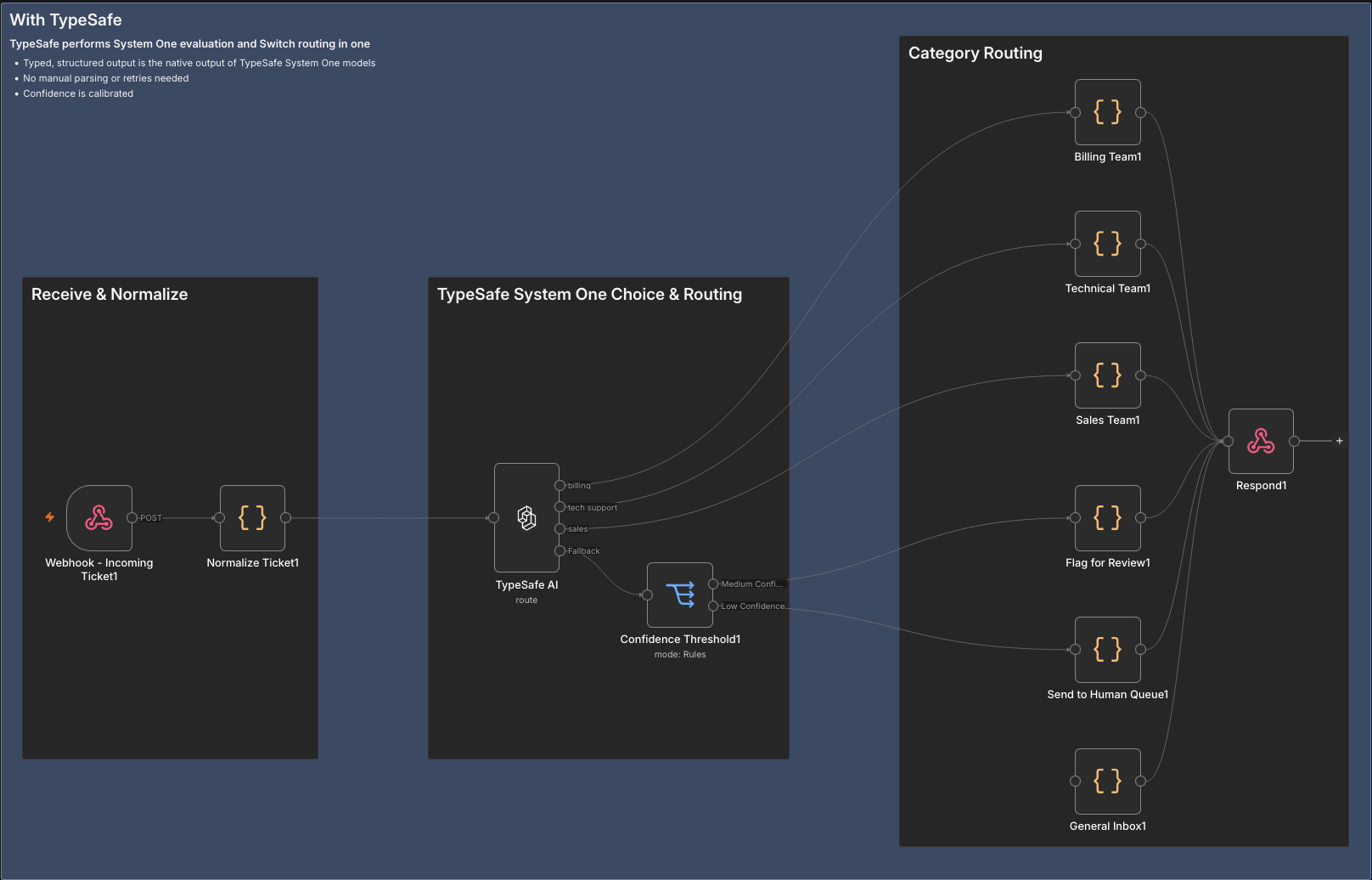
A support-ticket triage. A webhook receives each ticket and the node's Route operation asks a Choice question with three routes: billing, tech support and sales, each leading to the right team. Confidence Handling is set to a separate fallback output, so a ticket the model is unsure about leaves from Fallback and a Switch node sends it either to a review flag or to a human queue.
Output
| Field | Contents |
|---|---|
answers |
Evaluate: all the answers, keyed by question ID |
route |
Route: the answer to the routing question |
model |
The full ID of the model that answered, with its version |
usage |
Token usage, only when Simplify is off |
Three settings under Options shape the call and the result:
- Simplify (on by default) keeps only
noul,choiceorscorefor each answer, plusconfidencewhere the type has one. Turn it off to get the full answer object, includingprobabilities, and ausagefield. - Include Other Input Fields (on by default) keeps the incoming item's fields and binary data and writes the node's fields on top, replacing any field with the same name. Off, the item contains only the node's fields.
- Timeout is how long, in milliseconds, the node waits for the server to start answering. Default 5000, minimum 1000. A large model on a CPU can need more.
Errors
On failure the node stops and shows the HTTP status together with the server's message. A configuration problem, such as empty Instructions or two routes with the same name, tells you what to fix.
- Turn on Retry On Fail in the node's Settings to retry failed requests, rate limits (
429) included. - Set On Error to keep the workflow going:
- Continue (using error output) adds an error output that receives each failed item with an
errorfield. - Continue sends the failed item, with an
errorfield, to a regular output:
- Continue (using error output) adds an error output that receives each failed item with an
| Operation | Output the failed item goes to |
|---|---|
| Evaluate | The main output |
| Route, Choice | Fallback if present, otherwise the first route |
| Route, Noul (Yes/No) | Uncertain if present, otherwise False |
| Route, Score | The first level |
Typical connection problems: a wrong Base URL, a server that is not running, or n8n in Docker pointing at localhost (see Credentials).
Compatibility
Written against n8n 2.40. It also installs on 2.37. Requires a backend that implements the TypeSafe System One API, such as Ollaya or the TypeSafe AI cloud.
Credits and licence
- This node: MIT, see LICENSE.md. Based on the TypeSafe AI community node, whose copyright notice is kept in the licence file.
- Ollaya: the local decision-model server, created and maintained by its own authors under the Apache-2.0 licence. Each model it serves keeps its own licence.
- TypeSafe AI: the hosted System One API and the Jev models.
Resources
- Ollaya project · website · model catalogue
- TypeSafe AI documentation · API reference
- n8n community nodes documentation
- Report an issue with this node
Version history
See CHANGELOG.md.