Package Information
Documentation
n8n-nodes-openinbox





This is an n8n community node for OpenInbox — a disposable / temporary email API. Use it to programmatically create inboxes, read incoming emails, and trigger workflows the moment an email lands.
OpenInbox is receive-only disposable email infrastructure. You can create inboxes on demand, list received messages, and subscribe to webhook events such as
email.received.
Use Cases
- OTP & verification automation — Create a disposable inbox, trigger a signup flow, and extract the 6-digit code automatically.
- Email integration testing — Test your transactional email pipelines without polluting real inboxes.
- Signup flow QA — Spin up a fresh inbox per test run and verify confirmation emails end-to-end.
Example Workflow
The repo ships with a complete demo workflow that:
- Listens for OpenInbox webhook deliveries (
email.received,inbox.created,inbox.expired). - Verifies the
X-Webhook-SignatureHMAC. - Routes by event with a Switch node.
- On
email.received, pulls the full email body and extracts a 6-digit OTP.
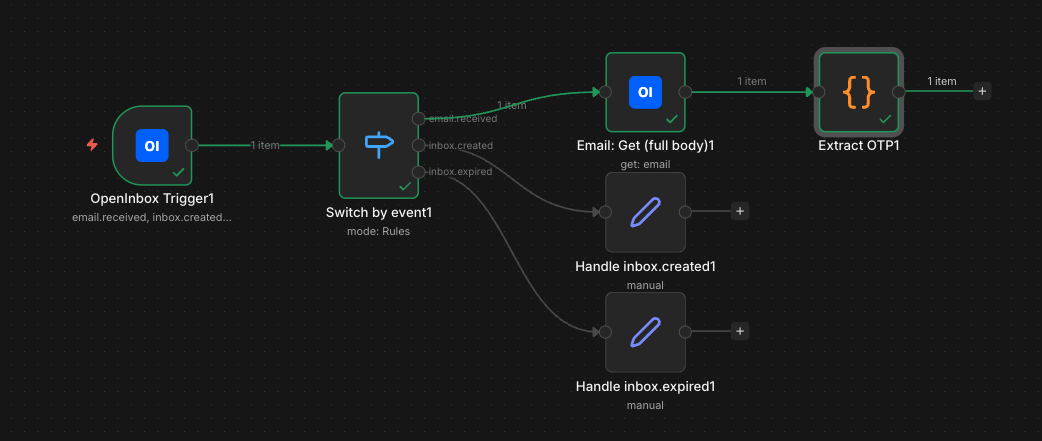
Import examples/openinbox-full-demo.workflow.json into n8n to try it.
Installation
n8n Cloud (verified node): Search for OpenInbox directly in the node picker on the canvas — no settings required. Just drag it into your workflow.
Self-hosted / manual:
- Go to Settings → Community Nodes.
- Click Install.
- Enter
n8n-nodes-openinboxand confirm. - Make sure Verified Community Nodes is enabled in your Admin Panel (you may need to restart your instance).
After installation, two nodes become available:
- OpenInbox — REST operations against the OpenInbox API.
- OpenInbox Trigger — Fires when an OpenInbox webhook event is delivered.
Credentials
Create an OpenInbox API credential and set:
- API Key — generate one from your OpenInbox dashboard at https://openinbox.io. API access is available on Pro, Business, and 7-Day Pass tiers. Pro plan includes a 7-day free trial — start free at openinbox.io.
The key is sent as the X-API-Key request header.
Operations
Inbox
| Operation | HTTP | Endpoint | Description |
|---|---|---|---|
| Create | POST |
/api/v1/inboxes |
Create a new disposable inbox. Optional prefix to control the local-part. |
| Get | GET |
/api/v1/inboxes/:inboxId |
Fetch an inbox by ID, including emailCount and isExpired. |
| Get Many | GET |
/api/v1/inboxes |
List inboxes with limit/offset pagination. Toggle Return All to auto-paginate. |
| Delete | DELETE |
/api/v1/inboxes/:inboxId |
Permanently delete an inbox and all its emails. |
| Operation | HTTP | Endpoint | Description |
|---|---|---|---|
| Get Many | GET |
/api/v1/inboxes/:inboxId/emails |
List emails in an inbox. Optional unreadOnly filter. |
| Get | GET |
/api/v1/emails/:emailId |
Fetch a single email (auto-marks as read). |
| Delete | DELETE |
/api/v1/emails/:emailId |
Permanently delete an email. |
Webhook
| Operation | HTTP | Endpoint | Description |
|---|---|---|---|
| Create | POST |
/api/v1/webhooks |
Register a webhook for one or more events. |
| Get Many | GET |
/api/v1/webhooks |
List all webhooks on the account. |
| Delete | DELETE |
/api/v1/webhooks/:webhookId |
Remove a webhook subscription. |
Account
| Operation | HTTP | Endpoint | Description |
|---|---|---|---|
| Get | GET |
/api/v1/account |
Get tier, rate limits and current usage. |
Trigger Node
The OpenInbox Trigger automatically registers a webhook with OpenInbox when the workflow activates and removes it when the workflow deactivates.
Setup
- Add an OpenInbox Trigger node to your workflow.
- Select the OpenInbox API credential.
- Choose one or more events:
email.received— fires for every email delivered to any of your inboxes.inbox.createdinbox.expired
- Activate the workflow. n8n will call
POST /api/v1/webhookswith the workflow's public webhook URL. Deactivating callsDELETE /api/v1/webhooks/:id.
Payload
OpenInbox delivers JSON like this:
{
  "event": "email.received",
  "timestamp": "2026-04-26T12:00:00Z",
  "data": {
    "emailId": "uuid",
    "inboxId": "uuid",
    "from": "sender@example.com",
    "subject": "Hello!"
  }
}
The trigger forwards this body verbatim, plus a __delivery object containing the X-Webhook-Signature, X-Webhook-Event, and X-Webhook-Delivery headers so you can verify the HMAC-SHA256 signature against your webhook secret.
Signature Format
X-Webhook-Signature: t=<timestamp>,v1=<hex_sha256>
To verify: HMAC_SHA256(secret, "<timestamp>." + JSON.stringify(payload)).
Compatibility
- n8n
>= 1.0 - Node.js
>= 18.10
Resources
License
MIT — see LICENSE.md.