Package Information
Available Nodes
Documentation generating…


Documentation
n8n-nodes-paheko
[!WARNING]
This project is experimental. Use it at your own risk — breaking changes may occur without prior notice.
This is an n8n community node. It lets you integrate Paheko (a free association management software) in your n8n workflows.
Paheko is a free, open-source web application for managing associations, including membership, billing, subscriptions, accounting, and messaging.
n8n is a fair-code licensed workflow automation platform.
Installation
Nodes
Credentials
Compatibility
Resources
Version history
Installation
Follow the installation guide in the n8n community nodes documentation.
Nodes
Paheko Bot
Automates interactions with the Paheko web interface. Unlike the REST API node, Paheko Bot logs in using a real Paheko user's email and password via the web UI, allowing it to perform actions that have no API endpoint. The bot maintains a session cookie to interact with the platform as if a human were using it.
Capabilities:
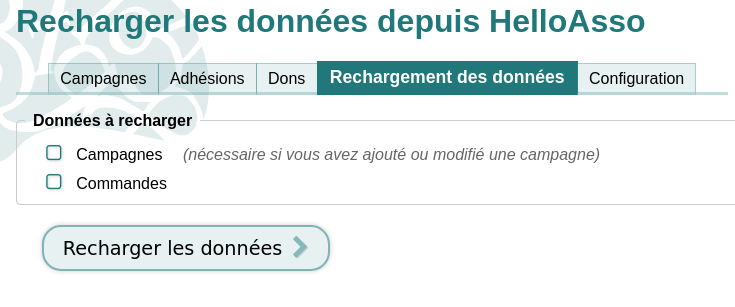
HelloAsso sync — Synchronizes HelloAsso campaigns and orders into Paheko. Requires the HelloAsso plugin to be enabled in the Paheko instance.
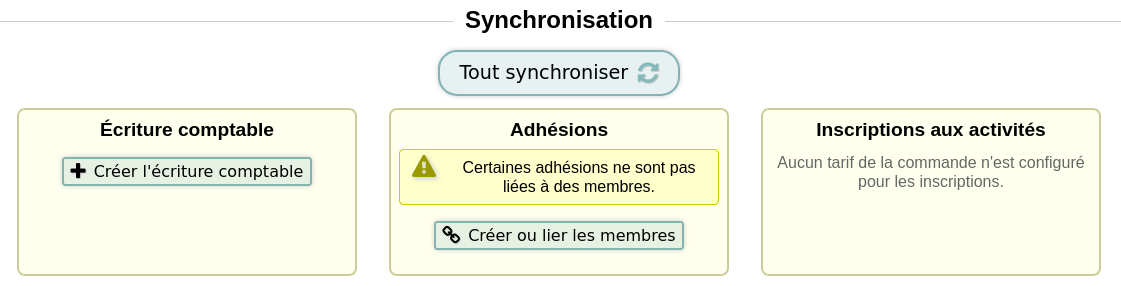
Order sync — Clicks the "Tout synchroniser" button on a specific HelloAsso membership order page, also requiring the HelloAsso plugin.
Send message — Sends a message (email) from the Paheko messaging interface to a member, as the organization or as the bot user.
Resources and operations:
- HelloAsso Sync —
Sync: Synchronize HelloAsso forms and orders - Order Sync —
Sync: Synchronize orders - Send Message —
Send: Send a message to a Paheko member
Paheko REST API
Interact with the Paheko REST API for managing association data, accounting, and members.
Operations:
- SQL —
Execute SQL query: Run a SQL SELECT query with configurable output format (JSON, CSV, ODS, XLSX) - Web —
List web pages,Get web page,Get web page HTML: Access the Paheko website pages - User Categories —
List user categories: Get member categories - Users —
Get user,Create user,Update user,Delete user,Subscribe user: Manage association members - Errors —
Report error,Get error log: Send and view error reports - Accounting —
List accounting years,List accounting charts,Get chart accounts,Get year journal,Get account journal: Access accounting data - Transactions —
Get transaction,Create transaction,Update transaction,Get transaction entries,Create/update/delete transaction entries,Get/update/delete transaction users,Get/update/delete transaction subscriptions: Manage journal entries and their linked data
API routes coverage:
| Category | Route | Method | Implemented | Operation |
|---|---|---|---|---|
| SQL | /api/sql |
POST | ✅ | Execute SQL |
| Downloads | /api/download |
GET | ✅ | Download database |
| Downloads | /api/download/files |
GET | ✅ | Download files ZIP |
| Web | /api/web/list |
GET | ✅ | List web pages |
| Web | /api/web/page/{PAGE_URI} |
GET | ✅ | Get web page |
| Web | /api/web/html/{PAGE_URI} |
GET | ✅ | Get web page HTML |
| Web | /api/web/attachment/{PAGE_URI}/{FILENAME} |
GET | ✅ | Get attachment |
| Users | /api/user/categories |
GET | ✅ | List user categories |
| Users | /api/user/category/{ID}.{FORMAT} |
GET | ✅ | Export category members |
| Users | /api/user/new |
POST | ✅ | Create user |
| Users | /api/user/{ID} |
GET | ✅ | Get user |
| Users | /api/user/{ID} |
POST | ✅ | Update user |
| Users | /api/user/{ID} |
DELETE | ✅ | Delete user |
| Users | /api/user/{ID}/subscribe |
POST | ✅ | Subscribe user |
| Users | /api/user/import |
PUT/POST | ✅ | Import members |
| Users | /api/user/import/preview |
PUT/POST | ✅ | Preview import |
| Services | /api/services/subscriptions/import |
PUT | ✅ | Import subscriptions |
| Errors | /api/errors/report |
POST | ✅ | Report error |
| Errors | /api/errors/log |
GET | ✅ | Get error log |
| Accounting | /api/accounting/years |
GET | ✅ | List fiscal years |
| Accounting | /api/accounting/charts |
GET | ✅ | List chart of accounts |
| Accounting | /api/accounting/charts/{ID}/accounts |
GET | ✅ | Get chart accounts |
| Accounting | /api/accounting/years/{ID}/journal |
GET | ✅ | Get year journal |
| Accounting | /api/accounting/years/{ID}/export/{FORMAT}.{EXT} |
GET | ✅ | Export fiscal year |
| Accounting | /api/accounting/years/{ID}/account/journal |
GET | ✅ | Get account journal |
| Transaction | /api/accounting/transaction |
POST | ✅ | Create transaction |
| Transaction | /api/accounting/transaction/{ID} |
GET | ✅ | Get transaction |
| Transaction | /api/accounting/transaction/{ID} |
POST | ✅ | Update transaction |
| Transaction | /api/accounting/transaction/{ID}/users |
GET | ✅ | Get transaction users |
| Transaction | /api/accounting/transaction/{ID}/users |
POST | ✅ | Update transaction users |
| Transaction | /api/accounting/transaction/{ID}/users |
DELETE | ✅ | Delete transaction users |
| Transaction | /api/accounting/transaction/{ID}/transactions |
GET | ✅ | Get transaction entries |
| Transaction | /api/accounting/transaction/{ID}/transactions |
POST | ✅ | Update transaction entries |
| Transaction | /api/accounting/transaction/{ID}/transactions |
DELETE | ✅ | Delete transaction entries |
| Transaction | /api/accounting/transaction/{ID}/subscriptions |
GET | ✅ | Get transaction subscriptions |
| Transaction | /api/accounting/transaction/{ID}/subscriptions |
POST | ✅ | Update transaction subscriptions |
| Transaction | /api/accounting/transaction/{ID}/subscriptions |
DELETE | ✅ | Delete transaction subscriptions |
Credentials
This package provides two credential types:
Paheko API
Used by the Paheko Bot node. Authenticates using a Paheko account session (email and password). The node handles the login and cookie management automatically.
Required fields:
- Paheko Base URL: Base URL of your Paheko instance (e.g.,
https://your-instance.paheko.cloud) - Email: Paheko account email
- Password: Paheko account password
Required permissions:
The Paheko account used for the bot needs the following permissions to function correctly:
- Ability to log in — The account must be allowed to authenticate.
- Members — Either Administration (full access) or Read & Write (can add and modify members, but not delete them; can enroll members in activities; can send bulk messages). Note: to send messages as the organization (sender = Organization) via the Paheko Bot Send Message node, the bot must have the Administration level for member management. The Read & Write level is sufficient for all other bot operations but does not allow sending emails as the organization.
- Accounting — Read & Write (can create journal entries, but not modify or delete existing ones).
Required permissions :
Recommended permissions :
Paheko REST API
Used by the Paheko REST API node. Authenticates using the Paheko REST API credentials with Basic authentication.
Required fields:
- Paheko Base URL: Base URL of your Paheko instance (e.g.,
https://your-instance.paheko.cloud) - API Identifier: API identifier
- API Password: API password
Compatibility
- n8n version: Requires n8n v1.0+ (n8n Nodes API v1)
- Node version: Supports all Node.js versions supported by n8n
- No external runtime dependencies
Resources
Version history
0.1.0
Initial release with two nodes:
- Paheko Bot: HelloAsso synchronization, order sync, and member messaging
- Paheko REST API: Full REST API coverage for users, accounting, transactions, web pages, and error reporting