Package Information
Available Nodes
Documentation generating…

Documentation
n8n-nodes-raposa
An n8n community node for Raposa Aval — a human approval layer for AI agents. Put it in front of any step that moves money or changes something irreversible: the workflow pauses until an authorised person approves, and the decision is sealed in a hash-chained audit log you can export and verify.
Before your first run — you need an approver
Ask and Wait only completes when a human presses Approve. That human is an approver on your Raposa account (a console login, or a linked Slack/Telegram). If your account has no approver, the request has no one to go to and can only run to timeout — that is the single most common reason a first run never succeeds.
- Self-service sandbox key (raposa.group/start?plan=sandbox): your own email is set as the default approver automatically. You will receive an approve/reject link by email on your first request — no extra setup.
- Removed it, or want more people? Add approvers (or connect Slack/Telegram) in your account: dcescrypt.com/api/portal. See Who approves.
From 0.1.6, Ask and Wait checks for an approver first and fails immediately with a clear message instead of hanging for the full timeout.
Try it in two minutes
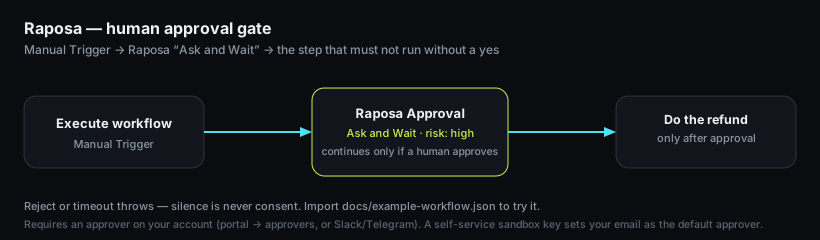
Import docs/example-workflow.json (Workflows → ⋯ → Import from File), pick your Raposa credential on the middle node, and run it.
Operations
| Operation | What happens |
|---|---|
| Ask and Wait | Creates the approval, polls until a human approves or rejects. Timeout is an error — silence never counts as approval. Rejection fails the workflow unless you turn Fail on Reject off and route on status yourself. |
| Create | Creates the approval and returns its id immediately. Give a Webhook URL to receive the HMAC-signed decision instead of polling. |
| Get | Reads an approval by id. |
Credentials
Raposa API: base URL (default https://dcescrypt.com/api) and your client API key. The credential test calls GET /v1/me.
Get a free sandbox key at https://raposa.group/start/?plan=sandbox — you receive a one-time reveal link by email in seconds (100 approvals/month, no card), and your email is set as the default approver so your first Ask and Wait can be approved right away.
Note on domains: the product is Raposa, run on DC ESCRYPT infrastructure. You request the key at
raposa.group, and the API base URL in the credential isdcescrypt.com/api— that is expected, not a mistake.
Install
Self-hosted n8n: Settings → Community Nodes → Install → n8n-nodes-raposa.
Develop
npm install
npm test        # builds, then runs the behaviour tests against a fake API
Links
- Docs: https://raposa.group/docs/
- Legal (DPA, sub-processors): https://dcescrypt.com/legal/
MIT © DC ESCRYPT SL