Package Information
Available Nodes
Documentation generating…

Documentation
n8n-nodes-webhook-signature
An n8n community node that checks whether an incoming webhook really came from the service it claims to be from. It supports Stripe, GitHub, Slack and a configurable Generic HMAC mode.
Place it straight after a Webhook trigger. Requests with a valid signature go to the Valid output; everything else goes to Invalid, with a reason code saying why.
This is a community node. It is not made, endorsed or supported by n8n GmbH.
- Why
- Installation
- Turn on Raw Body (required)
- Credentials
- Providers
- Generic HMAC and a Shopify example
- Output
- Security notes
- Example workflow
- Development
- Future work
- License
Why
Anyone who finds a webhook URL can send requests to it. Providers defend against that by signing each request with a secret shared between the provider and you. The receiver is supposed to recompute the signature and drop anything that doesn't match.
Doing this with n8n's built-in nodes takes four steps, and each one is easy to get subtly wrong:
| Step | Built-in nodes | Common mistake |
|---|---|---|
| 1. Get the exact request bytes | Webhook → Raw Body | Hashing the parsed JSON instead. Re-serialised JSON has different bytes, so it never matches |
| 2. Build the string that was signed | Set / Code | Each provider formats it differently (t.body, v0:t:body, body only) |
| 3. Compute the HMAC | Crypto | Wrong encoding, wrong key |
| 4. Compare | IF | Ordinary string comparison is not constant-time. Replay protection and secret rotation usually get skipped |
This node does all four in one place, with the security details handled for you.
Installation
Published on npm as n8n-nodes-webhook-signature, built and published from this repository by GitHub Actions with npm provenance.
- In n8n, go to Settings → Community Nodes → Install.
- Enter
n8n-nodes-webhook-signature.
See n8n's community nodes installation guide for details.
Turn on Raw Body (required)
A signature covers the exact bytes the provider sent. Once n8n parses the body into JSON, those bytes are gone: whitespace, key order and number formatting can all change. So this node needs the untouched body.
In the Webhook node, go to Options → Add Option → Raw Body and switch it on.
With Raw Body on, the Webhook node (v2.x) stores the request bytes as binary data in the property data, and the request headers under headers in the JSON. Those are this node's defaults. Both can be changed under Options (useful if the data has been moved by other nodes first).
If the raw body is missing, the node does not fall back to re-serialising the JSON. That would only ever produce false failures. It reports raw_body_missing instead.
Two cases to know about, both from how the Webhook node itself works:
- If the Webhook node's Binary Property option is on, the body is stored under that property name instead, so set Raw Body Binary Property to match.
multipart/form-datarequests are parsed as form data and not stored raw. None of the supported providers send multipart webhooks.
Credentials
Create a Webhook Signing Secret API credential.
| Field | Description |
|---|---|
| Signing Secret | The secret the provider gave you |
| Secondary Signing Secret | Optional. While rotating secrets, put the second secret here so both are accepted. Remove it once the rotation is complete |
A signing secret can't be checked against the provider's API: it's only ever used locally. So the credential test only checks that a secret is present and has no stray whitespace from copy-pasting.
Providers
| Provider | Where to find the secret | Headers used | Signed payload | Replay check |
|---|---|---|---|---|
| Stripe | Dashboard → Developers → Webhooks → your endpoint → Signing secret (whsec_...) |
Stripe-Signature |
{t}.{body} |
Yes (t) |
| GitHub | The secret you entered when creating the webhook (repo/org Settings → Webhooks) | X-Hub-Signature-256 |
{body} |
No timestamp is sent |
| Slack | api.slack.com/apps → your app → Basic Information → App Credentials → Signing Secret | X-Slack-Signature, X-Slack-Request-Timestamp |
v0:{timestamp}:{body} |
Yes |
All three use HMAC-SHA256 with a hex digest. Provider details:
- Stripe. The header can hold several
v1signatures (one per active secret while an endpoint secret is being rolled); the request is valid if any of them matches. Thev0scheme is test-only and ignored. The secret is used exactly as shown, including thewhsec_prefix. Docs: https://docs.stripe.com/webhooks#verify-manually - GitHub. Only the SHA-256 header is supported. The legacy SHA-1
X-Hub-Signatureheader is not. GitHub sends no timestamp, so to guard against replays, deduplicate on theX-GitHub-Deliveryheader. Docs: https://docs.github.com/en/webhooks/using-webhooks/validating-webhook-deliveries - Slack. Slack asks receivers to reject requests more than five minutes old, which matches this node's default tolerance of 300 seconds. Docs: https://docs.slack.dev/authentication/verifying-requests-from-slack
Generic HMAC and a Shopify example
For providers without a preset, choose Generic HMAC and describe the scheme:
| Parameter | Meaning |
|---|---|
| Signature Header | Header carrying the signature (case-insensitive) |
| Algorithm | SHA-1, SHA-256 or SHA-512 |
| Signature Encoding | Hex or Base64 |
| Signature Prefix | Text before the signature to strip, e.g. sha256= |
| Timestamp Header | Header carrying a Unix-seconds timestamp. Setting it turns on the replay check |
| Signed Payload Template | What was signed: {body} is the raw body, {timestamp} is the timestamp header's value, e.g. {timestamp}.{body} |
Shopify, as a worked example. Shopify signs the raw body with HMAC-SHA256 and sends the Base64 result in X-Shopify-Hmac-Sha256 (docs, section "HMAC verification"):
| Parameter | Value |
|---|---|
| Signature Header | x-shopify-hmac-sha256 |
| Algorithm | SHA-256 |
| Signature Encoding | Base64 |
| Signature Prefix | (empty) |
| Timestamp Header | (empty) |
| Signed Payload Template | {body} |
Output
Each item passes through unchanged (JSON and binary), with one field added:
{
  "signatureVerification": {
    "valid": true,
    "provider": "stripe",
    "reason": null,
    "message": null,
    "matchedSecret": "primary",
    "timestamp": 1758960000,
    "verifiedAt": "2026-09-27T10:00:00.000Z"
  }
}
| Reason | Meaning |
|---|---|
null |
Valid |
missing_header |
The signature header isn't in the request |
malformed_header |
A header isn't in the provider's format (e.g. Stripe header with no t=, non-numeric timestamp, missing prefix, or the header sent twice) |
raw_body_missing |
No raw body. Turn on Raw Body in the Webhook node |
timestamp_missing |
A timestamp is required (Slack, or a Generic template using {timestamp}) but none was sent |
timestamp_outside_tolerance |
The request was genuinely signed but is too old or too far in the future. Likely a replay, or the server's clock is wrong |
signature_mismatch |
The signature doesn't match any configured secret |
message is a plain-English explanation of the reason. matchedSecret is primary or secondary on success, which tells you when a rotation is safe to finish.
On Invalid Signature controls what happens to invalid items:
- Route to Invalid Output (default): the item goes to the second output, e.g. to answer with a 401.
- Stop Workflow With Error: the execution fails. If the node's On Error setting is Continue, the item goes to the Invalid output instead.
Security notes
- Constant-time comparison. Signatures are compared with Node's
crypto.timingSafeEqual, so response timing doesn't reveal how much of a forged signature was right. Lengths are checked first, becausetimingSafeEqualrequires equal lengths and a signature's length isn't secret. - Exact bytes. The signed payload is built from the raw body
Buffer, never from a decoded string, so non-UTF-8 bodies are handled correctly. - Replay window. For providers that send a timestamp, requests outside the tolerance (default 300 s, in both directions) are rejected. The timestamp is only checked after the signature, so
timestamp_outside_tolerancealways means the request really was signed by the provider. A tolerance of0turns the check off. As Stripe's docs also warn, that isn't recommended. - Rotation. A secondary secret is accepted alongside the primary. Stripe's multiple
v1signatures are also handled. - Nothing sensitive is output or logged. The result never contains the secret, the expected signature or the received signature.
- Strict parsing. Headers sent more than once are rejected rather than picking a copy. Hex signatures are compared case-insensitively. Base64 is compared exactly.
- No runtime dependencies. Only Node's built-in
cryptois used.
Example workflow
examples/stripe-verified-webhook.workflow.json wires Webhook (Raw Body on) → Verify Webhook Signature (Stripe), then responds 200 from the Valid output and 401 from the Invalid output.
Import it (Workflows → Import from File), choose or create the credential on the Verify node, and activate the workflow.
Trying it with curl
The same setup with the provider switched to GitHub is easy to test by hand, because GitHub's signature is just an HMAC of the body:
SECRET='test_secret_do_not_use'
BODY='{"action":"opened","number":1}'
SIG=$(printf '%s' "$BODY" | openssl dgst -sha256 -hmac "$SECRET" | awk '{print $NF}')

# Correctly signed: 200
curl -i -X POST http://localhost:5678/webhook/github-events \
  -H 'Content-Type: application/json' \
  -H "X-Hub-Signature-256: sha256=$SIG" \
  --data-raw "$BODY"

# Tampered body, same signature: 401 with "reason": "signature_mismatch"
curl -i -X POST http://localhost:5678/webhook/github-events \
  -H 'Content-Type: application/json' \
  -H "X-Hub-Signature-256: sha256=$SIG" \
  --data-raw '{"action":"opened","number":2}'
Both requests, run against a local n8n (npm run dev):
| Correctly signed → Valid → 200 | Tampered body → Invalid → 401 |
|---|---|
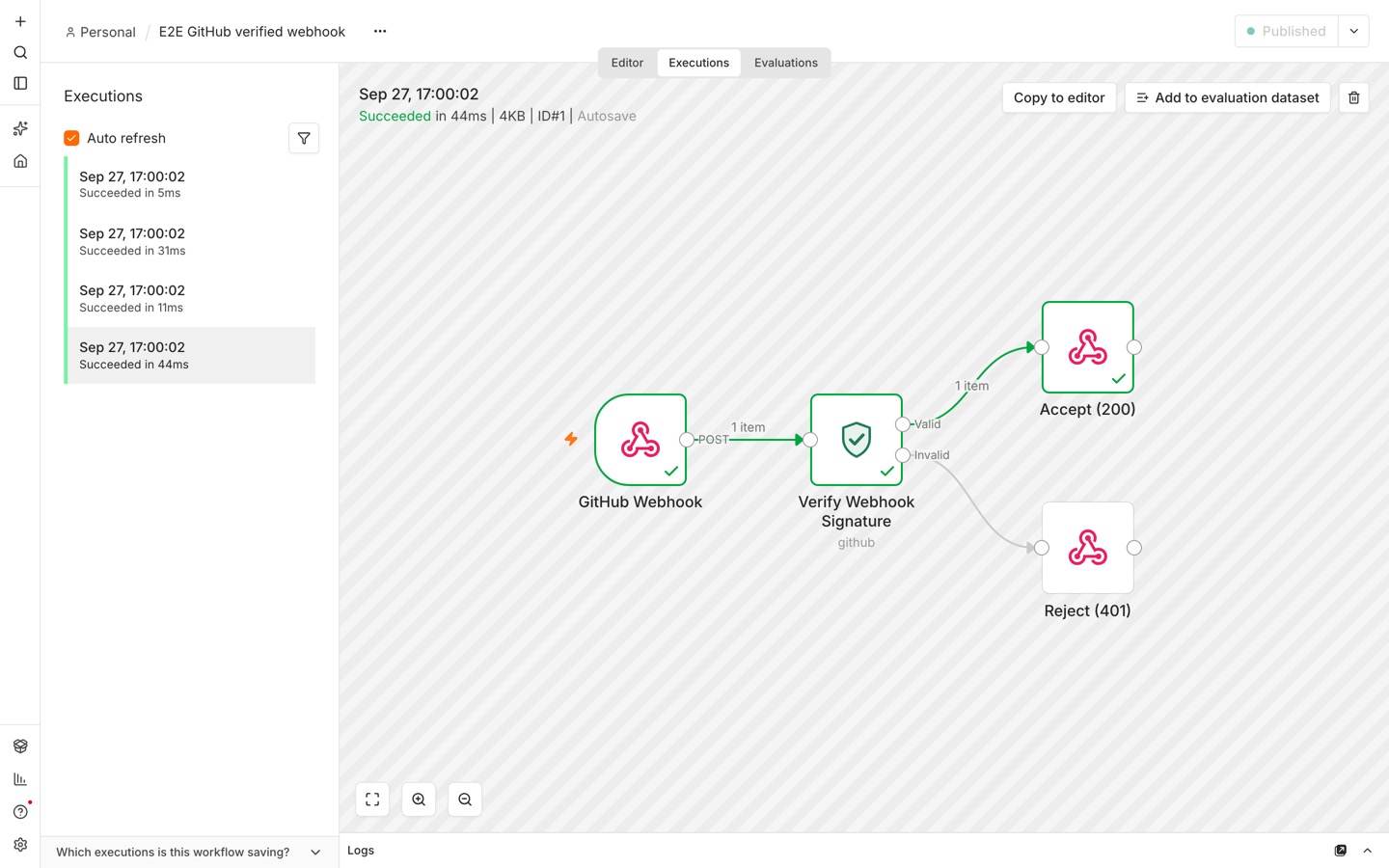 |
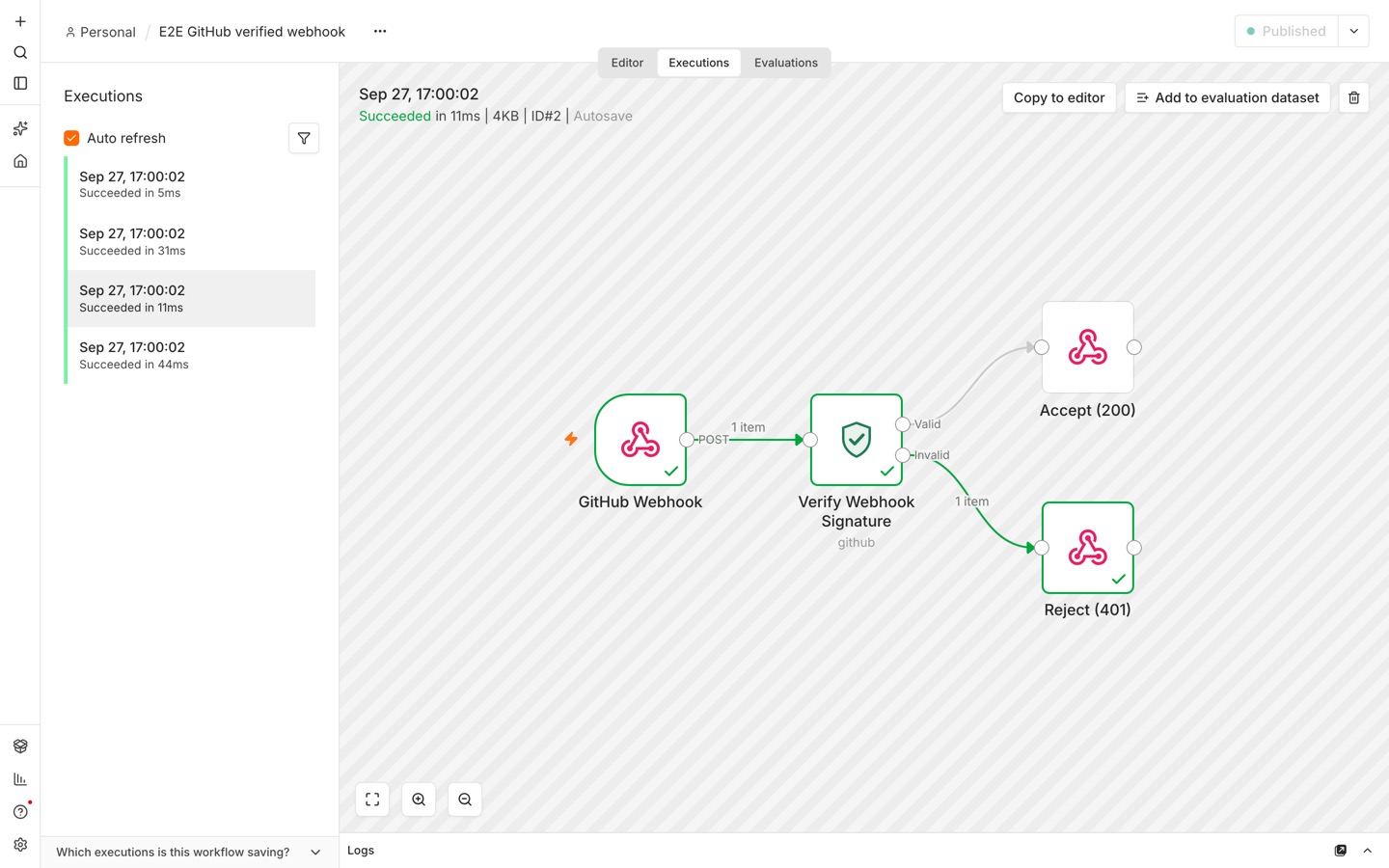 |
The same JSON re-sent with different whitespace is also rejected (signature_mismatch), which confirms the node checks the raw bytes and not the parsed body.
Note for
npm run dev: in dev mode n8n loads this node asCUSTOM.verifyWebhookSignature. The example workflow uses the type an npm install registers,n8n-nodes-webhook-signature.verifyWebhookSignature. To import the example into a dev instance, replace that type first.
Development
Use Node.js 24 (.nvmrc pins it). npm run dev starts the latest n8n, which requires Node 24+, and at the time of writing its SQLite driver has no build for Node 26.
nvm use
npm install
npm run build   # n8n-node build
npm run lint    # n8n's community-node lint rules (strict mode)
npm test        # vitest
npm run dev     # starts n8n on http://localhost:5678 with this node loaded
The code is split so the security-relevant part can be read and tested on its own:
nodes/VerifyWebhookSignature/
  VerifyWebhookSignature.node.ts  n8n wiring: parameters, reading items, routing outputs
  verify.ts                       verify(): HMAC, constant-time compare, replay window. No n8n imports
  providers/                      one parser per provider: header format -> bytes that were signed
  headers.ts                      case-insensitive header lookup, timestamp parsing
credentials/
  WebhookSigningSecretApi.credentials.ts
test/                             unit tests for verify() and the node's routing
verify() takes the clock as a parameter, so the tests use a fixed time instead of mocking.
Provider documentation used:
- Stripe: https://docs.stripe.com/webhooks#verify-manually
- GitHub: https://docs.github.com/en/webhooks/using-webhooks/validating-webhook-deliveries (its published test vector is one of the unit tests)
- Slack: https://docs.slack.dev/authentication/verifying-requests-from-slack
- Shopify (Generic example): https://shopify.dev/docs/apps/build/webhooks/subscribe/https
- n8n Webhook node: https://docs.n8n.io/integrations/builtin/core-nodes/n8n-nodes-base.webhook/
Future work
- Asymmetric signatures: Ed25519 (Discord) and RSA.
- A Standard Webhooks / Svix preset.
- More presets (Shopify, Twilio) on top of the Generic mode.
- Deduplication by event or delivery ID, as a second line of defence against replays.