Package Information
Available Nodes
Documentation generating…


Documentation
n8n-nodes-xberg-pdf-vlm-extractor


Two n8n community nodes that use a Vision Language Model (VLM) to work with PDFs, powered by the @xberg-io/xberg document-extraction library:
- PDF OCR — runs VLM-based OCR on a PDF and returns a searchable PDF with the recognised text embedded as an invisible layer.
- PDF Field Extractor — extracts structured fields from a PDF against a JSON Schema you provide, using the PDF's embedded text layer (with an optional VLM-OCR fallback).
Both nodes let you pick an LLM provider — Ollama (local), OpenAI, Anthropic, or Google Gemini — authenticate with n8n's matching built-in credential, and choose the model from a dropdown populated live from that provider.
Self-hosted only. This package has a runtime dependency (
@xberg-io/xbergships platform-specific native binaries), so it is not eligible for n8n Cloud verification. It installs and runs on self-hosted n8n.
Both nodes show up in the n8n nodes panel — search "PDF":
| PDF OCR | PDF Field Extractor |
|---|---|
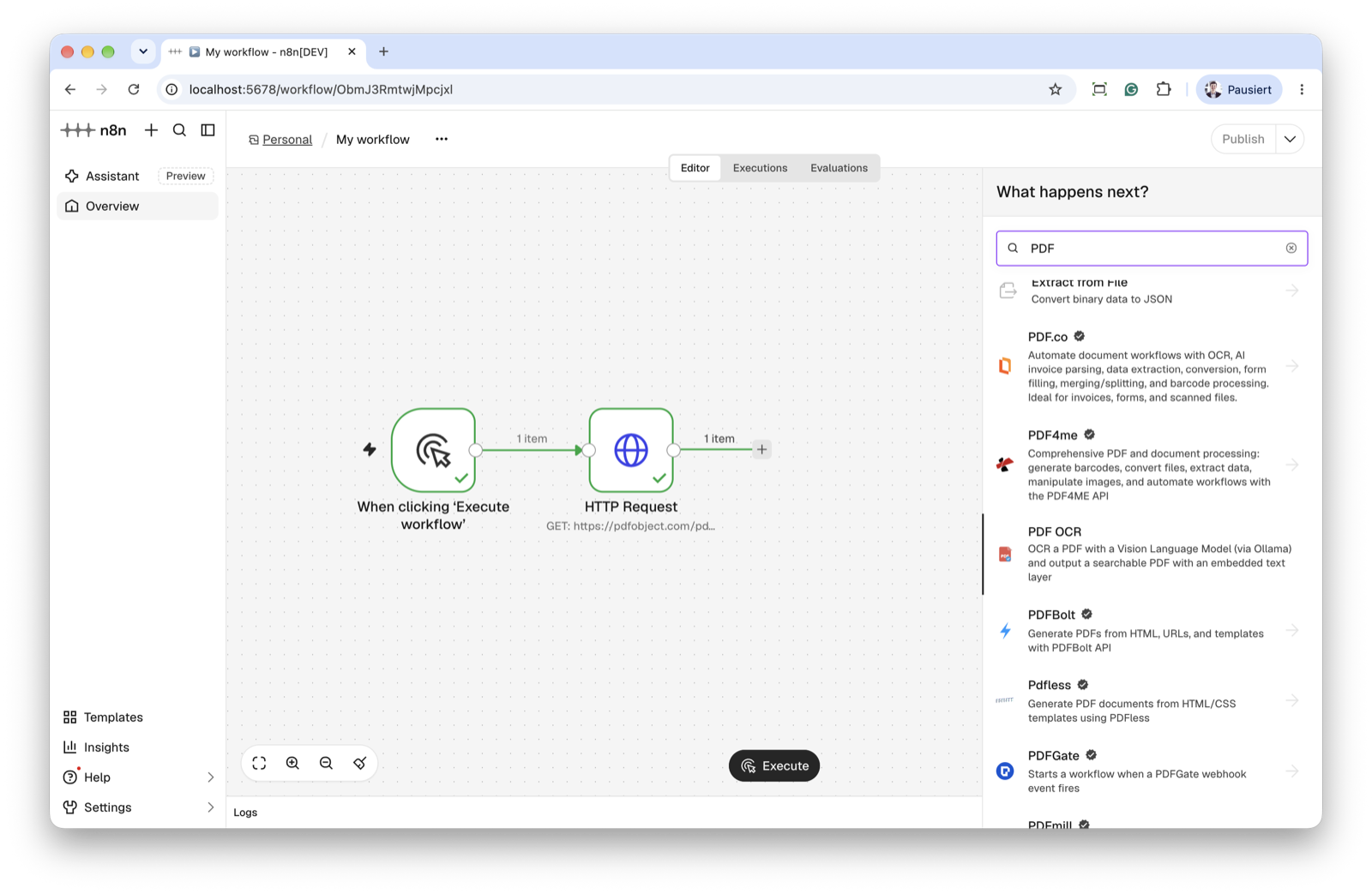 |
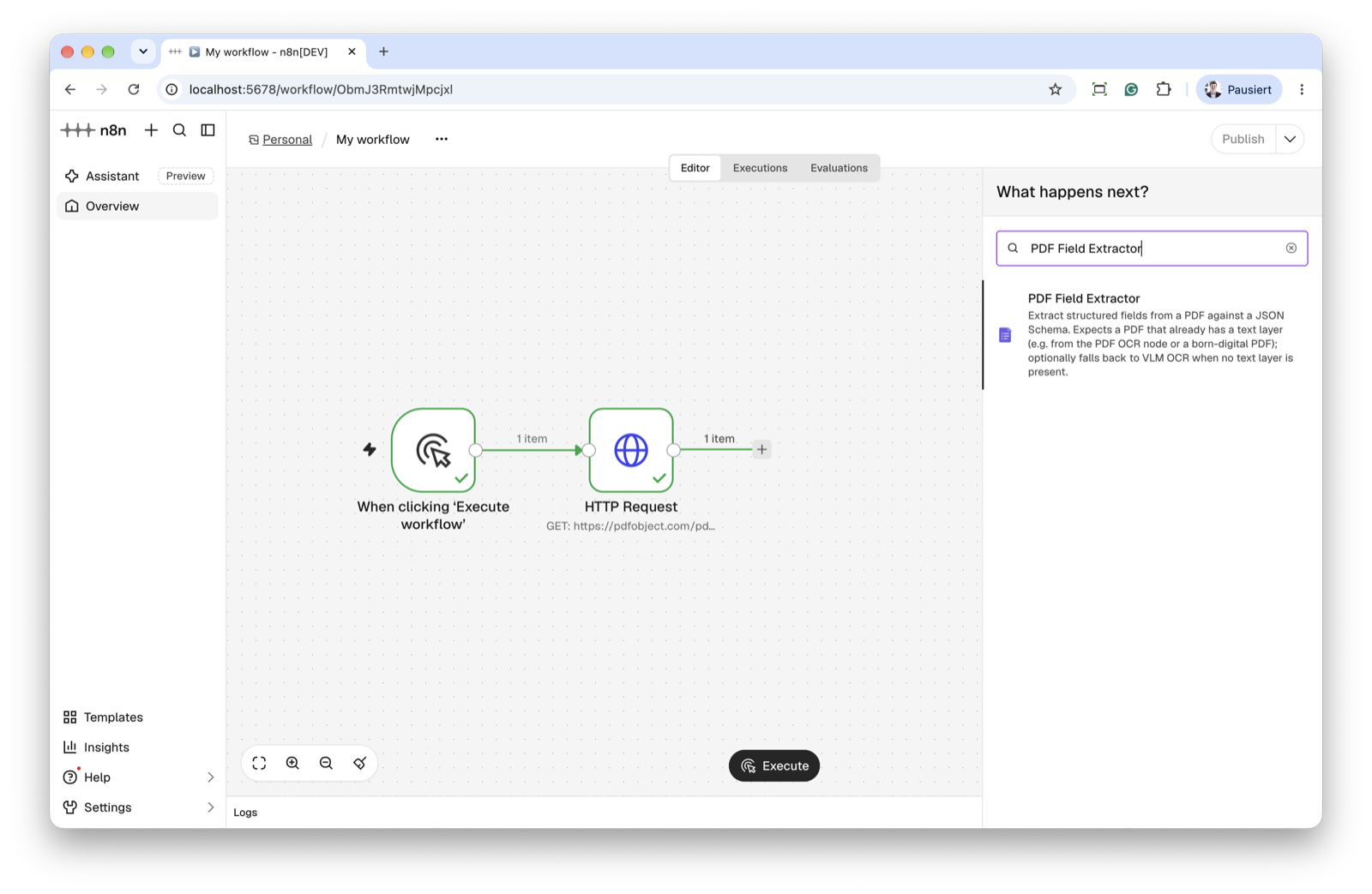 |
How the two nodes fit together
PDF source ──▶ PDF OCR ──▶ PDF Field Extractor ──▶ …
(disk / HTTP)  (searchable PDF)   (structured JSON)
- Scanned / image-only PDF? Run PDF OCR first. Its output is a searchable PDF, so any downstream node — including PDF Field Extractor — can read the text without OCR'ing again.
- Born-digital PDF (already has a text layer)? Send it straight into PDF Field Extractor; it reads the embedded text layer directly.
- No text layer and you'd rather not chain two nodes? Turn on OCR if No Text Layer in the Field Extractor to let it OCR the PDF itself.
The two steps are fully independent — use either on its own.
Quick start
- Install the package in your self-hosted n8n (see Installation).
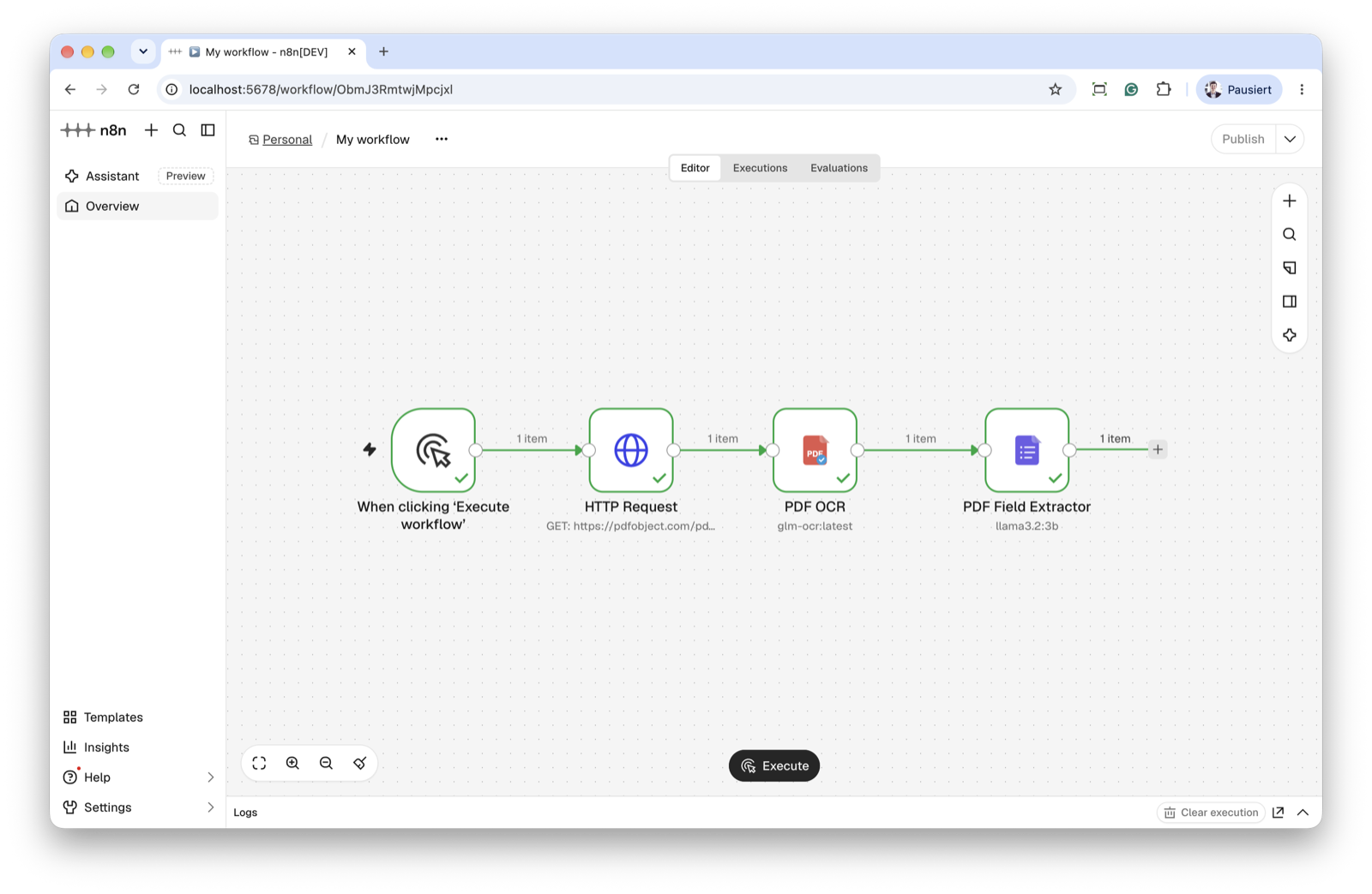
- Import the example workflow: in n8n, open a new workflow → ⋯ menu → Import from File and pick
docs/example-workflow.json(or copy its contents and paste onto the canvas). It wires up Manual Trigger → HTTP Request → PDF OCR → PDF Field Extractor — the HTTP Request node fetches a sample PDF, so it runs with no file on the n8n host. (Swap in Read/Write Files from Disk if you'd rather read a local PDF.) - Create an Ollama credential (Settings → Credentials → New → Ollama, Base URL
http://localhost:11434) and select it on both nodes. Swap in OpenAI/Anthropic/Gemini if you prefer — see Providers & credentials. - Pick a vision-capable model from the dropdown on each node and run.
Installation
Follow the n8n community nodes installation guide.
In your self-hosted n8n: Settings → Community Nodes → Install, then enter:
n8n-nodes-xberg-pdf-vlm-extractor
Or install from the command line in your n8n custom-nodes directory:
npm install n8n-nodes-xberg-pdf-vlm-extractor
Prerequisites
Node.js >= 24 (matches current n8n;
@xberg-io/xbergneeds >= 22, but this package targets the n8n runtime).An LLM provider with a vision-capable model, and the matching n8n credential (see below). For a local setup, a running Ollama server with a vision model pulled:
ollama pull glm-ocr              # OCR; or qwen3-vl / deepseek-ocr
ollama pull qwen3-vl:8b-instruct # field extraction (needs structured-output support)
curl http://localhost:11434/api/tags   # confirm the models are listed
Providers & credentials
Pick the Provider on the node, then attach the matching credential. All four are built-in n8n credentials (shipped by n8n core / the LangChain nodes) — this package ships none of its own. xberg routes to each provider natively via liter-llm; no OpenAI-compatibility shim is needed.
| Provider | n8n credential | Endpoint field | Default |
|---|---|---|---|
| Ollama (local) | Ollama (ollamaApi) |
Base URL (no /v1 — appended internally) |
http://localhost:11434 |
| OpenAI | OpenAI (openAiApi) |
Base URL | https://api.openai.com/v1 |
| Anthropic | Anthropic (anthropicApi) |
Base URL | https://api.anthropic.com |
| Google Gemini | Google Gemini(PaLM) Api (googlePalmApi) |
Host | https://generativelanguage.googleapis.com |
The Model dropdown is populated live from the selected provider (Ollama's /api/tags, OpenAI/Anthropic /models, Gemini's /v1beta/models). If the endpoint is unreachable at edit time, you can still type a model ID via an expression.
Verified models
Models vary a lot in how well they handle OCR and schema-constrained extraction. These are the ones that worked well in testing (local Ollama tags shown); the preferred pick in each category is marked. Any vision-capable model your provider offers will appear in the dropdown — this is a starting point, not an allow-list.
| Node | Verified models | Notes |
|---|---|---|
| PDF OCR | glm-ocr ✅ (best in testing), qwen3-vl, deepseek-ocr |
OCR-tuned vision models. glm-ocr gave the most accurate transcription. |
| PDF Field Extractor | qwen3-vl:8b-instruct ✅ (preferred), llama3.2:3b |
Must support structured output (JSON-schema-constrained generation). See the note below. |
Field extraction needs structured-output support. The Field Extractor always asks the model for JSON constrained to your schema (via the provider's structured-output / grammar mode). Models that don't support it — e.g. some
gemma3tags on Ollama — fail with "structured output is unavailable" and return empty fields. If that happens, switch to a model from the table above or upgrade Ollama. Turning off Strict does not help: the constraint is inherent to how extraction works.
Local Ollama in a container? If n8n runs in a container and Ollama runs on the host, use
http://host.docker.internal:11434(orhost.containers.internalfor Podman) as the Base URL.API-key note. For Ollama the API Key is only needed behind an authenticating proxy; leave it empty for a default local install.
Nodes
PDF OCR
Runs VLM OCR on every page of the incoming PDF and returns a searchable PDF.
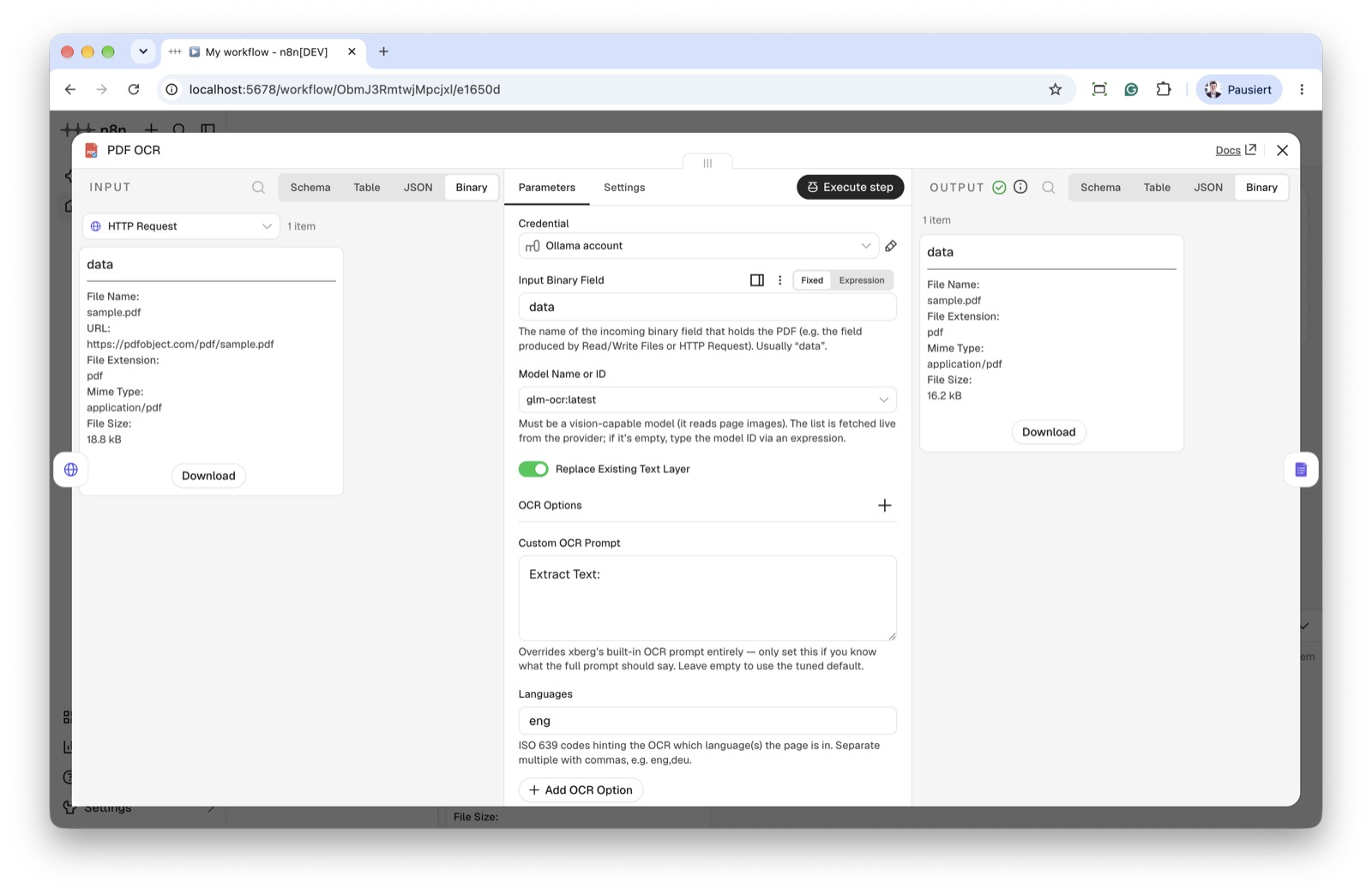
- Feed a PDF into the node as binary data (e.g. from Read/Write Files from Disk or HTTP Request). The default binary field name is
data. - Pick the Provider and Model from the dropdowns (the model list is loaded from the selected provider).
- Replace Existing Text Layer (default on): removes any text already embedded in the PDF before adding the OCR layer, so a PDF that already carries a (possibly wrong) text layer doesn't end up with two overlapping layers. Turn it off to keep the original text and append the OCR layer on top.
- Output:
Binary: a PDF (same field name as the input) with the OCR text embedded as an invisible, selectable text layer — findable with Ctrl+F in any viewer and by downstream text extraction.
JSON:
{
  "text": "…full transcribed text…",
  "pageCount": 3,
  "mimeType": "application/pdf",
  "searchable": true
}
About the text layer. xberg's VLM OCR returns text per page but no per-word coordinates, so the embedded layer is flowed in reading order rather than positioned over each original glyph. Full-text search lands on the correct page; it does not highlight the exact word position. If a PDF can't be rebuilt (e.g. encryption), the node returns the original PDF plus the text in JSON and sets searchable: false with a warning. If a single page's existing content can't be safely rewritten, that page falls back to append-only and the rest of the document is unaffected.
PDF Field Extractor
Extracts structured fields described by a JSON Schema. It expects a PDF that already has a text layer (e.g. the output of PDF OCR, or a born-digital PDF).
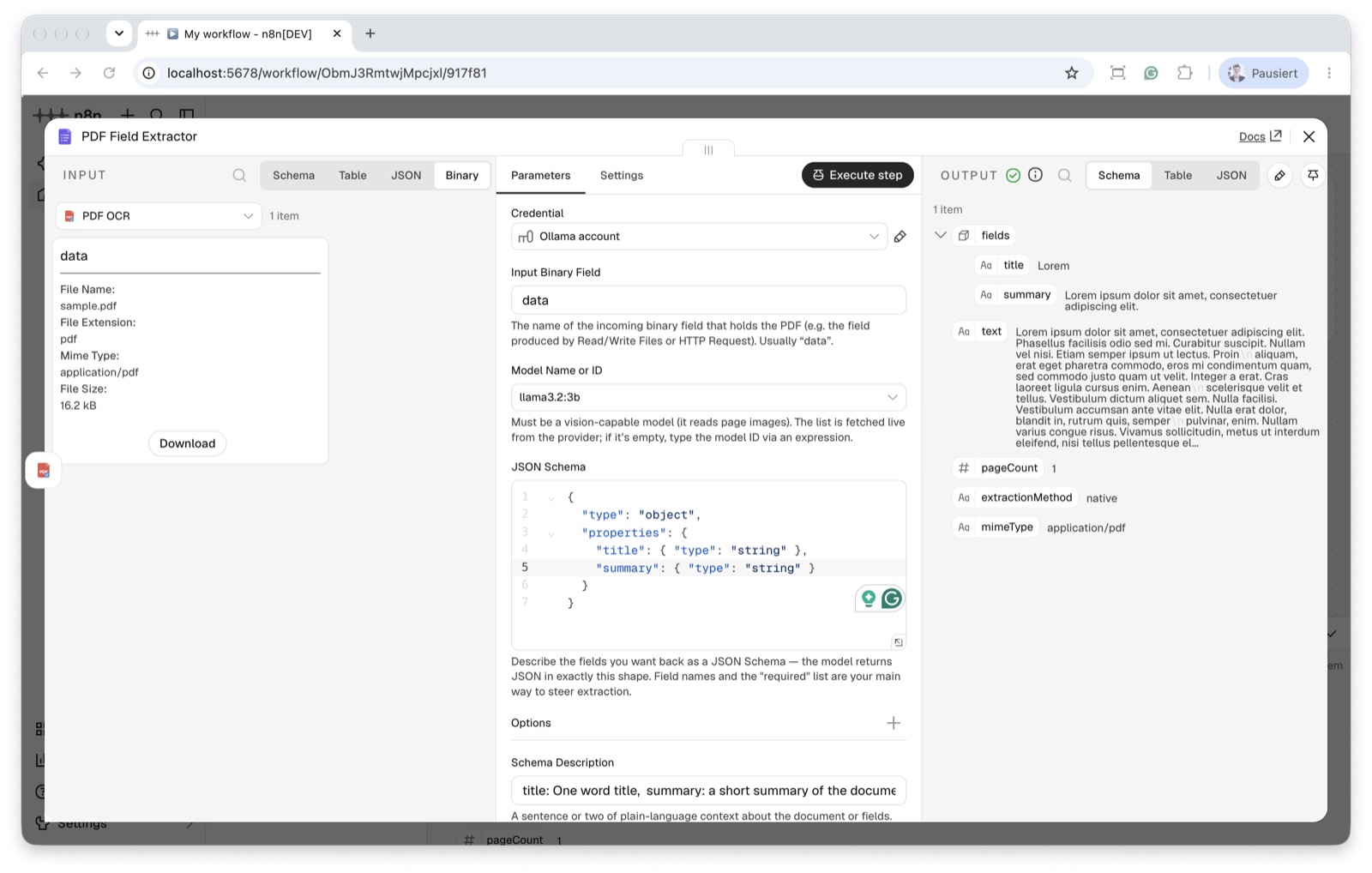
Provide the PDF binary as above.
Pick the Provider and Model.
In JSON Schema, describe the fields you want:
{
  "type": "object",
  "properties": {
    "invoiceNumber": { "type": "string" },
    "total": { "type": "number" },
    "date": { "type": "string" }
  },
  "required": ["invoiceNumber"]
}
Output:
{ "fields": { "invoiceNumber": "INV-042", "total": 199.9, "date": "2026-10-27" }, "text": "…", "pageCount": 3, "extractionMethod": "native", "mimeType": "application/pdf" }extractionMethodtells you how the text was obtained:native(used an embedded layer),ocr(fresh VLM OCR), ormixed.By default (OCR if No Text Layer off) the node reads the embedded text layer and errors if the PDF has none — run PDF OCR first in that case. Turn OCR if No Text Layer on to let the node OCR the PDF itself when no layer is present; this reveals the OCR tuning options, including Force OCR to always run a fresh pass.
Options
PDF OCR: Replace Existing Text Layer (top-level, default on), plus OCR Options — Languages (comma-separated ISO codes, e.g. eng,deu), Custom OCR Prompt, Temperature, Timeout (seconds).
PDF Field Extractor: an Options collection for extraction — Schema Description and Strict mode. The OCR if No Text Layer toggle (default off) controls the OCR fallback; when on, an OCR Options collection appears (Force OCR, Languages, Custom OCR Prompt, Temperature, Timeout).
Shape extraction through the JSON Schema and Schema Description, not a custom prompt: xberg's extraction prompt would replace its tuned default outright (there's no extend/append hook), so no custom-prompt field is exposed for field extraction.
Tip: OCR-tuned models (e.g.
glm-ocr,deepseek-ocr) are great at transcription but may extract fields less reliably. For field extraction, use a model that supports structured output —qwen3-vl:8b-instructorllama3.2:3bworked best in testing (see Verified models).Strictdefaults to off; add a Schema Description to steer the model when results are off.
Local development
npm install
npm run build        # compile TypeScript to dist/
npm run lint         # lint
npm test             # run the vitest suite
npm run dev          # start a local n8n with the nodes hot-reloaded (http://localhost:5678)
npm run dev (docs) is the local test environment — no separate n8n instance is required. To run against an existing host n8n instead:
N8N_DEV_RELOAD=true npx n8n start
n8n-node dev --external-n8n --custom-user-folder <path>
Tests
The vitest suite covers the shared provider/OCR config helpers, the searchable-PDF text-layer builder (replace vs. append round-trip), and the node-description contract for both nodes:
npm test              # run once
npm run test:watch    # watch mode
npm run test:coverage # with a coverage report
CI runs lint + tests + build on Node 24 for every push and PR — see .github/workflows/ci.yml.
Releasing
Publishing to npm happens from GitHub Actions with an npm provenance statement (required for n8n verification from May 1, 2026), behind a manual approval gate: a tag push builds and packs the release, then the publish step waits for a maintainer to approve the npm-release environment before shipping over OIDC. See RELEASING.md for the one-time npm/GitHub setup and the per-release steps.
Compatibility
- Requires Node.js >= 24 (matching current n8n).
- Built and tested against
n8n-workflow2.x,@xberg-io/xberg1.3.x, andpdf-lib1.17.x.