Package Information
Available Nodes
Documentation generating…

Documentation
n8n-nodes-subnoto
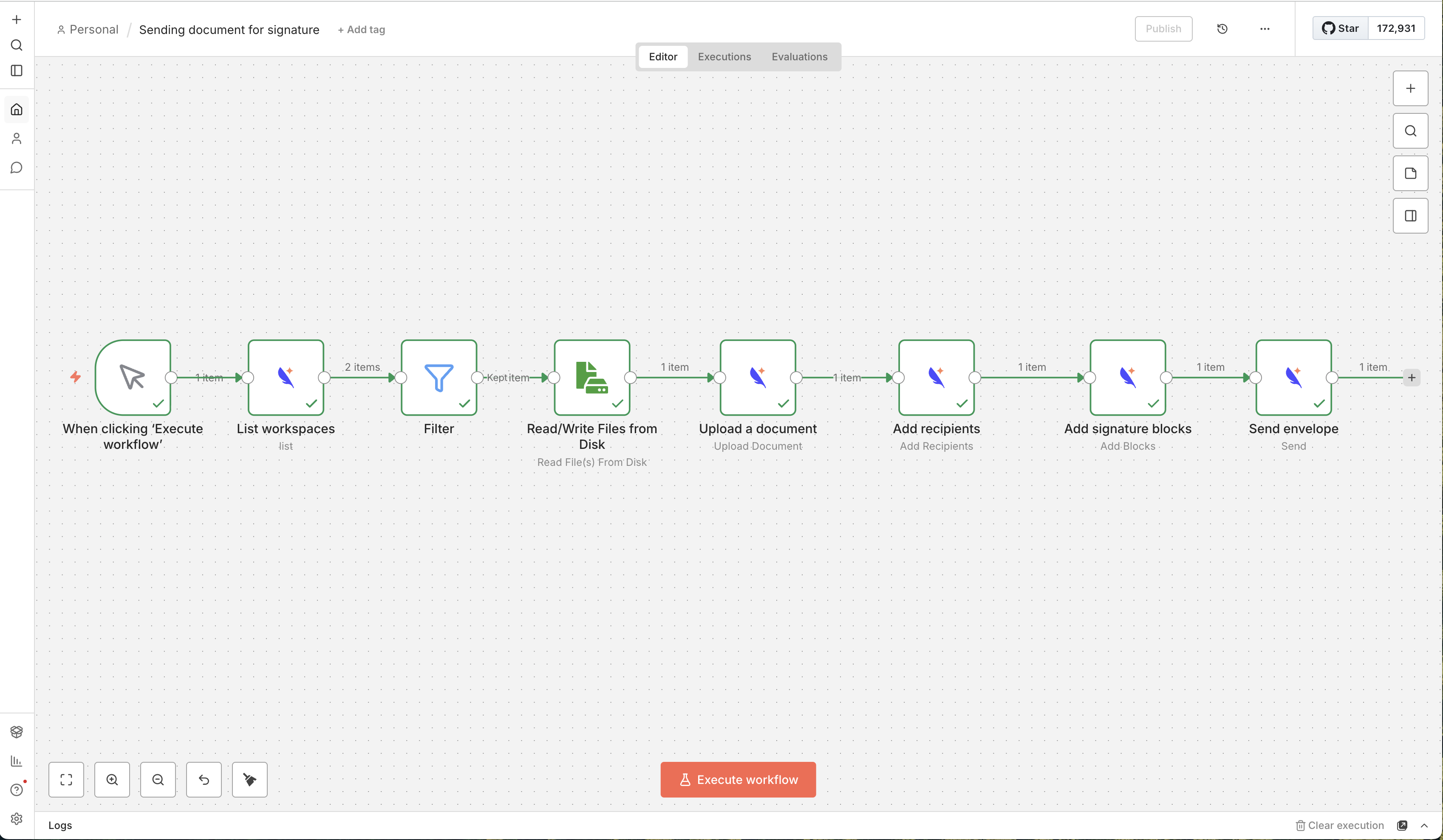
n8n community node to integrate with Subnoto for document signing. Uses the Subnoto TypeScript SDK.
Installation
The built package is published on npm. To use this custom node on your personal (self-hosted) n8n instance:
From the n8n UI (recommended)
- In n8n, go to Settings → Community Nodes → Install.
- Enter the package name:
@subnoto/n8n-nodes-subnoto. - Optionally specify a version (e.g.
@subnoto/n8n-nodes-subnoto@1.0.0), then install. - Restart n8n when prompted. The Subnoto node will appear in your node list.
Manual install (CLI / Docker)
If your instance runs in queue mode or you prefer installing via the command line:
Install the package in n8n’s custom nodes directory:
mkdir -p ~/.n8n/nodes
cd ~/.n8n/nodes
npm install @subnoto/n8n-nodes-subnoto
For Docker: run the same commands inside the container (e.g.
docker exec -it n8n sh), or use an image that installs this package and setN8N_CUSTOM_EXTENSIONSto the path where it’s installed.Tell n8n to load custom nodes by setting
N8N_CUSTOM_EXTENSIONSto that directory before starting n8n:export N8N_CUSTOM_EXTENSIONS="/path/to/.n8n/nodes" n8n start(Use
~/.n8n/nodesor the path where you rannpm install.)Restart n8n. Add a Subnoto API credential and use the Subnoto node in your workflows.
Community node installation is only available on self-hosted n8n, not on n8n Cloud.
Operations
Workspace UUID is optional on all operations that support it. Leave it empty to use your team's default workspace.
Envelope
- Upload Document — Upload a PDF or Word document and create an envelope.
- Upload Document and Send — Upload, add recipients, optionally add blocks, and send in one step.
- Create From Template — Create an envelope from a template with labeled recipients.
- Add Recipients — Add recipients to an envelope.
- Add Blocks — Add signature, text, text input, or image blocks to a document.
- Send — Send the envelope to recipients.
- List — List envelopes in a workspace (with optional status and tag filters).
- Get — Get envelope details by UUID.
- Update — Update envelope title, tags, expiration, reminders, and invitation message.
- Delete — Delete an envelope.
Workspace
- List — List all workspaces the API key owner is a member of.
Template
- List — List templates accessible by the team.
Contact
- Create — Create one or more contacts.
- Get — Get a contact by email.
- List — List contacts in a workspace.
- Update — Update a contact.
- Delete — Delete contacts by email.
Util
- Who Am I — Get information about the authenticated team and API key. Use this to validate credentials.
Credentials
Create a Subnoto API credential with:
- API Base URL — e.g.
https://enclave.subnoto.com - Access Key — Your API access key
- Secret Key — Your API secret key (hex-encoded, characters 0-9 and a-f only)
- Unattested Mode — Optional (default: false). Only enable if advised by Subnoto support.
The credential Test button uses the Subnoto SDK (Oak tunnel + request signing), the same path as node operations. If the test fails, also try the Who Am I operation on the Subnoto node to confirm credentials in a workflow.
Development
Using the Dev Container
- Open the project in VS Code (or Cursor) and Reopen in Container (Dev Containers extension).
- After the container is built, dependencies are installed and the project is built automatically (
postCreateCommand). - Start n8n to test the node:
npx n8n start - Open http://localhost:5678. The Subnoto node is loaded from the workspace via
N8N_CUSTOM_EXTENSIONS. - Add a Subnoto API credential and run a workflow with the Subnoto node.
Local (without Dev Container)
- Install dependencies:
npm install - Build:
npm run build - Link for local n8n:
mkdir -p ~/.n8n/custom && cd ~/.n8n/custom && npm init -y && npm link /path/to/n8n-node - Start n8n:
n8n start(ornpx n8n start)
Scripts
npm run build- Build the nodenpm run build:watch- Watch and rebuildnpm run lint- Lintnpm run lint:fix- Lint and fix
License
MIT