Package Information

Documentation
n8n-nodes-unleash
An n8n community node for Unleash. Evaluate feature flags in your workflows and AI agents, and react to flag changes.
The node evaluates flags through the Unleash Frontend API with a frontend token, on every Unleash plan. It works against Unleash itself or against Unleash Edge.
- Installation
- Credentials
- Operations
- Use it as an AI agent tool
- React to flag changes
- Change flags from n8n
- Example workflows
- Compatibility
- Development
Installation
Follow the n8n guide to install a community node and enter the package name:
@unleash/n8n-nodes-unleash
Credentials
The node uses one credential, Unleash Frontend API:
| Field | Value |
|---|---|
| Base URL | The Frontend API URL of your Unleash instance or Unleash Edge, ending in /api/frontend. For example https://unleash.example.com/api/frontend. |
| Frontend Token | A frontend token for the environment you want to evaluate. |
Create the token in Unleash under Admin settings > Access control > API access, or under Settings > API access inside a project. Choose the Frontend type, the projects and the environment.
Frontend tokens are built to be shared with client-side apps: they can only read the flags that are enabled in their projects and environment. To keep evaluation inside your network, point the Base URL at an Unleash Edge instance you host.
Operations
The node has one resource, Flag, with two operations. Both take the same context fields, and both cache their result for 30 seconds by default — see Caching below.
Evaluate
Checks whether one flag is enabled for a context, and returns its variant.
{
	"name": "new-checkout",
	"enabled": true,
	"variant": {
		"name": "blue",
		"enabled": true,
		"feature_enabled": true,
		"payload": { "type": "json", "value": "{\"color\":\"blue\"}" }
	}
}
A flag that is disabled, archived, unknown or outside the token's projects returns enabled: false with the disabled variant. The Frontend API leaves disabled flags out of its response, so the node can't tell these cases apart, and a missing flag is never an error.
Use an If or Switch node on {{ $json.enabled }} or {{ $json.variant.name }} to branch. A variant payload is returned as a string; parse a JSON payload with {{ JSON.parse($json.variant.payload.value) }}.
Lookup Method defaults to Full Flag List, which fetches every flag for the context and picks this one out of the list — works on any Unleash server. Set it to Single Flag (Edge Only) to use a lighter endpoint instead, fetching only this flag. That endpoint only exists on Unleash Edge today, so this only works when the Base URL above points at an Edge instance, not a standard Unleash server.
Report Usage is off by default. Turn it on to send a usage metric to Unleash for every evaluation, so flags that are only used in n8n still show as in use, and n8n appears among the connected SDKs (as n8n-nodes-unleash). It's an extra call on every evaluation, and Unleash Edge isn't designed to take that on a hot path, so leave it off unless you need Unleash's "last seen" data for this flag. If the metric can't be sent, the node logs a warning and the workflow carries on.
Get Enabled
Returns one item per flag that is enabled for the context, in the same shape as Evaluate. It does not report usage: counting every returned flag as used would hide flags that are really stale.
When no flag is enabled, the node returns no items and the workflow stops there. Turn on Always Output Data in the node settings if the workflow should continue.
Caching
Evaluating one flag still means fetching every flag for the context on a standard Unleash server — there's no narrower request available there (Edge adds one; see Lookup Method above). So instead of calling Unleash on every single node execution, Cache Duration (Seconds) (default: 30, the same default refresh interval Unleash's own frontend SDKs use) reuses a previous result for the same context and credential rather than fetching again. For something that needs to react quickly, like a kill switch, use a short duration (1–3 seconds) rather than 0 — every other flag in Unleash follows the same consistency model, and a few seconds is negligible next to how long it takes a person to act on the change. See Agent kill switch.
On top of that, both a standard Unleash server and Unleash Edge support conditional requests (If-None-Match) — this node always uses GET, specifically because that's what makes conditional requests work at all (Express, which Unleash's server is built on, only honors a matching If-None-Match for GET/HEAD, never POST). Once the cache above is stale, the node revalidates instead of blindly refetching, and a 304 Not Modified replaces resending the full body when nothing changed. That saves bandwidth, not evaluation work on the server — the cache duration above is what actually skips that — but it means even a short Cache Duration still gets this benefit on every call it makes, with no extra staleness: every execution that isn't served straight from cache makes a real round trip and gets the current, confirmed answer, it just doesn't re-download it when nothing changed.
If a call to Unleash fails — a network error, a timeout, a gateway problem — the node falls back to the last cached result (however stale) and logs a warning, rather than failing the whole workflow over what's usually transient; this is the same degrade-gracefully pattern official Unleash SDKs use. It only throws when there's nothing cached yet to fall back to, which is only possible on the very first call for a given context. Redirects are followed automatically (the node never disables that); if redirects are ever exhausted or fail, that's treated as the same kind of failure as any other request error, with the same fallback.
The cache lives in the n8n process, not in the workflow: separate workflows that evaluate the same context against the same Unleash credential share one cached result. In a queue-mode n8n install, each worker is its own separate process and caches independently.
Context fields
| Field | Description |
|---|---|
| User ID | The user to evaluate for. |
| Session ID | Used for stickiness when there is no user ID. |
| Additional Context > App Name | Sent in the context and in usage metrics. Defaults to n8n. |
| Additional Context > Custom Properties | Name and value pairs for strategy constraints, for example plan = enterprise. Values are sent as strings. |
| Additional Context > Remote Address | IP address for IP-based strategies. |
Set a User ID or Session ID whenever a flag uses a gradual rollout. Without either, Unleash makes up a random session ID for each request, so the same input can get a different result on every run. See stickiness. Without a Remote Address, Unleash uses the IP address of your n8n server. More on the Unleash context.
Use it as an AI agent tool
The node can be attached to an AI Agent node as a tool, so an agent can check a flag before it acts. A common pattern is a kill switch for an agent: evaluate a flag at the start of the workflow and stop when it's off.
Give the agent more tools only when a flag is on
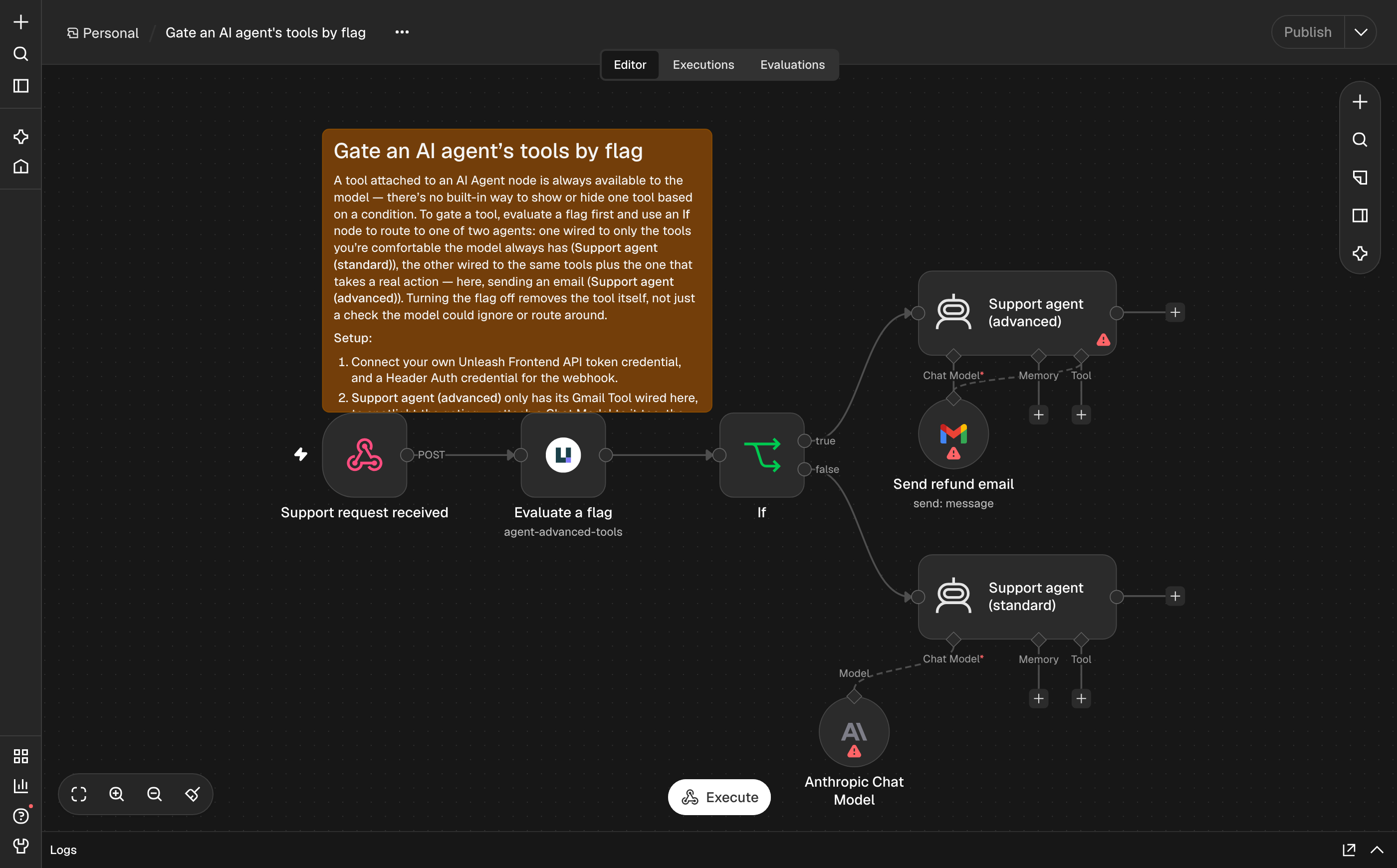
A tool you attach to an AI Agent node is always available to the model; there's no built-in way to show or hide one tool based on a condition. To gate a tool, evaluate a flag first and use an If node to route to one of two AI Agent nodes: one wired to only the tools you're comfortable the model always has, the other wired to the same tools plus the one that takes a real action (sending an email, changing a record, calling a paid API). Turning the flag off removes the tool itself, not just a check the model could ignore or route around.
React to flag changes
Unleash can send flag events to n8n through its Webhook integration and n8n's built-in Webhook node. No extra node is needed.
- In n8n, add a Webhook node. Set HTTP Method to
POST, and Authentication to Header Auth with a credential whose name isAuthorizationand whose value is a long random secret. Copy the production URL and activate the workflow. - In Unleash, go to Integrations, open Webhook and configure it:
- Webhook URL: the production URL from n8n.
- Authorization: the same secret. Unleash sends it as the
Authorizationheader exactly as you type it, with noBearerprefix. - Events: the events you want. Optionally limit them to some projects and environments.
- In n8n, route on the event type with a Switch node on
{{ $json.body.type }}.
Each request carries one event. The fields you'll use most are id, type, featureName, project, environment, createdBy and createdAt.
| Event | type |
|---|---|
| Flag turned on or off in an environment | feature-environment-enabled, feature-environment-disabled |
| Strategy added, changed or removed | feature-strategy-add, feature-strategy-update, feature-strategy-remove |
| Flag created, archived or marked stale | feature-created, feature-archived, feature-stale-on |
| Lifecycle: flag completed or potentially stale | feature-completed, feature-potentially-stale-on |
| Change requests (Enterprise) | change-request-sent-to-review, change-request-approved, change-request-applied, change-request-cancelled, change-request-scheduled-application-failure |
Plan for these when you build on webhooks:
- Order and duplicates. Events can arrive out of order, and the same event can arrive twice. Use the numeric
idto order events and to drop duplicates, for example with the Remove Duplicates node set to remove items processed in previous executions. - No guaranteed retry. Don't rely on Unleash retrying a failed delivery. Keep the workflow that receives events small and always on.
- Private URLs. Unleash rejects webhook URLs that point to a private or internal network address. If you self-host both Unleash and n8n on a private network, set
UNLEASH_ALLOW_PRIVATE_URL_IN_INTEGRATION=trueor list the host inUNLEASH_ALLOW_LIST_INTEGRATIONon the Unleash server.
See the Unleash Webhook integration docs for all options.
Change flags from n8n
This node only reads flags. To change them (turn flags on or off, roll out, kill switches, clean up), connect n8n's built-in MCP Client or MCP Client Tool node to the Unleash MCP server. The remote MCP server is available on Unleash Enterprise. It opens change requests where your environments require them.
Example workflows
Each pattern below was built and run in n8n. A node you'd still need to configure yourself (an HTTP endpoint, a Slack channel, your own sub-workflows) is left unconfigured in the screenshot, so you can see the shape of the workflow without copying placeholder values out of it.
Guard a scheduled automation with a kill switch
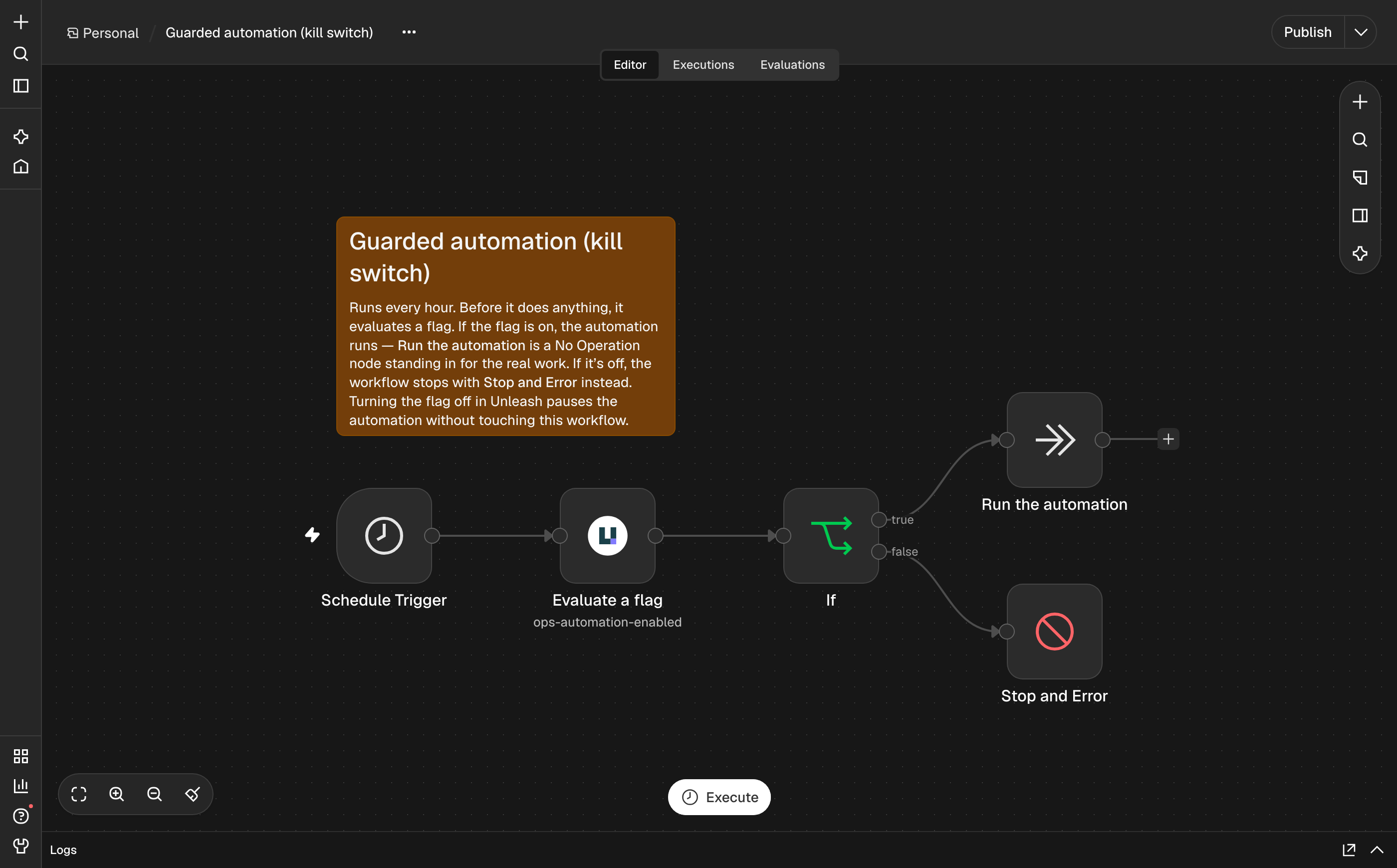
A Schedule Trigger runs some automation every hour. Before it does anything, it evaluates a flag. If the flag is on, the automation runs — here a No Operation node stands in for the real work. If it's off, the workflow stops with Stop and Error. Turning the flag off in Unleash pauses the automation without touching the workflow in n8n.
Gate a deploy on a flag, from CI
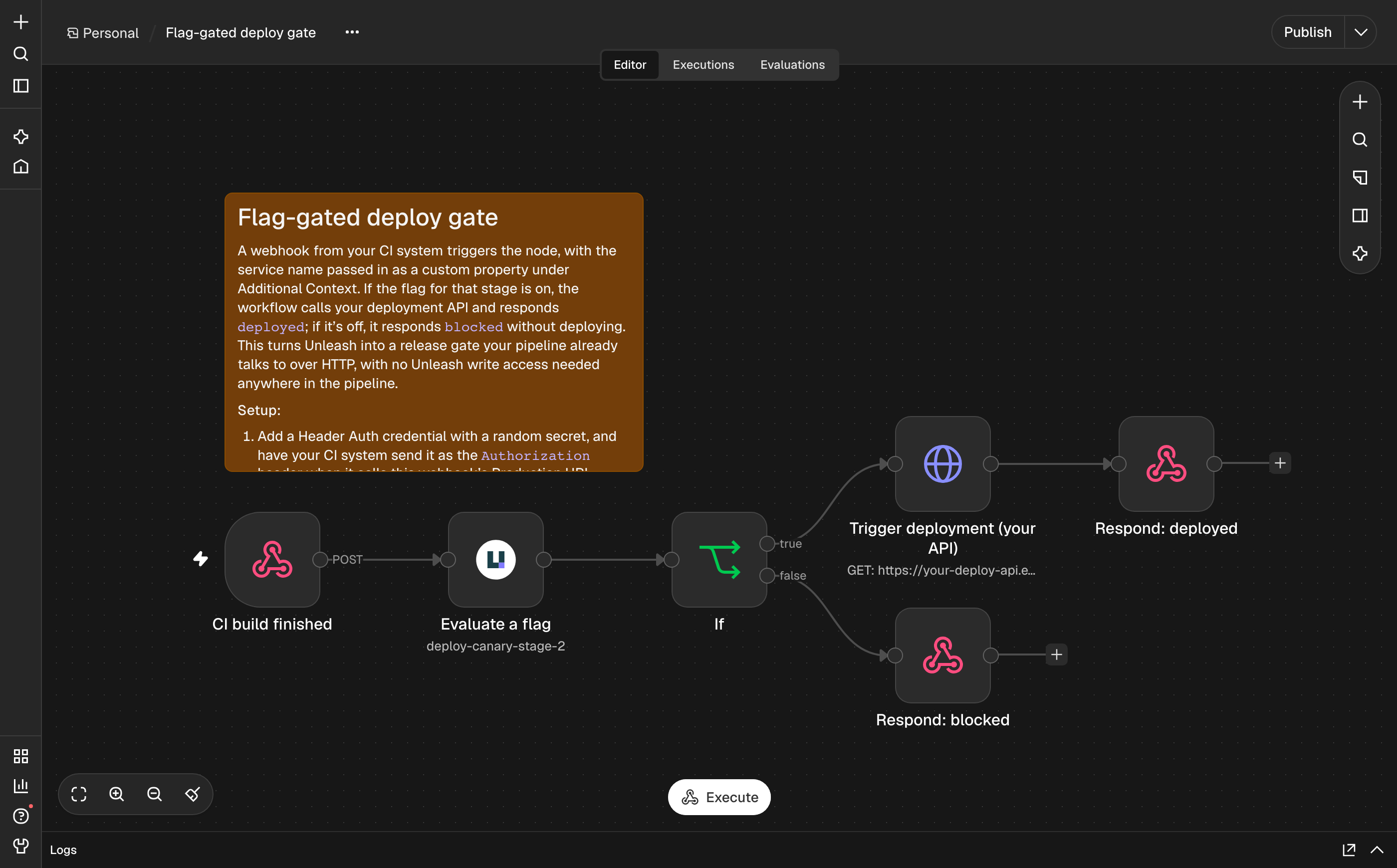
A webhook from your CI system triggers the node, with the service name passed in as a custom property under Additional Context. If the flag for that stage is on, the workflow calls your deployment API and responds deployed; if it's off, it responds blocked without deploying. This turns Unleash into a release gate your pipeline already talks to over HTTP, with no Unleash write access needed anywhere in the pipeline.
Route a tenant to a different workflow by variant
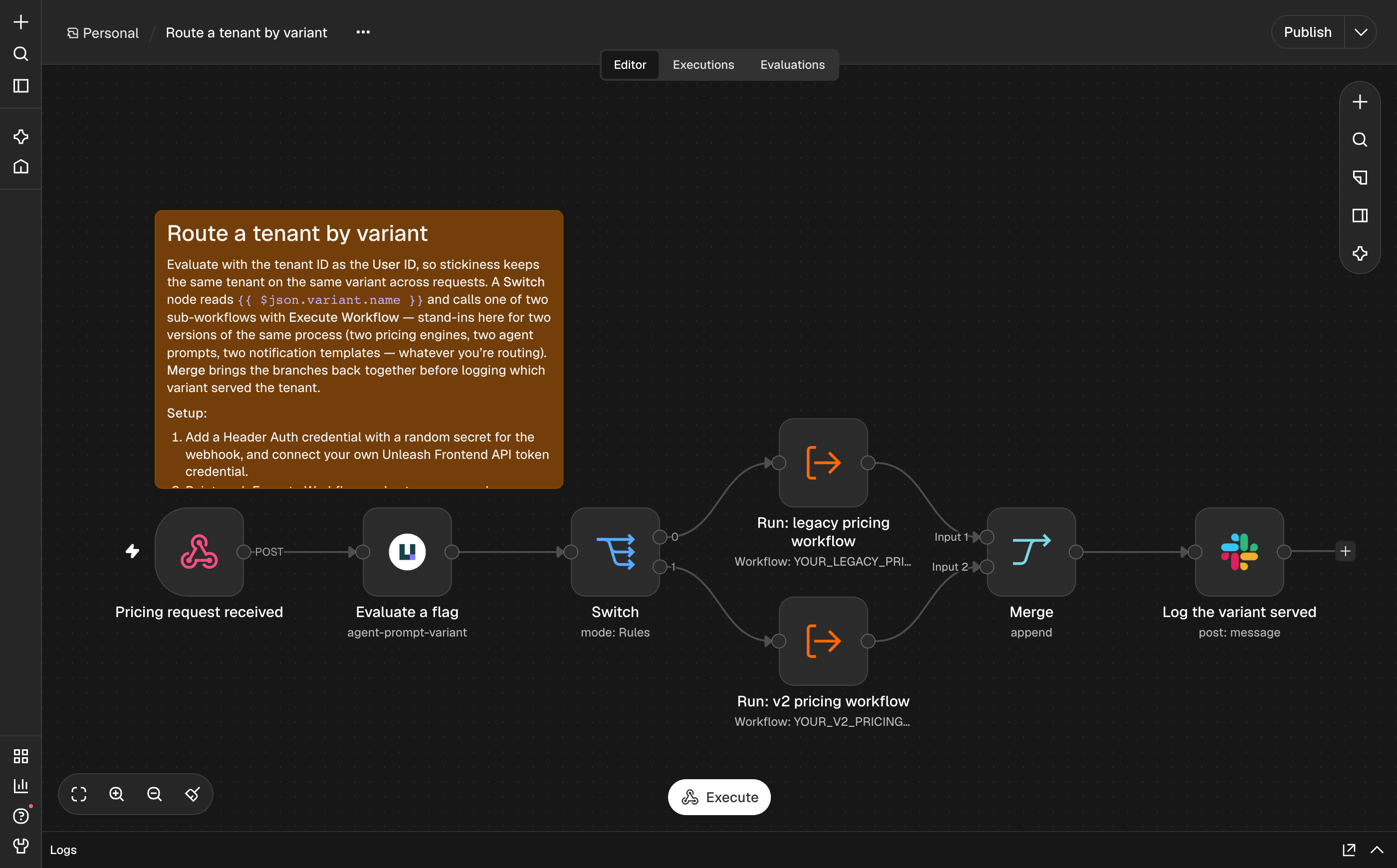
Evaluate with the tenant ID as the User ID, so stickiness keeps the same tenant on the same variant across requests. A Switch node reads {{ $json.variant.name }} and calls one of two sub-workflows with Execute Workflow — stand-ins here for two versions of the same process, for example two pricing engines, two system prompts for an AI agent, or two notification templates. Merge brings the branches back together before logging which variant served the tenant. Because the Unleash variant drives the routing, you can move a tenant to the new version, or change the rollout percentage, without redeploying the workflow.
Ready-made templates
The /templates folder has ten full workflows exported as JSON, ready to import: six that work on every plan (the agent kill switch, a lifecycle-driven Jira ticket, and the four worked examples above as their own files — guarded automation, the deploy gate, variant routing, and agent tool gating), and four Enterprise ones that call the Unleash MCP server (an incident kill switch, a weekly cleanup sweep, change request approvals, and a Slack ops agent). See templates/README.md for what's tested and what each one needs.
More patterns
| Pattern | Nodes you'd pair it with |
|---|---|
| Weekly digest of flags that look stale | Schedule Trigger, Get Enabled, Filter, Slack or Gmail |
| Audit trail of flag changes (see React to flag changes) | Webhook, Set, Google Sheets, Airtable or Postgres |
| On-call alert when a kill switch flips off | The webhook from React to flag changes, Switch, Slack, Microsoft Teams or PagerDuty |
| Per-customer entitlement check | Evaluate with User ID set to the customer ID, If, HubSpot or Salesforce to look up the plan first |
Compatibility
Tested with n8n 2.47.5, Unleash 8.3.1 and Unleash Edge 20.6.4.
Development
npm install
npm run dev     # starts n8n at http://localhost:5678 with this node loaded
npm run lint
npm test        # builds, then runs the unit tests in test/
Releasing
Releasing is a manual GitHub Actions run, no local checkout required: open the Actions tab, run 🚀 Release, and type in the new version (and, if it's a pre-release, the npm tag). That one run lints, builds, and tests the package; bumps the version; updates the tag; pushes; publishes to npm with provenance; and creates the GitHub release — matching how other Unleash npm packages release (see Unleash/toolbar), via a shared workflow in Unleash/.github. See .github/workflows/release.yml for exactly what each step does and why, including why it needs its own validation job even though a generic org-wide template handles the actual release mechanics.
Update CHANGELOG.md by hand, in its own PR, before running a release — the workflow doesn't touch it; GitHub's release notes are generated from commit history instead.
The one genuinely manual, one-time exception is the very first release ever: npm's OIDC Trusted Publishing can't be configured for a package that has never been published, so that first version has to go out some other way (e.g. npm login and npm publish by hand) before this workflow can take over for every release after it. See the comments at the top of release.yml for the exact Trusted Publishing setup steps.
There's also a local escape hatch if the automated flow is ever unavailable: npm run release (n8n-node release) bumps the version, updates the changelog, and tags/pushes/creates the GitHub release, but — by design — never publishes to npm itself, to keep every real publish going through a workflow that attaches provenance.
Versioning
The package and the node have separate version numbers, and they don't need to match:
- The package version (
versioninpackage.json) counts releases on npm. It changes with every release, following semver. - The node version (
versioninnodes/Unleash/Unleash.node.ts) is saved in every workflow that uses the node. A saved workflow keeps its node version, but runs the code of whichever package version is installed.
When you release:
- For a fix, or for something new that existing workflows don't use (an operation, an optional field), bump only the package version.
- For a change that would make existing workflows behave differently (renaming or removing a parameter, changing the output, changing a default), add a node version with light versioning: set
version: [1, 1.1], show the new behavior only from 1.1 with@versionindisplayOptions, setnodeVersioninUnleash.node.jsonto the new version, and bump the package's minor version. Full versioning (a separate class per version) is also available now that the node is programmatic-style, but hasn't been needed yet — light versioning covers every case so far. - n8n saves only the parameters that differ from their default, so a new default reaches every workflow that never changed the field. Treat it as a breaking change.
- Name the node version in
CHANGELOG.mdwhenever it changes.