Package Information
Available Nodes
Documentation generating…

Documentation
n8n-nodes-wiro: Wiro AI for n8n
One n8n node for every Wiro AI model: generate video, images, speech and music, chat with LLMs, edit and upscale images, and create 3D models inside your n8n workflows.


Website · Models · Docs · Dashboard

The Wiro AI node runs any of the 1,000+ models on Wiro AI through the Wiro REST API. Pick a model from a searchable list and its inputs load into the node with their default values, so the same node handles text to video, image editing, speech, music, LLM chat, upscaling and 3D. It also works as a tool for the n8n AI Agent.
Screenshots
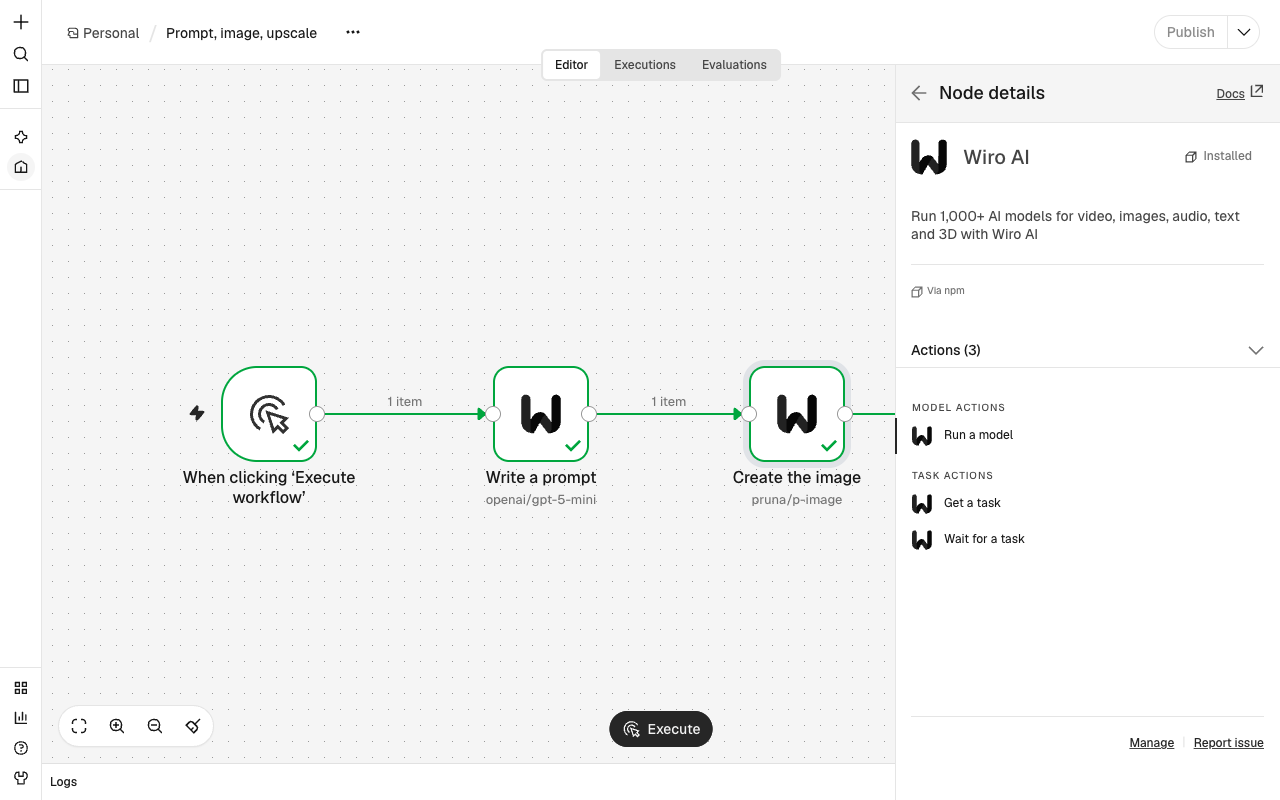
The node and its actions in the n8n node panel:
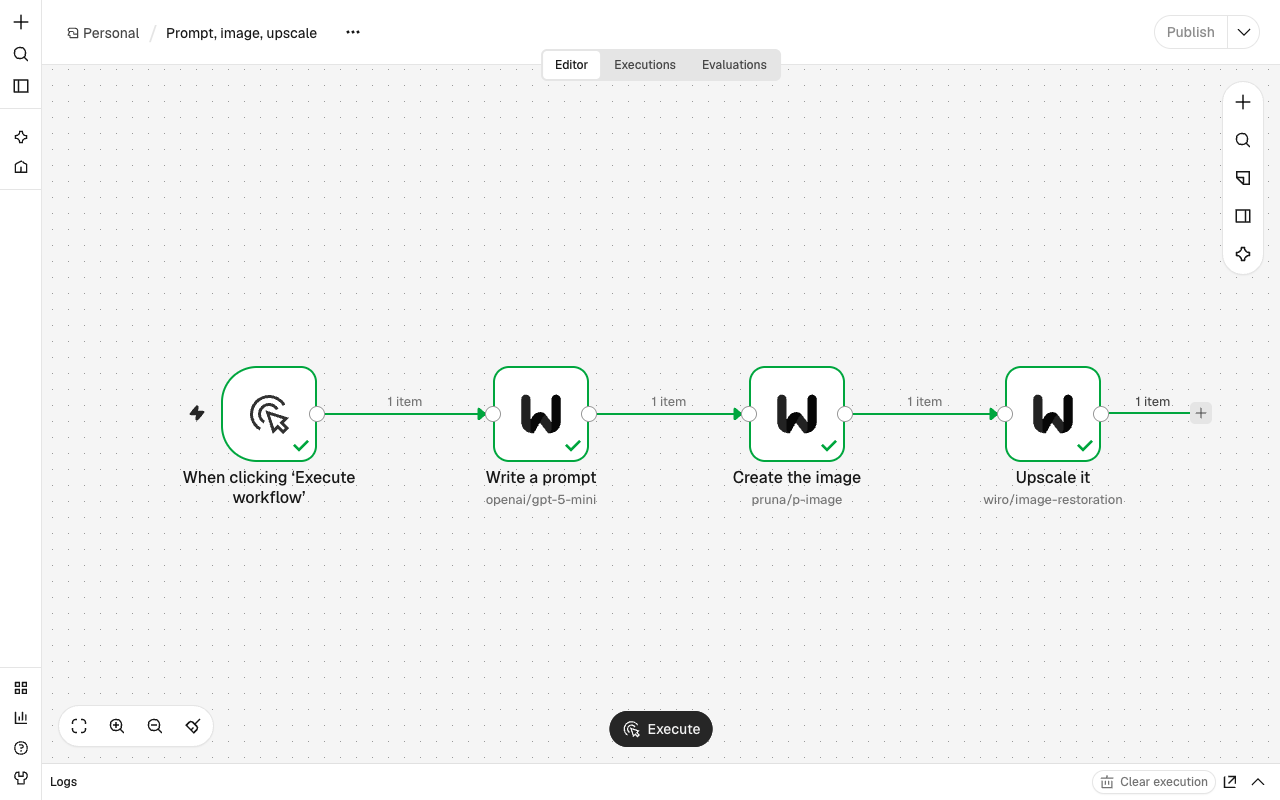
A workflow where three Wiro AI nodes write a prompt, create the image and upscale it:
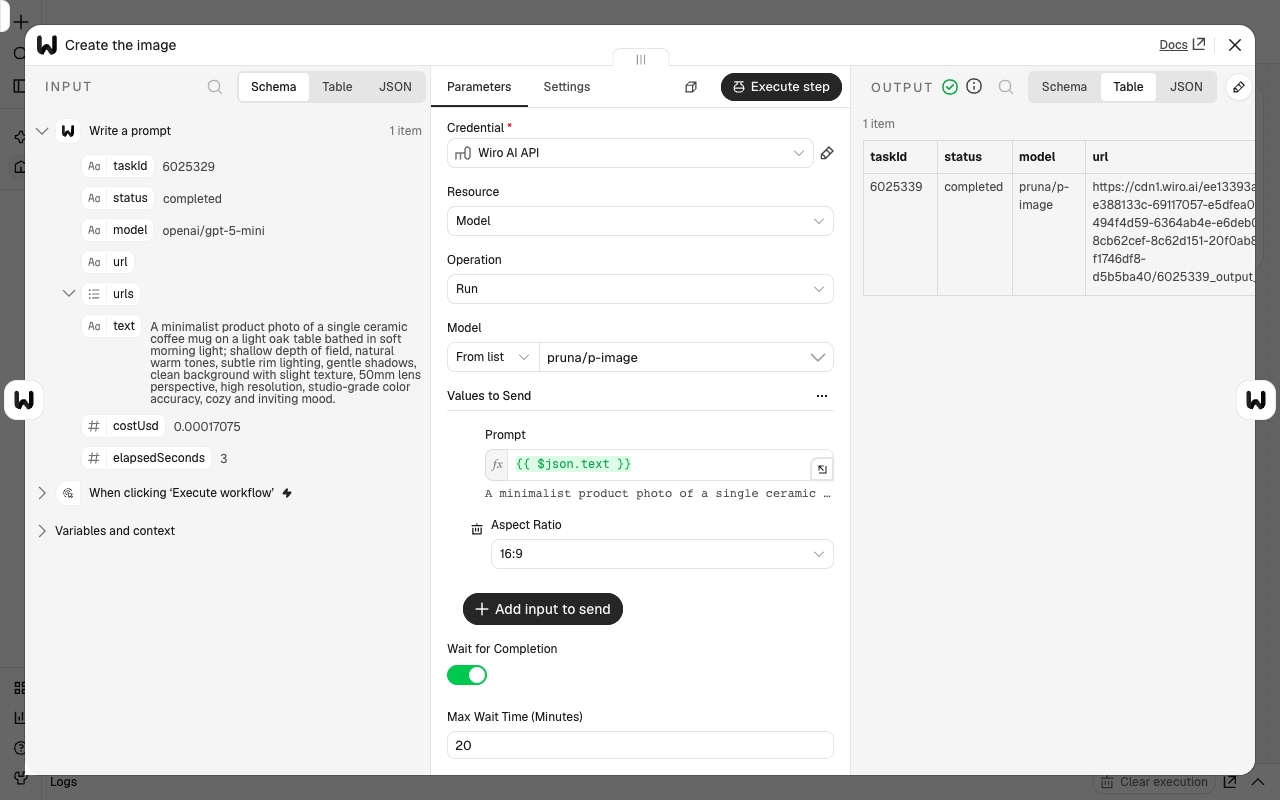
The image step: the prompt from the step before, the model's inputs and the output with the image URL:
Installation
On a self-hosted n8n instance, an Owner or Admin can go to Settings > Community Nodes, select Install, enter @wiro-ai/n8n-nodes-wiro, accept the risk notice and select Install. The n8n community nodes guide covers the other install methods.
For a manual install (for example inside a Docker container), run this in ~/.n8n/nodes and restart n8n:
npm install @wiro-ai/n8n-nodes-wiro
Credentials
- Sign up at wiro.ai and create a project at wiro.ai/panel/project/new.
- In n8n, go to Credentials > Add new > Wiro AI API.
- Enter the project's API Key. If the project uses signature authentication, also enter its API Secret: the node then signs every request with HMAC-SHA256, so the secret itself is never sent.
Runs are billed to the wallet of the project's workspace. See Authentication in the Wiro docs.
Operations
| Resource | Operation | What it does |
|---|---|---|
| Model | Run | Runs a model with your inputs, waits for the task and returns its outputs |
| Task | Get | Reads a task by its ID, with its status and outputs |
| Task | Wait | Waits until a task finishes, then returns its outputs |
Model > Run
- Model: pick it From List (search by name), paste its wiro.ai link (By URL, for example
https://wiro.ai/models/pruna/p-image) or enter it By Slug (pruna/p-image). - Inputs: the model's inputs load with their defaults. Required inputs are always shown. Advanced ones start hidden; add them with Add input to send. Inputs you leave out use the model's defaults.
- File inputs take public URLs. When an input takes several files, separate the URLs with commas.
- To feed one step into the next, map a field from the step before, for example
{{ $json.url }}or{{ $json.text }}.
- Wait for Completion (on by default) waits for the task and returns its outputs. Turn it off to get the task ID at once and read the task later with Task > Get or Task > Wait.
- Max Wait Time (Minutes) (20 by default, up to 120): a task still running after this time comes back with status
running. Read it later with Task > Wait and the same task ID instead of starting it again.
Task > Get and Task > Wait
Both take a Task ID, the taskId field of a Wiro AI node's output.
Output
| Field | What it holds |
|---|---|
taskId |
The ID of the Wiro task |
status |
queued, running, completed, failed or cancelled |
model |
The model, as owner/model |
url |
The first output file |
urls |
Every output file |
text |
The reply of a text model |
costUsd |
What the task cost, in US dollars |
elapsedSeconds |
How long the task ran |
A task that fails or is cancelled stops the node with an error. To handle it in its own branch, set the node's On Error setting to Continue (using error output).
Example workflow
Copy this JSON and paste it into an n8n workflow. Then select your Wiro AI API credential on the two Wiro AI nodes.
{
  "nodes": [
    {
      "name": "When clicking ‘Execute workflow’",
      "type": "n8n-nodes-base.manualTrigger",
      "typeVersion": 1,
      "position": [0, 0],
      "parameters": {}
    },
    {
      "name": "Write a prompt",
      "type": "@wiro-ai/n8n-nodes-wiro.wiro",
      "typeVersion": 1,
      "position": [260, 0],
      "parameters": {
        "resource": "model",
        "operation": "run",
        "model": { "__rl": true, "mode": "id", "value": "openai/gpt-5-mini" },
        "inputs": {
          "mappingMode": "defineBelow",
          "value": { "prompt": "Write one image prompt for a product photo of a ceramic coffee mug. Reply with the prompt only." },
          "matchingColumns": [],
          "schema": []
        }
      }
    },
    {
      "name": "Create the image",
      "type": "@wiro-ai/n8n-nodes-wiro.wiro",
      "typeVersion": 1,
      "position": [520, 0],
      "parameters": {
        "resource": "model",
        "operation": "run",
        "model": { "__rl": true, "mode": "id", "value": "pruna/p-image" },
        "inputs": {
          "mappingMode": "defineBelow",
          "value": { "prompt": "={{ $json.text }}", "aspectRatio": "16:9" },
          "matchingColumns": [],
          "schema": []
        }
      }
    }
  ],
  "connections": {
    "When clicking ‘Execute workflow’": { "main": [[{ "node": "Write a prompt", "type": "main", "index": 0 }]] },
    "Write a prompt": { "main": [[{ "node": "Create the image", "type": "main", "index": 0 }]] }
  }
}
Use with the AI Agent
The node is marked usableAsTool, so you can attach it to an n8n AI Agent as a tool and let the agent run the model you set.
Compatibility
Needs n8n 1.85.0 or later, the first release with NodeConnectionTypes, which the node imports. Tested on n8n 2.46.7. The package has no runtime dependencies.
Resources
- Wiro AI models
- Run a model, Tasks and Model parameters in the Wiro docs
- n8n community nodes
- Support: support@wiro.ai
More from Wiro AI
| Repository | What it is |
|---|---|
| Wiro-MCP | Official MCP server for Wiro AI, @wiro-ai/wiro-mcp on npm |
| Wiro-LLM | Vercel AI SDK provider for chat, images, speech, transcription and video, @wiro-ai/wiro-llm on npm |
| Wiro-Chromium-Extension | Wiro AI extension for Chrome, Edge, Opera and Brave |
| Wiro-Firefox-Extension | Wiro AI add-on for Firefox |
| Wiro-Safari-Extension | Wiro AI extension for Safari on the Mac |
| Wiro-Plugin | Wiro AI plugin for Cursor, Claude Code, Gemini CLI, Devin, Antigravity and Kiro |
| Wiro-Skills | Agent skills for images, image edits, video, music, speech, transcripts, 3D and model search |
| Swift-QuickStart | WiroKit, the Wiro AI SDK for iOS |
| Kotlin-QuickStart | WiroKit, the Wiro AI SDK for Android |
| Dart-QuickStart | Wiro AI SDK for Dart and Flutter, wiro on pub.dev |
| ReactNative-QuickStart | Wiro AI SDK for React Native and Expo, @wiro-ai/wiro-react-native on npm |
| Swift-Realtime | Realtime voice AI example for iOS |
| Kotlin-Realtime | Realtime voice AI example for Android |
| Dart-Realtime | Realtime voice AI example for Flutter |
| ReactNative-Realtime | Realtime voice AI example for React Native |
| Wiro-Dify-Plugin | Wiro AI plugins for Dify: the LLM gateway as a model provider, plus image, video, speech and music tools |
| Wiro-ComfyUI | Wiro AI nodes for ComfyUI |
| Wiro-Hermes | Wiro AI plugins for Hermes Agent: image, video, audio and 3D tools, plus the LLM gateway as a model provider |
| Wiro-Zed | Wiro AI MCP server extension for Zed |
| Wiro-Action | GitHub Action for Wiro AI models and the LLM gateway, on the GitHub Marketplace |
| Wiro-Raycast | Wiro AI extension for Raycast: image and video generation, LLM chat and model search |
| Wiro-WordPress | Wiro AI plugin for WordPress: featured images, image edits, alt text, narration and SEO suggestions |
| Wiro-Obsidian | Wiro AI plugin for Obsidian: images, video, speech, music, transcription and text tools |
| Wiro-Blender | Wiro AI add-on for Blender: text to 3D, image to 3D and textures |
| Wiro-Figma | Wiro AI plugin for Figma: images, vectors, image edits and text |
| Wiro-Next-Starter | Next.js starter for Wiro AI: Playground, image, video and audio tools, and LLM chat, ready for Vercel and Railway |
| Wiro-Docs | Source of the Wiro AI API docs |